You're mid-flow. Configuring a free gift program. You search for the product — and it's not there.
So you open a new tab. Navigate to Shopify admin. Find the product (or create it). Save. Switch back to Joy. Search again. Re-find your place. Continue.
Every time this happens, the setup takes longer. The momentum breaks. Small friction, repeated over a dozen configuration steps, adds up to real time lost.
Not anymore.
Add and edit without ever leaving Joy
Joy now lets you add and edit customers, products, and collections directly inside the app — no tab-switching required.
Wherever you're working — setting up a free gift reward, configuring a membership perk, placing a manual order — if a product, collection, or customer is missing, you can create or edit it right there. A modal opens. You fill in the details. You're back in your workflow.
Everything stays in one place.
What you can now do inside Joy
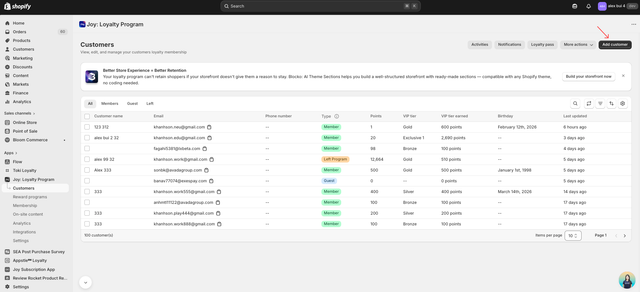
Add a new customer. From the Customers dashboard or Customer Detail page. Name, email, phone, tags — saved directly to Shopify.
Edit an existing customer. Update contact details, add notes, adjust tags without leaving the loyalty context.
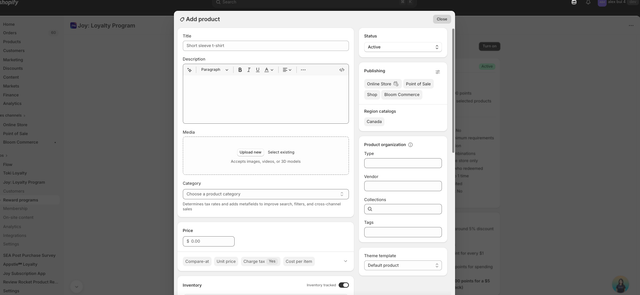
Add a new product. Title, description, price, inventory, publishing channels — fully configured in the Joy modal. Available anywhere you need to select a product.
Edit an existing product. Adjust details on the fly when something is missing or out of date.
Add or manage collections. Create new collections or update existing ones when configuring collection-based rewards.
Where it shows up
The add/edit modals appear anywhere Joy needs you to select a record:
Customers: Dashboard and Customer Detail pages — look for the Add customer button in the top action bar.
Products and Collections: Any program configuration screen that includes a product selection field. If you can search for a product in Joy, you can now add one there too.
The modals are built on Shopify's native interface — so the fields and validation are exactly what you'd expect from Shopify admin, just without the tab-switch.
How to use it
Step 1 — Go to any page in Joy that involves customer or product selection.
Step 2 — Click the Add button next to the search field, or use the action bar on the Customers page.
Step 3 — Fill in the details in the modal. All standard Shopify fields are supported.
Step 4 — Save. The record is created in Shopify and immediately available to select.
This feature is available on all Joy plans.
Small change. Big difference.
We don't always ship features that make the headlines. Sometimes the most valuable updates are the ones that remove a small annoyance you didn't realize was slowing you down.
Tab-switching to create a missing product is one of those annoyances. It's small. It breaks your flow. It happens more than you think.
Joy should be the only tab you need to build your loyalty program. We're making sure it is.
Ready to turn retention into real growth?
Join the future of loyalty today. With our omnichannel platform, you can connect with customers across every touchpoint, reward their engagement, and build lasting relationships that drive growth. Request a demo · Get started free