Most loyalty programs live on a page customers have to remember to visit. So they earn points they never see, reach tiers nobody tells them about, and lose balances they didn't know were expiring.
In markets where LINE is the main channel, that's a fixable problem. Every moment that matters in a loyalty program — joining, earning, reaching a tier, coming back, referring a friend — can arrive as a message in the chat your customers already have open.
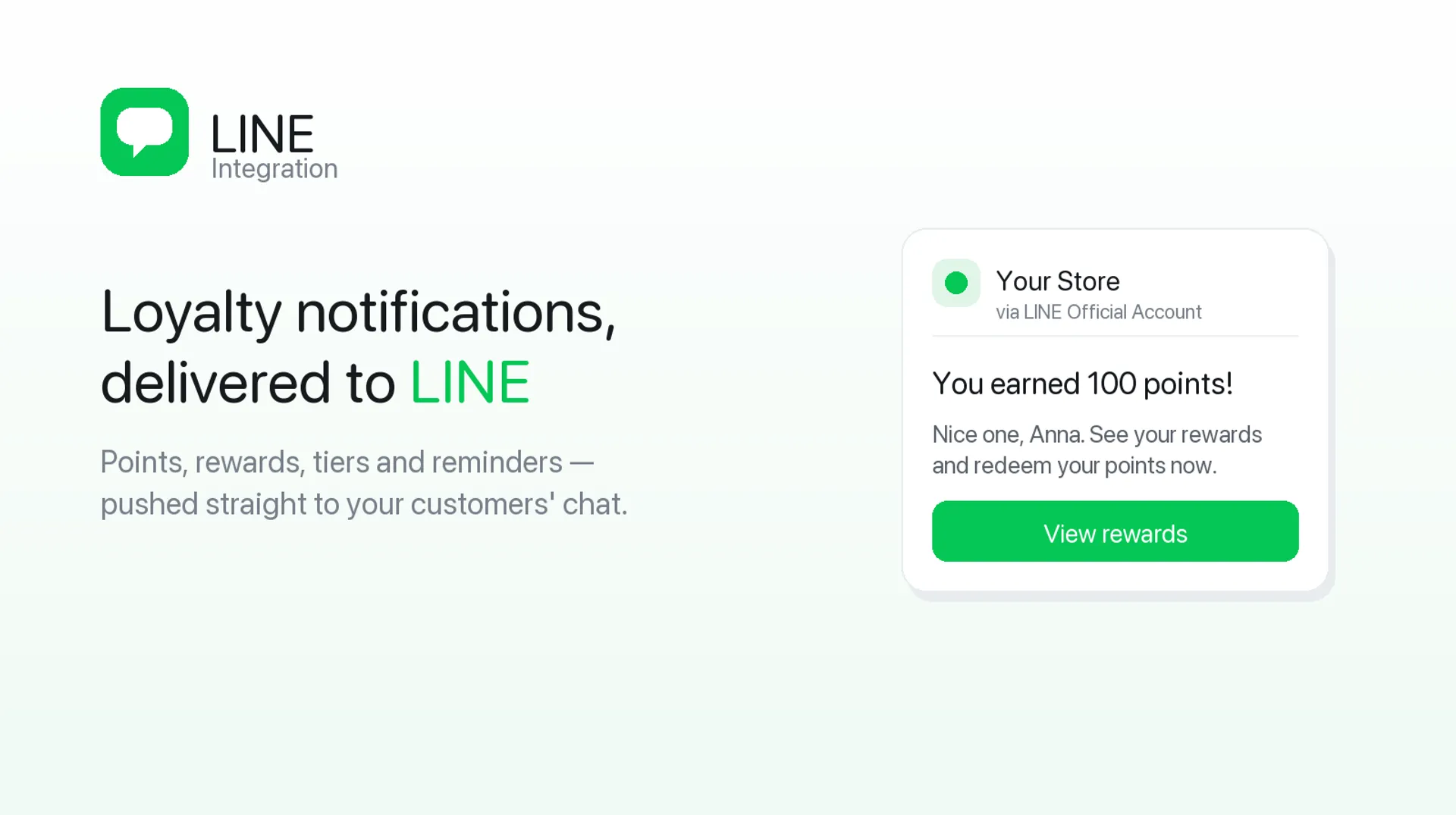
Joy runs the program itself: the earning rules, VIP Tiers, points expiration, and referral programs. It then sends twelve of those events straight to your LINE Official Account as Flex cards. One app owns the points and the message.
To be clear about what this is not: it isn't about pushing marketing campaigns to LINE. Your LINE app already does that well. This is about the loyalty program itself living there.
Here are the five moments, what each one looks like in the chat, and the decision you make at each.
Moment 1 — Joining: Turn a LINE Friend Into a Member
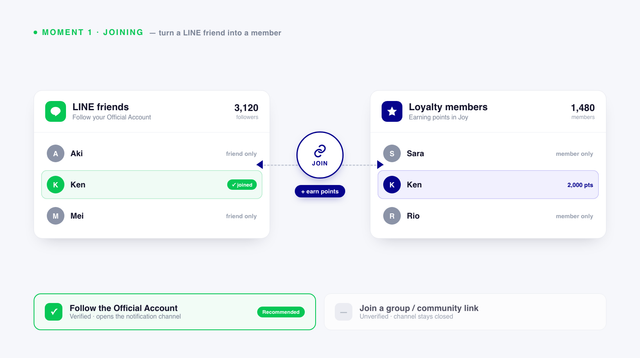
A LINE friend list and a loyalty member list are two different things.
Someone can follow your LINE Official Account for three years and never join your program. Someone else can sit on 2,000 points and never have followed you. Until those two records are joined, the program can't reach anyone through LINE — no matter how many friends you have.
The mechanic: Joy's earning rules already cover things like signing up and placing orders. Joining LINE is another rule in that same list — do an action, get points. The difference is that this particular action is what makes every other section of this article possible. It works on all plans.
Pick the right method. Joy gives you two:
- Follow the Official Account — verified, and the one that opens the notification channel
- Join a group or community via link — unverified
If you want to send anything afterward, choose Follow. The group option builds a community but leaves the channel closed.
Decide how many points it's worth. This is the most consequential number in the whole setup, because everything downstream depends on people linking. Points are awarded once, for the initial link — not on every login. So it's a one-time acquisition cost, not a recurring one, and it's usually worth more than store owners set it at. A useful way to size it: compare it against what you already pay for a sign-up.
Decide where to ask. The loyalty page on its own won't carry this. From the Essential plan, Joy gives you 20+ loyalty placements plus Customer Account blocks for Online Store 2.0, so the invitation can sit on the post-purchase page, the account page, or a widget — not just one destination. Then add the LINE rich menu on LINE's side.
Everything below is capped by this one number.
Moment 2 — Earning: Points the Customer Actually Sees
Points earned in silence do no motivational work. A balance someone has to log in to check is a balance they forget they have.
Joy already covers half of this on your storefront. The point calculator on product, cart, and checkout pages (Essential and up) shows customers what an order will earn before they buy.
That handles the moment of buying. It doesn't handle the two weeks afterward. Three Joy events fill that gap in the chat:
- Earn points — confirms the reward landed
- Redeem points — the receipt that makes the program feel real
- Points eligible for reward — the moment a balance crosses into being spendable
Which one earns its send? Points eligible for reward, without much competition. Earn-point confirmations are pleasant, but they're frequent, and everyone spends their LINE quota. The eligibility message arrives at the exact moment the customer can do something with what they have.
There's one case where the earned confirmation is worth it. On Ultimate, Joy's advanced rule engine can grant bonus points on conditions you set — a weekend, a holiday, a minimum order value. Those are worth announcing, because they're temporary. Standard points-per-dollar isn't news. Double points until Sunday.
Put the number in the message. Using `{customer_name}` and `{points}`, the card reads "Linh, you have 800 points — enough for your next reward." Compare that to "You have rewards waiting," which asks the customer to go find out for themselves. Most won't.
Moment 3 — Climbing: Make VIP Tiers Visible
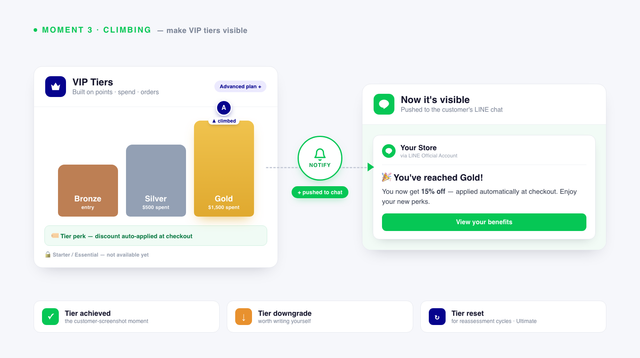
A tier only motivates someone who knows they're in it. Most programs change a status in a database and announce it nowhere, which makes the tier structure the most designed and least communicated part of a typical loyalty program.
The mechanic: Joy's VIP Tiers start on the Advanced plan. You can build them on points, amount spent, or number of orders, and members can get discounts applied automatically at checkout as a tier perk. On Ultimate, tiers can be reassessed by points or total spend on a cycle.
Worth saying plainly: if you're on Starter or Essential, VIP Tiers aren't available yet. This section is something to plan for rather than set up today.
Three-tier events reach LINE:
- Tier achieved — the one customer screenshot
- Tier downgrade — worth writing yourself
- Tier reset — for programs running reassessment cycles
Say what they get, not just what they're called. A message that announces "You're now Gold" is a label. A message that says Gold means an automatic discount at every checkout is a reason to shop. Use `{tier_name}`, and if you have tier artwork, give each tier its own card image — it costs nothing per send.
Handle downgrade deliberately. Some stores skip the message entirely. Others soften it into "here's what brings you back." Both are defensible. What doesn't work is a blunt notice that someone lost something, with no path forward.
This is also the clearest example of why a messaging app can't cover loyalty on its own. A tier change has no Shopify order behind it. Nothing outside the loyalty program knows it happened, so nothing outside it can announce it.
Moment 4 — Coming Back: Expiry and Birthday
Expiry is the strongest message your program will ever send.
The member already has the balance. There's no persuasion needed and no discount to fund — you're telling someone that something they own is about to disappear. It's the only loyalty message where the value is already in the customer's hands.
The mechanic: points expiration is configurable from the Essential plan. On Ultimate, dynamic point expiration expires balances gradually instead of all at once, which keeps large balances from piling up into a liability you can't clear.
That pairing is the interesting part. Gradual expiration plus a LINE reminder is a genuinely different system from an annual wipe plus an email. The balance decays in visible steps, and the customer hears about each step in the app they actually read. A silent liability becomes a series of reasons to come back.
Joy sends two windows:
- 7 days before points expire — the main one
- 3 days before points expire — the follow-up
Decide whether you need both. Running both on every member doubles your quota spend. A reasonable approach is seven days for everyone, and three days only above a balance threshold worth returning. Nobody comes back for 40 points, and that message costs exactly as much to send as one for 800.
Birthday works differently. Joy's birthday reward is a redeem program (Essential and up), and LINE carries two events — birthday, and seven days before. The earlier one is usually more useful. It gives someone time to plan a purchase instead of arriving on a day they're already busy.
One honest caveat. Expiry messages work because they carry real consequences, which means the expiry policy itself has to be reasonable. A program that expires points aggressively and then messages about it is teaching people not to trust the balance in the first place.
Moment 5 — Referring: The One That Belongs on a Chat App
A referral program asks a customer to refer someone they know.
On email, that's a forward. On LINE, it's just... what the app is for. The link opens within the conversation the customer is already having, with no channel switch and no copy-pasting into a different app.
The mechanic: Joy runs unlimited referral programs from the Essential plan, with Starter capped at 150 referrals a month. Joy already sends referral notifications over email. On LINE, the same two events land where the sharing actually happened:
- Referral successful — the referrer learns their friend converted, and gets their reward
- Referee claimed the reward — closes the loop on the other side
Both events matter, and here's why. Referral programs stall when the referrer never finds out whether anything happened. Silence after a share reads as a program that doesn't work, so they don't share again. Referral success is what turns a one-time sharer into a repeat one — and it arrives in the same thread where they made the recommendation.
Pick your reward moment. Those two events can fire days apart. Decide whether your referrer is notified when their friend purchases or when their friend claims a reward, and keep it consistent so the program behaves predictably.
One limit to plan around: LINE's strength here is also a blind spot. Sharing happens in private chats and groups you can't see. Measure it through referral conversions in Joy, not through anything visible on LINE's side.
Connecting It
This part is short, and that's the point. If your LINE Official Account already exists, you're looking at 20 to 30 minutes and no developer.
What you need:
- A LINE Official Account
- A LINE Developers account and a Provider
- A Messaging API channel, linked to your Official Account
- A LINE Login channel (Web app type), under the same Provider
- Joy is installed on your store
The step people get wrong: you need both channels, and each does a different job. The Messaging API channel delivers the message. The LINE Login channel identifies who it's for — it's what joins a customer record to a LINE account. With only the Messaging API, you can broadcast to friends, but you can't send anyone their own balance, which means none of the five moments above will work.
From there, it's four credentials pasted into Joy — Channel ID, Channel Secret, Channel Access Token, and Messaging API secret — then a callback URL and webhook URL copied back into the LINE Developers Console. Callback goes to the Login channel, webhook to the Messaging API channel.
Worth noting for this audience: Joy supports 30+ languages, so your loyalty page and widgets can run in Japanese, Traditional Chinese, or Thai alongside the LINE cards.
Already running a LINE app? Plenty of stores use CRM PLUS on LINE, StoreCRM, or Lipify for campaigns, cart abandonment, and one-to-one chat. You don't need to remove them. Those apps own your marketing messages. Joy owns the five loyalty moments above. Running both is normal.
Full steps are in the help doc.
What to Turn On First, and What to Watch
Every LINE message counts against your LINE Official Account's monthly quota, which is set by your LINE plan — not your Joy plan. Joy sends twelve loyalty events. Turning on all twelve spends that quota on the low-value ones.
Start with three:
- Join LINE reward — nothing else reaches anyone until members link
- Points expiring in seven days — the highest-intent message in the program
- Tier achieved — the cheapest status moment you can give someone
Then add referral successful, points eligible for reward, and birthday. One at a time, watching the quota as you go.
What to expect once it's live:
- Only members who follow your Official Account receive messages
- One LINE account per customer, one customer per LINE account
- Linking points are awarded once, on the first connection
- If someone unfollows, messages stop — the link stays, so re-following resumes messaging with no re-linking needed
Measure the right thing. Joy's advanced reports (Advanced plan and up) cover Assisted Orders revenue, ROI, CLV, and customer retention rate. For this specific question, compare repeat purchase rate and assisted orders between members who've linked LINE and members who haven't. That comparison is the question — it tells you whether the channel is doing work or just sending messages.
And ignore LINE friend count. It goes up whether or not any of this is working.
Where to Start
Your program doesn't move to LINE. Its moments do — joining, earning, climbing, coming back, referring.
Get the linking reward right first, because every other moment depends on it. Then turn on expiry reminders and tier messages, and give it a month before you add anything else.
Set up the LINE integration · Start with Joy on Shopify
Frequently Asked Questions
Can a loyalty program send points and tier updates to LINE?
Yes. Joy sends twelve loyalty events to a LINE Official Account, including ones with no order behind them — points expiring, tier achieved, and tier downgrade. That's exactly why an app that only reads Shopify order data can't send them.
Which loyalty events can Joy send?
Earn points, redeem points, points eligible for reward, tier achieved, tier downgrade, tier reset, birthday, seven days before birthday, seven and three days before points expire, referral successful, and referee claimed reward.
How do customers become reachable on LINE?
They link their LINE account to their customer record, and Joy's Join LINE earning rule awards points for doing it. Choose the "Follow Official Account" method — the group option doesn't open the notification channel.
Which Joy plan do I need?
The LINE connection and the Join LINE earning rule work on all plans. Points expiration and the 20+ placements start at Essential. VIP Tiers start at Advanced. Dynamic point expiration and the advanced rule engine are Ultimate.
Do I still need CRM PLUS on LINE or a similar app?
Not for loyalty messages. Those apps handle campaigns, cart abandonment, and one-to-one chat, which a loyalty app doesn't do. Many stores run both, each owning a different type of message.
Will these messages cost extra?
They count against your LINE Official Account's monthly message quota, set by your LINE plan — not your Joy plan. That's why it's worth starting with a few high-value events instead of all twelve.
What happens if a member unfollows my Official Account?
Messages stop. The account link stays in place, so if they follow again later, messaging resumes with no relinking.



-9d2bb6.webp?width=828&q=80&f=webp&auto=format)
-599d00.webp?width=828&q=80&f=webp&auto=format)