-9d2bb6.webp?width=1920&q=80&f=webp&auto=format)
Most loyalty programs treat redemption as the finish line. The customer earns enough, cashes in, and the loop quietly closes.
But think about what that moment really is. Someone has just gotten real value from you, the peak of how they'll ever feel about your store. In most setups, goodwill passes unused, and the next thing you spend on acquisition is a cold ad to a stranger who's never heard of you.
Send a Reward to a Friend is built for that moment. Instead of ending at redemption, Joy lets a customer pass a reward to someone they know, so a friend arrives at your store with a real gift already in hand. Redemption stops being a dead end and becomes your next acquisition.
This guide covers how it works, why the redeem moment is the cheapest introduction you'll get, the three ways to run it, and how to set it up on Shopify without giving up control.
What Send a Reward to a Friend actually is
At its core, Send a Reward to a Friend is a redemption-to-acquisition loop. After a customer redeems a reward, they get the option to send it onward instead of keeping it, and the person they send it to becomes a new contact for your store.
Here's the mechanic, start to finish:
- First, a customer redeems a free gift or a gift card in your program.
- Right after that, a Send to a friend button appears.
- They then enter a friend's email, an optional name, and a short personal message.
- Next, Joy emails the friend the reward, whether that's a real gift card or a free product, adapted to whatever was sent.
- Finally, the friend opens it and finds the reward waiting in a From friends section of My Rewards, even if they've never been a loyalty member before.
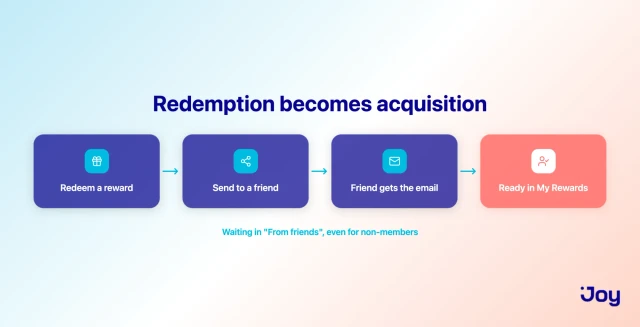
That last step is the whole idea. A person who had no relationship with your store a minute ago now has an account touchpoint, a reward with their name on it, and a reason to place a first order. Better still, the introduction came from a friend rather than a banner, and it landed at the one moment your existing customer was happiest to make it.
Compare that to how most loyalty apps handle redemption. They hand over the reward and stop, so the value goes to one person, once, and nothing downstream happens. Send a Reward to a Friend, by contrast, takes the same redemption you were already going to honor and gives it a second job.
Why the redeem moment is your cheapest acquisition channel
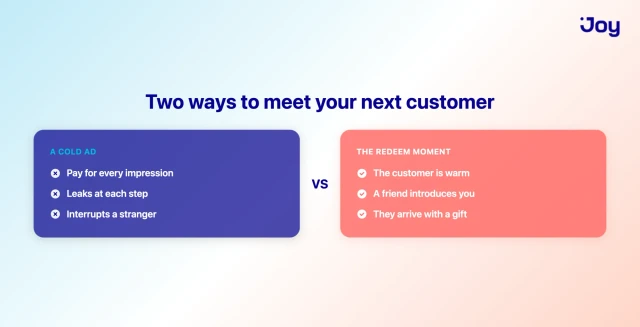
To see why that second job matters, compare two ways of finding your next customer.
The paid way leaks at every step. You pay for an impression, hope it reaches someone relevant, hope they click, and hope a cold visitor converts. Every "hope" is a place to lose them, so the cost per acquired customer keeps climbing. In effect, you're paying to interrupt strangers who owe you no attention.
The redeem moment runs the other way. Nothing about it is cold:
- The customer is already warm. They've bought from you, earned a reward, and decided it was worth claiming. That's your best-case audience, at their most generous second.
- The introduction is warmer still. A friend recommending your store already carries more weight than an ad. A friend recommending it while handing over a real gift is a different category of introduction entirely: the new person shows up curious, welcomed, and holding something they can spend today.
- Nobody gets interrupted. Instead of buying attention, you're letting goodwill do the work an ad tries to pay for.
This is exactly where a loyalty and referral program stop being two separate things and start feeding each other.
Still, "free acquisition" would be overselling it. You're not adding ad spend and you're not paying a separate referral platform, but you are giving a second reward, and that reward has real value. So the honest way to see it isn't free. It's spend pointed at a pre-warmed introduction instead of a cold impression, and for a store watching its referral and acquisition costs, that's a favorable trade.
One last angle is measurement. Redemption is the part of a loyalty program that actually drives return behavior, which is why redemption rates are worth watching in the first place. Sending a reward onward extends that engine past a single customer, so once the feature is on, two numbers tell you whether it's working:
- how many gifts get sent, and
- how many recipients go on to place a first order.
Free gifts and gift cards: both shareable, both ready to use
So what can actually be sent? Two reward types: a free gift (a free product) and a gift card. Helpfully, the email the friend receives adapts automatically to whichever one was sent, so you're not maintaining separate flows for each.
The gift card is the part worth slowing down on, because it's where a lot of "gifting" features quietly fall apart. Joy sends a native Shopify gift card, the real thing, spendable at your checkout immediately. There's no two-step coupon to activate, and no design that forces the recipient to run their own checkout before the gift means anything, the way some social gifting flows do. Instead, the friend gets a balance they can apply to an order, full stop.
On top of that, you get a small but useful bit of timing control. The sender can schedule the date the gift is sent, so a customer can line a gift up with a birthday or a specific day rather than firing it off immediately.
One honest limit is worth noting up front, though. Discount rewards and free shipping rewards can't be sent. That's deliberate, because this is a feature for rewards genuinely worth passing on, like a product or a gift card someone would actually want to receive, not for forwarding a small percentage off. In that sense, the constraint is a feature rather than a gap. After all, a gift that lands as real value converts, whereas a gift that lands as "10% off, minimum spend applies" doesn't.
What the friend experiences
If the sending side is about your customer, the receiving side is deliberately frictionless, because friction is where a referral dies.
Here's how it feels for the friend. They get an email, optionally with a personal message of up to 200 characters, so the introduction sounds like a person and not a system. When they open the reward, it's already theirs. It sits in the From friends section of My Rewards, ready to use, with no account hoops to clear first. Crucially, it works even if they were never a loyalty member and have never interacted with your store before.
That's what makes this an acquisition tool rather than an engagement one. The recipient doesn't have to sign up, prove anything, or jump through a flow to unlock the gift. Instead, they arrive at your store already holding value, already welcomed by name, and already in your customer account system. From there, the first order is a much shorter step than it would be for a cold visitor.
Three ways to automate it, built your way
Behind that simple experience, Joy lets you decide how the gift email actually goes out. It can be sent three different ways, so the feature fits how your store already works instead of forcing you onto one path.
- Joy in-app. Joy sends the email for you, with no setup, no configuration, and nothing to build. This is the recommended starting point for most stores, and it comes with sensible guardrails already in place.
- Shopify Flow. Joy fires a trigger, and you build the email inside Shopify Flow. It's a good fit if you're standardizing your automations on Flow, or if you want custom branching and logic around the send.
- Klaviyo. Joy sends an event to Klaviyo, and you build the flow there. This one suits you if you run your lifecycle messaging in Klaviyo and want the gift email living inside your existing templates and deliverability setup.
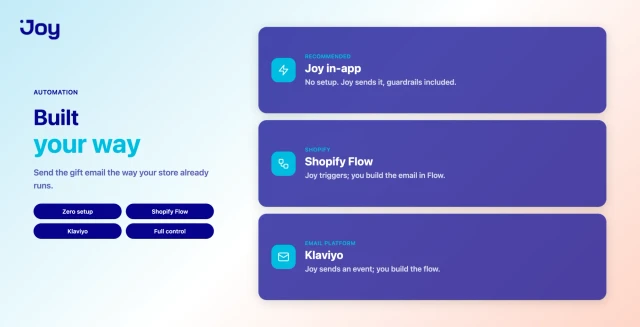
You pick one method that matches your stack. Here's the quick comparison:
| Method | Setup | Best for |
|---|---|---|
| Joy in-app | No setup, since Joy sends the email, with guardrails built in | Most stores, and the fastest way to start |
| Shopify Flow | Joy fires a trigger, then you build the email in Shopify Flow | Teams standardizing on Flow or wanting custom logic |
| Klaviyo | Joy sends an event, then you build the flow in Klaviyo | Stores running lifecycle and deliverability in Klaviyo |
The point of offering all three is that you don't have to compromise your existing setup to turn the feature on. If you've never touched Flow or Klaviyo, the in-app method gets you running in a couple of clicks. And if you've already invested in one of those tools, the gift email drops into it cleanly.
Staying in control
Flexibility only helps, of course, if you can still govern how the feature behaves. Handing customers a way to send rewards to others requires guardrails, and Joy gives you the controls to set them right inside the app.
Turn it on per program
In Joy, the feature is a toggle on a Free gift program or a Gift card program, so you decide exactly where it's available rather than switching it on everywhere at once. Turning it off later doesn't touch gifts that were already sent, since those stay valid. It simply hides the Send to a friend button for new redemptions.
There's one thing worth knowing before you flip it on. If the reward's coupon was originally restricted to only the customer who redeemed it, enabling Send to a Friend changes that restriction to Everyone, since the friend needs to be able to use it. That's expected behavior, but it's the kind of detail you'd want to know rather than discover.
Customize the email
Beyond the toggle, you can edit the Send gift to friend template inside Joy, under Notifications → Reward program, where it's marked New. The sender name, subject, header, body content, button text, colors, and footer are all yours to change, so the gift arrives sounding like your brand instead of a generic system message.
To keep each email personal, the template supports variables:
- `{{sender_name}}` for the customer sending the gift
- `{{recipient_name}}` for the friend receiving it
- `{{reward_title}}` for what's being sent
- `{{coupon_code}}` for the code or gift card, where relevant
- `{{personal_message}}` for the note the sender wrote
There's also a live preview and a test-send option, so you can see the real thing and mail yourself a copy before any customer does.
Guardrails that come standard
Finally, a feature that sends email on your customers' behalf needs limits, and Joy's in-app method ships with them:
- Self-sending is blocked, so a customer can't send a reward to their own email to double-dip.
- Rate limits are in place, capped at 100 emails per day per customer and one email per recipient per 24 hours, so nobody can turn the feature into a spam channel.
- The personal message is capped at 200 characters, which keeps it a genuine note rather than a payload.
Best of all, these aren't settings you have to configure. They're the default behavior, so the feature is safe to leave on.
How to set it up in Joy
With those controls in mind, getting it running takes only a few steps:
- Open your Free gift or Gift card program in Joy, since this is the program the feature attaches to.
- Turn on the Send to Friend toggle for that program. That alone is enough to start if you're using the in-app method.
- Customize the Send gift to friend email under Notifications → Reward program. Adjust the copy, drop in the variables you want, and send yourself a test.
- Choose your automation method if you're not using Joy in-app. Connect the trigger in Shopify Flow, or the event in Klaviyo, and build the email there instead.
- Publish. The Send to a friend button now appears after redemption across your loyalty surfaces: the widget, the loyalty page blocks, My Rewards, and the customer account.
After that, you set it once, and it runs on its own. Every qualifying redemption from then on carries the option to bring in a friend.
For the full step-by-step setup, see Joy's help doc on sending a reward to a friend.
A few honest trade-offs
Before you switch it on everywhere, though, it's worth being straight about where the feature stops. It isn't the right fit for every reward or every setup.
- It's not at checkout yet. The Send to a friend button shows up on your loyalty surfaces, namely the widget, loyalty page, My Rewards, and customer account, but not inside the checkout flow in this version. So if you were hoping to catch customers at the moment of purchase, that's not where this lives.
- Expired gifts aren't auto-refunded. If a friend doesn't use the reward before it expires, the value isn't returned to the sender automatically. You decide whether to reissue it from the customer's profile, which is fair, but it's a manual call rather than an automatic one.
- It only pays off where the reward is genuinely giftable. A free product or a gift card that someone would want makes sense to send. A minor perk doesn't, and discounts can't be sent anyway, so point the feature at rewards worth receiving.
- The gift has a real cost. Because you're issuing a second reward, this is a spend rather than a free lever. It earns its place when a warm introduction is worth the value of the gift, which, against the cost of a cold ad, it often is.
Taken together, these points lead to a single rule. Used where it fits, with real, giftable rewards handed to happy customers at the moment they redeem, the feature turns your loyalty program into a quiet acquisition channel. Switched on indiscriminately, it's just extra rewards going out the door. So set it up where the introduction is worth the gift.
Give your best moment a second job
That rule is really the whole idea. Redemption is the happiest second in the entire customer relationship, and yet most stores let it pass without doing anything with it. Send a Reward to a Friend uses it instead. The same reward you were already giving becomes an introduction, carried by a friend, landing as a real gift card or free product, and delivered to someone who arrives welcomed rather than interrupted.
Better yet, it fits how you already work, with three ways to send the email and full control over how it looks and behaves. It's also honest about its limits, which is rather the point. Pointed at giftable rewards and happy customers, it's a low-cost way to turn people you already have into the people you're trying to reach.
So if you're running rewards on Shopify and watching acquisition costs climb, this is a way to let your existing customers do some of that work for you. You can try Joy for free, turn on Send to a Friend for one program, and see who your customers bring in.
Frequently asked questions
What rewards can a customer send to a friend?
A free gift (a free product) or a gift card. The email adapts to whichever one is sent. Discount rewards and free shipping rewards can't be sent, because this is meant for rewards that land as a real, giftable value.
Does the friend need to be a loyalty member to receive it?
No. The reward shows up in the From friends section of My Rewards, even if the recipient has never been a member before, which is what makes this useful for acquisition rather than only engagement.
Is the gift card a real Shopify gift card?
Yes. Joy sends a native Shopify gift card the recipient can spend at your checkout right away, with no two-step coupon to activate and no separate checkout they have to run first.
How do I control the email that gets sent?
Three ways. Joy can send it in-app with no setup, or Joy can fire a trigger into Shopify Flow, or send an event to Klaviyo, so you build the email in whichever of those you prefer. The in-app template is fully editable, with variables, a live preview, and a test send.
Can customers send a reward to their own email?
No. Self-sending is blocked, so the feature can't be used to double up on a reward.
Is there a limit on how many gifts one customer can send?
With Joy's in-app method, yes. It allows up to 100 emails per day per customer, and one email per recipient per 24 hours, so it can't be used as a spam channel. The personal message is also capped at 200 characters.
What happens to gifts if I turn the feature off?
Rewards that were already sent stay valid. Turning the toggle off only hides the Send to a friend button for new redemptions.
Can a customer send the gift during checkout?
Not in this version. The Send to a friend button appears on your loyalty surfaces, meaning the widget, loyalty page, My Rewards, and customer account, rather than inside the checkout flow.
What plan do I need?
Send a Reward to a Friend is available on the Essential, Advanced, and Ultimate plans.



-599d00.webp?width=828&q=80&f=webp&auto=format)