
Every extra click kills a review. Your loyalty widget just removed them all.
Embed Judge.me reviews directly inside your Joy Unified Widget. Customers read and write reviews, earn points, and never leave your loyalty surface.
Summarize this post with AI
Picture this: a customer loves the order that just arrived. They're ready to rave about it. So they open your loyalty widget to check what a review is worth — then realize they have to close it, find the product page, scroll to the review form, write the review there, and circle back later to see if the points ever landed.
Three surfaces. Two apps. One customer who, somewhere in the bouncing, just gives up.
That's the gap between wanting to review and actually reviewing. And for your loyalty program, it's worse: the reward meant to celebrate the review is disconnected from the moment it happens.
Until now.
Judge.me, now inside your loyalty widget
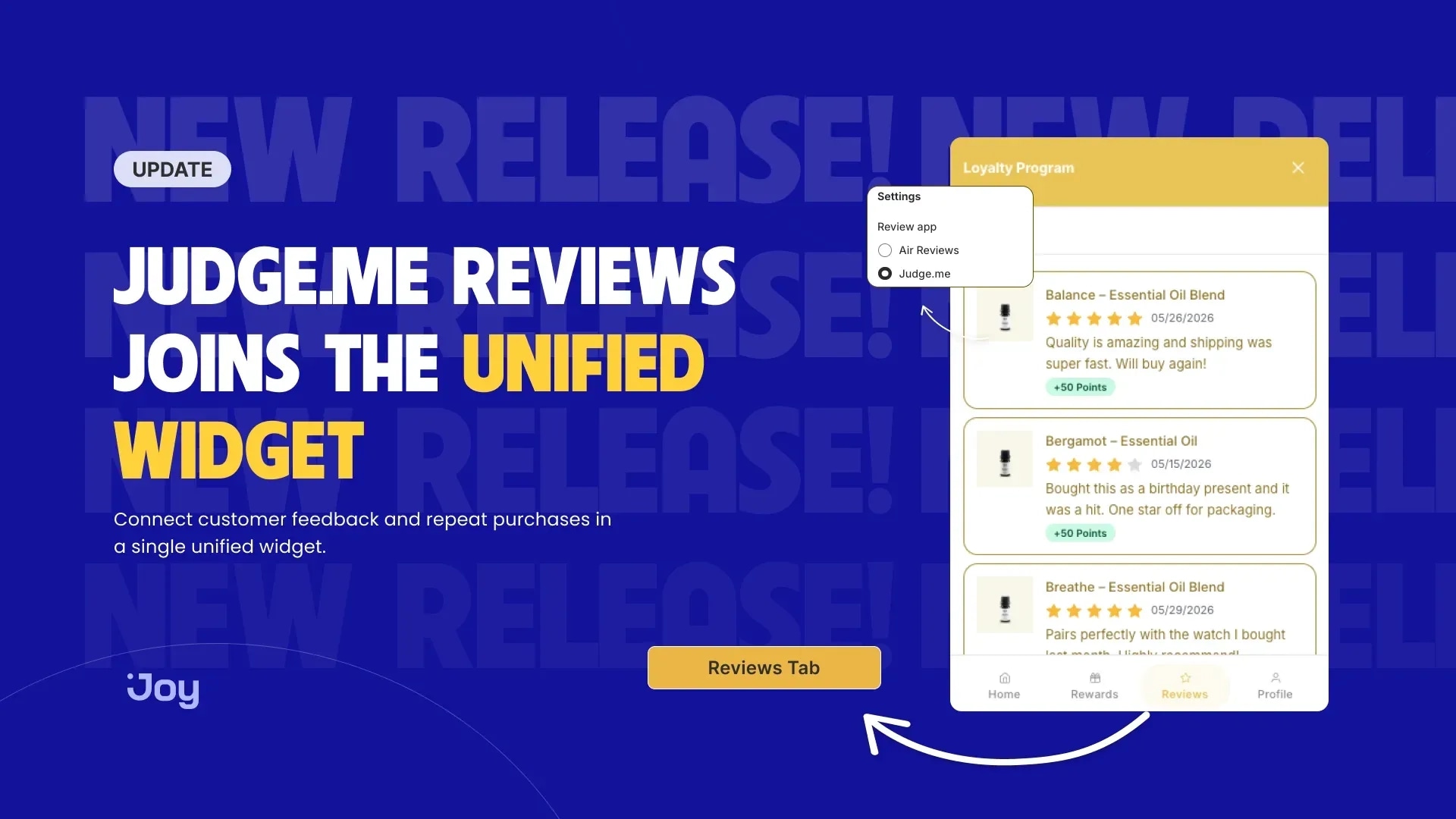
Joy now embeds Judge.me as a plugin in your Unified Widget. A new Reviews tab sits right alongside Home, Rewards, and Profile.
Customers open it to see every review they've written — date, product, star rating, status, and the points each one earned. Haven't reviewed yet? A Write a review button opens a form inline — rating, photo, text — with no redirect and no hunting for the product page.
Joy renders the entire experience in your brand styling: your fonts, your colors, your star color. Judge.me serves the review data behind the scenes, and your customer never sees a seam.
Why does one window change the math
Every extra click between wanting to review and submitting one is a customer you lose. Collapsing three surfaces into a single tab removes that friction — the review happens where the motivation already is.
And because it runs on your existing Write a review earning program, the points are tied to the moment. The customer writes, the review gets approved, the balance updates — all inside the same widget they were already looking at. The reward stops being a thing they have to go find. It's just there.
How to turn it on
Step 1 — Connect Judge.me. In Joy, open Integrations → Judge.me and connect your account. You'll need Judge.me's Awesome plan or above for API access.
Step 2 — Open the Unified Widget. Go to On-site content → Widget → Unified Widget.
Step 3 — Turn on the Reviews extension. In Extensions, switch on Reviews — it's added to your widget automatically.
Step 4 — Choose Judge.me. In the Reviews extension settings, set your review provider to Judge.me, then save and publish.
Judge.me Reviews in the Unified Widget requires the Unified Widget and a connected Judge.me account. Full setup guide: Judge.me Reviews in the Unified Widget.
One surface, every interaction
We believe your loyalty program should be the one place your customers come back to — not a stop on the way to three other apps. Reviews are just the start: the same plugin model is coming to more of the review tools your customers already use.
One widget. Every interaction. Zero detours.
Ready to turn retention into real growth?
Join the future of loyalty today. With our omnichannel platform, you can connect with customers across every touchpoint, reward their engagement, and build lasting relationships that drive growth.

Written by
Thomas Nguyen is the CTO of Joy, a loyalty solution for Shopify and eCommerce brands. With years of experience building high-performance Shopify apps, Thomas aims to help merchants grow through customizable and retention-focused tools.
Related reading
-9cfb3e.webp&w=3840&q=75) Product update
Product updateJoy now connects to Claude and ChatGPT: ask your loyalty program anything
Joy now connects to Claude and ChatGPT through MCP. Ask about points, tiers, and performance in plain language, and see how real answers can shape your next move.
 Thomas Nguyen
 Product update
How to build a sustainable loyalty program that spends points
A discount-only reward menu leaves points sitting. Here's how an environmental reward spends that balance without cutting into your margin again.
Thomas Nguyen-9d2bb6.webp&w=3840&q=75) Product update
Product updateSend a Reward to a Friend: Turn Redemption Into Acquisition
Redemption doesn't have to be the finish line. See how sending a reward to a friend turns your happiest customers into your next acquisition channel.
Thomas Nguyen