You're in the Shopify admin, halfway through something else, when a question pops up: how much revenue did loyalty actually drive last month? Normally, that means opening the Joy app, finding the right report, and clicking through a couple of screens. Not a big deal on its own, but it breaks your focus, and small breaks add up over a busy week.
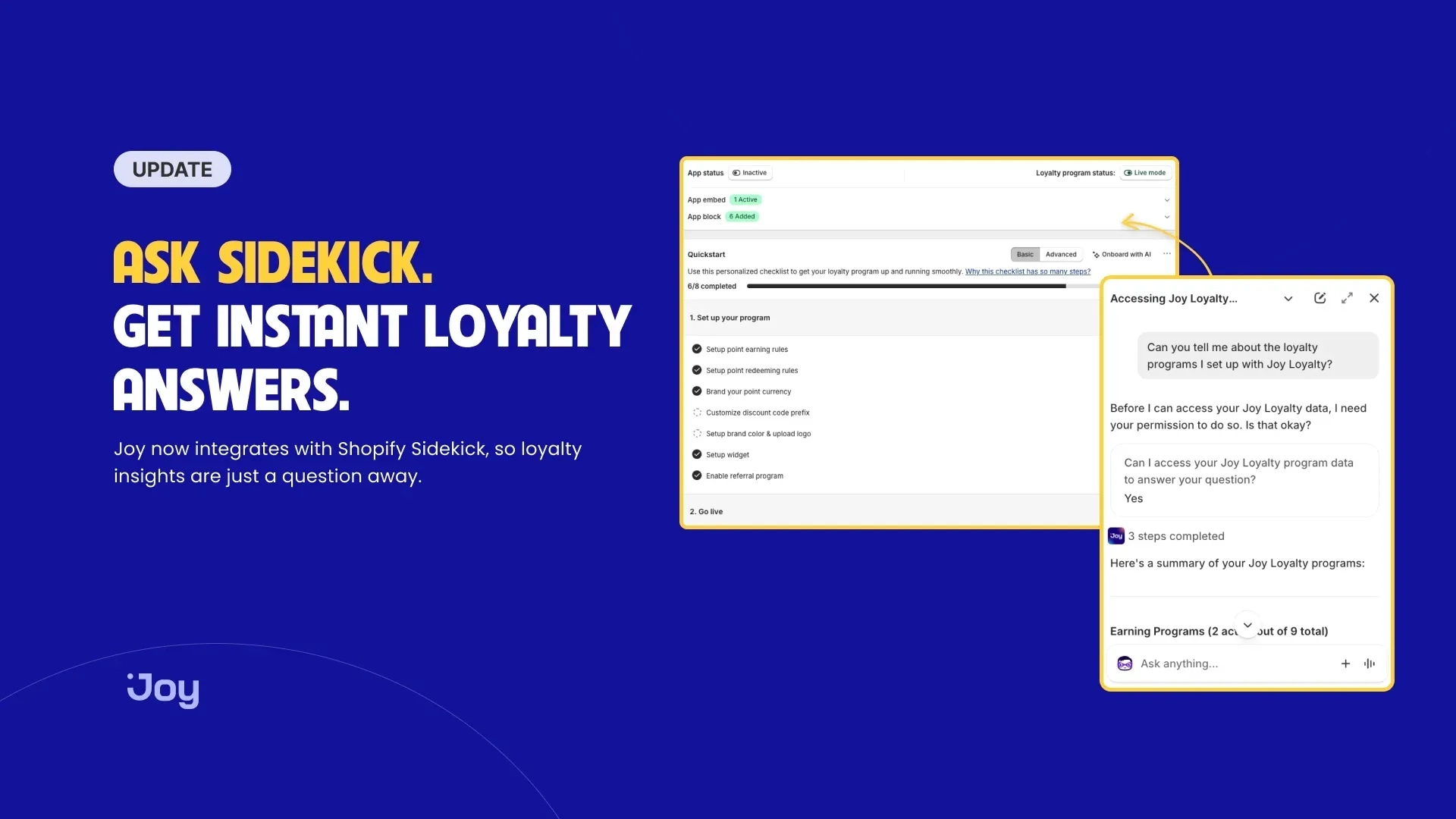
Joy now connects to Shopify Sidekick, the AI assistant built into your Shopify admin. Instead of navigating menus, you type the question in plain language and Sidekick answers from your live Joy data, right where you already are.
The bigger shift is how you relate to your own numbers. When checking a metric means opening an app and hunting for a report, you end up checking less often. When it's a one-line question in a chat you already have open, you check when the thought occurs, which is usually the moment the answer is worth the most. This guide covers what you can ask, what each answer actually tells you, how to act on it, and where the limits are.
Key takeaways
- Joy plugs into Shopify Sidekick, so you can ask about your loyalty program in plain language without leaving the Shopify admin.
- Sidekick reaches six areas of your Joy data: health check, analytics, customers, rewards and referrals, programs, and VIP tiers.
- The value isn't just faster answers. It's asking questions you'd otherwise skip, in the flow of the work you're already doing.
- It's read-only. Sidekick answers questions, but changes to your program still happen inside Joy.
- Most answers are live. Revenue and analytics figures can lag by a few minutes.
What Shopify Sidekick is
If you haven't used it yet, Sidekick is Shopify's own AI assistant, built into the admin. You reach it from any page, on desktop or mobile, and you talk to it the way you'd message a teammate: type a question, get an answer. It already understands your store's orders, products, and settings, and Shopify made it free for every store, with no per-conversation charge.
Two details matter specifically for loyalty work. First, Sidekick respects staff permissions, so a team member only sees data they're already allowed to see. Second, on its own, Sidekick doesn't know your loyalty program. The Joy integration is what extends its reach to points, tiers, rewards, and referrals, so those questions get answered in the same place as everything else, without a detour into another app.
Why asking beats navigating
A quick word on why this is more than a shortcut, because it changes what you'll actually do day to day.
Dashboards are built for browsing. You open one, scan a few charts, and hope the number you need is on the screen you landed on. That works when you have a set review to do, but it's a poor fit for the questions that come up mid-task, the ones you'd normally shrug off because pulling the report isn't worth the interruption.
Conversational access flips that. "What's my redemption rate?" costs you one sentence, so you ask it. A support reply, a campaign decision, a quick sanity check before a meeting, these all get a little sharper when the underlying number is one question away. The point isn't that Sidekick shows you something Joy's reports can't. It's what you'll look more often, and looking more often is how you catch things early.
The six areas you can ask about, and what to do with the answers
Sidekick reaches six areas of your Joy data. You don't need exact phrasing or a command syntax. Ask the way you'd ask a person, and Sidekick works out what you mean. Here's each area, what it tells you, and how you might act on it.
Health check: catch what slipped
Ask: "Is my loyalty program set up correctly?"
Sidekick runs a diagnostic of your setup and returns a score from 0 to 100. Think of it as a fast proxy for "are the pieces actually live and working" rather than a grade on strategy. The kinds of things it surfaces are whether your earning rules are active, whether rewards are redeemable, and whether the program is wired up the way you intended.
How to use it well: run the check right after you launch, and again after any big change, a theme update, a migration, a new reward, or a plan change. Those are the moments when something quietly breaks. A drop in the score is your cue to look before customers notice a widget that stopped showing or points that stopped accruing.
Analytics: the numbers that tell you if it's working
Ask: "How much revenue did loyalty drive last month?" · "What's my redemption rate?" · "Show my returning-customer rate."
These are the questions that usually send you hunting through dashboards. Each one answers a different part of "Is this program earning its keep?"
- Revenue driven by loyalty indicates how much of your sales the program drove. It's the closest thing to a bottom-line answer for whether loyalty is pulling weight or just running quietly in the background.
- Redemption rate is the share of what customers earn that they actually use. It's easy to overlook and quietly important. When points pile up unredeemed, it usually means the rewards aren't compelling enough or aren't visible enough to change behavior, and points nobody spends don't build loyalty. A low redemption rate is a prompt to revisit reward value or where you're surfacing it.
- The returning-customer rate is the whole reason a loyalty program exists. It's the trend to watch over time, not the number to obsess over on any single day.
How to use it well: make this a monthly habit. If revenue attribution is flat, your earning triggers may be too weak to change what people do. If redemption is low, the problem is usually the reward or its visibility, not the customer. This is also the one area where the few-minute delay matters, so for exact reconciliation, give it a beat or open the report in Joy.
Customers: answer support questions without leaving the reply
Ask: "How many points does [email protected] have?" · "What tier is this customer?" · "Show their recent point activity."
This is the one you'll reach for most, and it shines in support. A shopper emails to ask why they didn't receive their reward. Instead of opening Joy, finding the customer, and reading their history, you ask Sidekick for their balance, tier, and recent activity, then answer in the same window where you're already typing the reply.
How to use it well: glance at a customer's tier before you respond to anyone. Knowing you're talking to a top-tier regular versus a first-time buyer changes how you handle the conversation, and it's the difference between a generic reply and one that makes a loyal customer feel seen. Because Sidekick honors staff permissions, your support team can only see what they're cleared to see.
Rewards and referrals: spot your advocates and settle disputes
Ask: "What rewards does this customer hold?" · "Who has this customer referred?" · "Show recent referral activity."
Referral questions are fiddly to chase down by hand, which is exactly why having them a sentence away helps. A customer swears they referred a friend, but never got credit. You check their referral activity and either confirm it or spot what went wrong, in seconds.
How to use it well: use the referral view to find your quiet advocates, the customers bringing others in without being asked. Those are the people worth a personal thank-you or an extra perk, and they're invisible unless you go looking. Recent referral activity also tells you whether a referral push is actually landing after you promote it.
Programs: audit what you're actually offering
Ask: "List my active earning programs." · "What does my birthday program reward?" · "Show my redemption options."
It's surprisingly easy to lose track of your own setup, especially if you inherited the store or configured things months ago. These questions give you a fast inventory of what's live right now.
How to use it well: run this before a campaign or a busy season to know what customers can currently earn and redeem. It's also a quick way to spot gaps, a birthday program that rewards too little, or a thin list of redemption options that gives customers little reason to spend their points. You can't fix it from Sidekick, but you'll know exactly what to change in Joy.
VIP tiers: check whether your tiers are doing their job
Ask: "What are my VIP tiers?" · "What's the threshold for Gold?" · "Compare revenue across tiers."
The first two are quick references. The third, which compares revenue across tiers, is the most strategic question in the set. It tells you whether your top tier genuinely spends more than the tiers below it, and whether your thresholds are set at the right levels.
How to use it well: if your highest tier doesn't clearly out-earn the others, the perks may not be pulling people up, or the threshold may be so high that almost nobody reaches it. If a middle tier looks like a dead zone, it may not offer enough of a reason to climb. Tier structure is one of the hardest parts of a loyalty program to get right, and a revenue comparison turns a guess into a defensible decision.
A ten-minute loyalty review, done in chat
Here's how these fit together into a routine you can actually keep. Once a week or once a month, with Sidekick open, run through a short set of questions:
- "Is my loyalty program set up correctly?" to confirm nothing broke.
- "How much revenue did loyalty drive last month?" and "What's my redemption rate?" for the health of the program.
- "Show my returning-customer rate" to watch the trend that matters most.
- "Compare revenue across tiers" to check your VIP structure is pulling its weight.
That's four questions and a few minutes, no report exports, no app-switching. The goal isn't a perfect audit. It's a steady pulse-check that surfaces problems while they're still small, and it happens right in the admin you already live in.
How to turn it on
Setup takes one step on the Joy side.
- Open Sidekick
- Click the Sidekick icon in your Shopify admin to open the assistant.
2. Ask about your loyalty program
- Type your question in plain language — mention a customer email, a program name, or a metric. Sidekick recognizes Joy and routes the question to the right place.
- Sidekick replies inline with the answer, pulled straight from your live Joy data.
Once the key is in place, Sidekick can reach your live loyalty data whenever you ask.
What it can and can't do, and why that's by design
Two boundaries are worth understanding up front, because both are deliberate rather than missing features.
Sidekick is read-only. It answers questions about your loyalty program, but it doesn't make changes. Editing a reward, moving a tier threshold, or launching a program still happens inside Joy. That might sound like a limit, but it's also a safeguard: an assistant that can only read can't accidentally change a live program while you're mid-conversation. You get the answers with none of the risk, and you keep the actual changes deliberate.
Most answers are live, but not all. Customer, program, and tier answers reflect your current Joy data in real time. Revenue and analytics figures can lag by a few minutes, since those numbers take a moment to roll up. Knowing this up front matters more than it sounds, because it means you won't second-guess a revenue figure that's simply catching up. For a gut check, it's fine as-is; for reconciling exact totals, wait a moment or open the report in Joy.
Joy in Sidekick vs Joy AI
If you've spent time in the Joy app, you may have already met Joy AI, and it's easy to mix the two up. They're separate assistants that live in different places and suit different moments.
- Joy AI operates within the Joy app, with its own set of capabilities.
- Joy in Sidekick operates within the Shopify admin, answering questions via Shopify's assistant.
You don't have to choose. Reach for Joy AI when you're already in Joy doing focused loyalty work. Lean on Sidekick when a loyalty question comes up while you're busy somewhere else in the admin, which, in practice, is most of the time.
Getting the most out of it
A few habits make the difference between a novelty you try once and a tool you actually use:
- Be specific. "What's my redemption rate this month?" gets you further than "How's my program doing?" The more precise the question, the more useful the answer.
- Fold it into support. Looking up a customer's tier and points before you reply is the single highest-value habit here, and it costs one sentence.
- Make it a rhythm. The weekly or monthly pulse-check above is where the early-warning value lives. One-off questions are handy, but the routine is what catches problems.
- Remember it reads, it doesn't write. When Sidekick surfaces something worth changing, that's your signal to hop into Joy and make the change there.
Frequently asked questions
- Does Sidekick change my loyalty program settings?
No. The integration is read-only. Sidekick answers questions, but edits to rewards, tiers, and programs still happen inside Joy. That's as much a safety feature as a limit.
- Is the data Sidekick shows live?
Mostly. Customer, program, and tier answers reflect your live Joy data. Revenue and analytics figures may be a few minutes behind.
- How is this different from Joy AI?
Joy AI lives inside the Joy app and has its own capabilities. Joy in Sidekick lives in the Shopify admin and answers questions through Shopify's built-in assistant.
- Do I need to phrase questions a certain way?
No. Ask in plain language, the way you'd ask a teammate. Sidekick handles the interpretation.
- Can my whole team use it?
Sidekick respects Shopify staff permissions, so team members can ask about the data they're already allowed to see, and nothing beyond that.
Ask your loyalty program a question
The heart of this integration is a small change with a real effect: the answer meets you where you already are. Instead of switching apps to check a point balance or redemption rate, you ask, and the number appears in the admin you were already looking at. Over a week, that turns questions you'd have skipped into answers you actually get, and that's how you catch the things worth catching.


-890520.webp?width=828&q=80&f=webp&auto=format)