
Rubik Variant Images & Swatch Review: The Best App for Large Variant Catalogs
Rubik Variant Images & Swatch earns its 5.0/5 rating with features that actually work, like AI auto-assign - here's what that's worth for the price.
-c995d0.webp&w=3840&q=95)
Summarize this post with AI
Selling products in multiple colors gives shoppers more choice, but it can also make the product page harder to navigate. When images, selectors, and variants do not stay visually aligned, customers may struggle to compare options or feel confident about their selection.
Rubik Variant Images & Swatch aims to simplify that experience by organizing variant media and replacing basic selectors with visual swatches. This review examines how the app works, which features offer the most value, how much it costs, and whether it is a practical choice for your Shopify store.
Quick verdict: 4.8/5
AI auto-assign does actual work here, not just a checkbox feature - and the rating holds up once you read the reviews: support gets praised by name, and the setup doesn't override your theme's layout. The catch is the price: the Free plan is capped at a single product (too thin to properly test first), and with almost no negative reviews visible, how well the AI handles messy photos or heavily customized themes is still unverified.
What is Rubik Variant Images & Swatch?
Craftshift, a Shopify app studio based in Zaandam, the Netherlands, launched Rubik Variant Images & Swatch on October 18, 2024. Shopify has awarded the app its Built for Shopify badge, which recognizes apps that meet higher standards for performance, user experience, and support.
Shopify lists Rubik under Product variants and Selling products. The app lets merchants assign multiple images to each product variant and automatically updates the gallery when shoppers choose a color, size, or style. By showing only the images that match the selected option, Rubik helps shoppers understand exactly what they are buying, which can improve conversions and reduce returns.
Ready to try it? Install Rubik Variant Images & Swatch
Notable features of Rubik Variant Images & Swatch
Rubik Variant Images & Swatch includes several features designed to simplify variant management and improve the product-page experience:
- Multiple images per variant
Merchants can assign several images to each variant instead of limiting every option to a single photo. - AI-powered image assignment
The app can automatically match product images to the relevant variants, reducing manual work for stores with large catalogs. - Custom color and image swatches
Merchants can replace standard text dropdowns with visual color swatches or image thumbnails, making variant selection clearer and more engaging. - Theme gallery preservation
Rubik works with the existing product gallery rather than replacing its layout. It filters the displayed images based on the shopper’s selected variant. - Broad app and theme compatibility
The app supports popular page builders, third-party variant apps, ThemeForest themes, and tools such as PageFly, Varia, Stamp, and 2048 Variants.
The feature list looks strong on paper. The next section examines which features deliver the most practical value for merchants.
Feature deep dive: what's actually good here
Here's what holds up under closer inspection, starting with the one everything else on this list depends on.
Multiple photos per variant
Shopify lets merchants assign one featured image to each variant, while the remaining photos stay in a shared gallery. This becomes confusing when a product has several variants and multiple images for each one.
For example, a hoodie with six colors and four photos per color may create a 24-image gallery. Even after selecting “Olive,” shoppers may still need to scroll through images of every other color.
Rubik lets merchants assign a complete image set to each variant. When shoppers select “Olive,” the gallery shows only the relevant front, back, close-up, and on-model images.
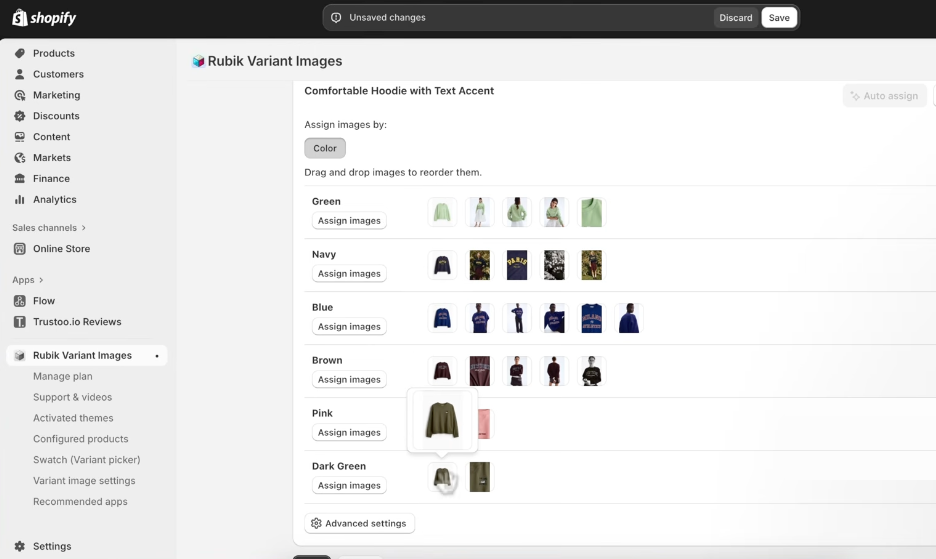
This keeps product pages easier to browse, especially on mobile, and helps customers confirm the exact color, texture, and finish before purchasing. It is particularly useful for fashion, furniture, beauty, accessories, and home decor stores, where visual differences strongly influence buying decisions.
Verdict: This is Rubik’s most valuable feature. It gives each variant a focused product gallery, helping shoppers understand exactly what they are buying while keeping complex product pages easier to navigate.
AI auto-assign
Assigning images manually can become a major setup burden for stores with hundreds of products and multiple visual variants. Rubik’s AI reduces that workload by matching product images with the most relevant colors, finishes, or patterns. Merchants only need to review the suggestions and correct any missed assignments.
The main benefit is scalability. Instead of repeating the same image-mapping process for every product, merchants can organize large catalogs more quickly and maintain a consistent variant experience as they add new SKUs. This lowers setup time and reduces the risk of images being assigned to the wrong option.
The feature works best when variants look clearly different. Similar shades, vague names, and non-visual options such as size may still require manual review. In our test, the AI correctly grouped several color sets but left some matching images unassigned.
AI usage ranges from 50 images per month on Free to 50,000 images per month on Premium.
Verdict: Auto-assign is most valuable for stores with large, color-heavy catalogs. It does not eliminate manual work, but it turns a repetitive catalog task into a quicker review process.
Custom color and image swatches
Variant names such as “Navy,” “Sand,” or “Forest Green” do not always tell shoppers what a product actually looks like. Rubik replaces plain-text selectors with visual swatches, using either a custom color or an image thumbnail.
In our test, the swatch editor was straightforward to set up. Solid color swatches only required a hex code, making them quick to configure even before the product images were fully organized. Image swatches took slightly more setup, but they gave a much clearer representation of patterns, textures, fabrics, and finishes.
The difference was most noticeable on products such as wood furniture or marble surfaces. A brown color chip could not show the grain, tone, or texture, while an image thumbnail made each option immediately recognizable. Shoppers could compare variants directly in the selector, instead of switching options and repeatedly checking the gallery.
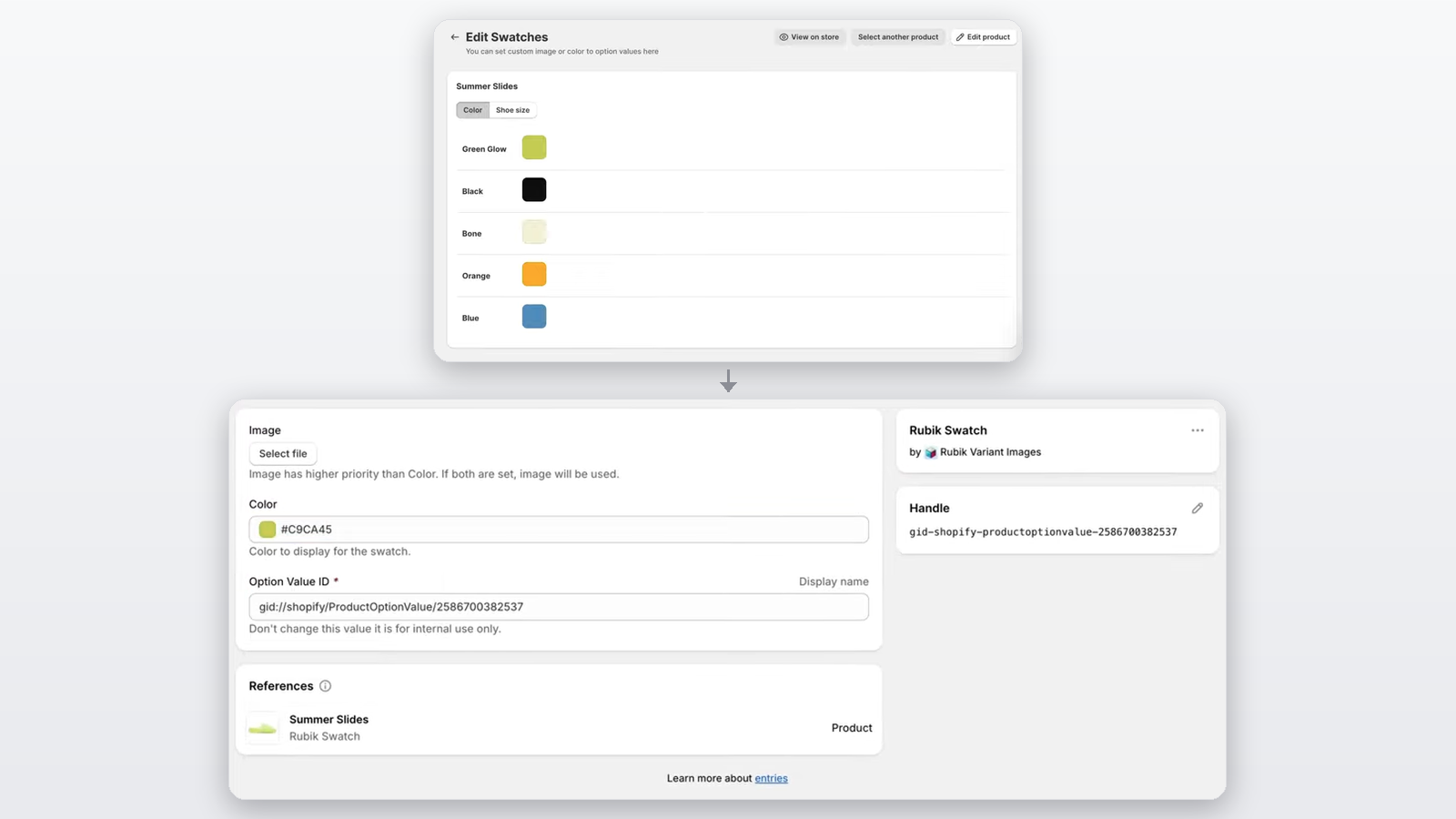
Verdict: Swatches may appear to be a visual upgrade, but their real value is making product selection clearer. Color swatches work well for simple options, while image swatches are the better choice when texture, pattern, or finish affects the buying decision.
Preserves your theme's original gallery
One detail we appreciated during setup is that Rubik does not replace the product gallery with a completely separate design. On Online Store 2.0 themes, it integrates through the Shopify app blocks and filters the media already displayed by the theme. Shoppers keep the familiar gallery layout but see only the images linked to their selected variant.
This approach also reduces the amount of custom storefront code the app needs to introduce. That should lower the risk of layout conflicts and make the integration easier to manage when changing or updating a theme, although compatibility still depends on the specific theme.
Verdict: Preserving the existing gallery is a practical design choice. It allows Rubik to improve variant browsing without forcing stores to replace a product-page component that may already work well.
Broad compatibility with other apps and themes
Rubik lists specific integrations rather than making a vague claim that it works with everything. Its Shopify App Store listing includes popular page builders, product option tools, variant apps, and ThemeForest themes, with support for PageFly, EComposer, GemPages, Instant, Varia, Stamp, and 2048 Variants.
This matters because these tools may all affect the product page, particularly the gallery and variant selector. Clear compatibility information gives stores more confidence that Rubik can fit into an existing setup without requiring major changes.
That said, listed compatibility does not guarantee a conflict-free experience with every theme configuration. Stores that use heavily customized themes or multiple product-page apps should still test the gallery, swatches, and variant switching before publishing.
Verdict: Rubik’s compatibility list is more useful than a generic “works with all themes” promise. It makes the app a stronger option for established stores that already rely on page builders or variant tools.
Who Is Rubik Variant Images & Swatch For?
Rubik is best suited to Shopify stores where customers rely heavily on product images to compare variants. This includes fashion, furniture, beauty, accessories, home decor, fabrics, and other products offered in multiple colors, patterns, textures, or finishes.
It is especially useful for stores that:
- Need to show several photos for each variant
- Have large catalogs with many visual options
- Want image or color swatches instead of text dropdowns
- Use page builders or heavily customized product pages
- Spend too much time assigning images manually
The app becomes more valuable as the catalog grows. A small store with a few simple products can manage variant images manually, while a store with hundreds of color-based SKUs can save significant setup and maintenance time through image filtering and AI auto-assign.
Rubik is less useful when variants differ mainly by non-visual options such as size, weight, quantity, or packaging. In those cases, separate image galleries and AI image matching may provide limited value.
Set Up and How It Works
Rubik’s setup process is fairly compact:
- Install the app and open a product from your existing catalog.
- Assign media to each variant manually, with AI auto-assign, or through bulk assignment based on gallery order.
- Choose how variants appear, using image swatches, color swatches, or pill buttons.
- Enable the app through your theme editor.
- Preview the product page and confirm that the gallery updates correctly when switching variants.
For supported themes, setup requires no code editing. Custom themes and page builders may still require testing or support assistance, especially when multiple apps modify the same product page.
The most important step is reviewing the storefront after setup. AI auto-assign can reduce manual work, but its accuracy depends on your images, variant names, filenames, and alt text. It should speed up the assignment rather than replace the final check.
Rubik Variant Images & Swatch Pricing
| Plan | Monthly | Annual | Limits |
|---|---|---|---|
| Free | $0 | Not available | 1 product, 50 AI images monthly |
| Starter | $25 | $200 | 100 products, 500 AI images monthly |
| Advanced | $50 | $400 | 1,000 products, 5,000 AI images monthly |
| Premium | $75 | $600 | Unlimited products, 50,000 AI images monthly |
All paid plans include a seven-day free trial. Annual billing saves 33%, and Shopify bills in USD.
The Free plan is useful for testing the full experience on one product, but most active stores will need Starter or above. The right plan mainly depends on catalog size, while the AI allowance determines how quickly you can process new or existing products.
At $25 to $75 per month, Rubik makes the most sense when multiple visual variants create clutter or require frequent image management. AI can strengthen the value for large catalogs, but the core return comes from cleaner galleries, clearer variant selection, and less manual setup.
Is it actually good? What real reviews say
This is the part I find most convincing. As of when I checked, Rubik Variant Images & Swatch has 411 reviews and a 5.0/5 average rating - 407 five-star reviews and 4 four-star reviews. No 1, 2, or 3-star reviews are publicly visible.
A few specific reviews from the app listing:
"I had an issue with the app where the variant images were not updating correctly when switching between product colors. [Support] responded very quickly, identified the cause of the problem, and fixed it within a short time."
- sea me at home, July 28, 2026
"This app presented the configuration options in a very approachable way, and we were quickly able to get our page setup to 95%... We couldn't be happier with this app, highly recommend."
- Waning Skein, July 24, 2026
"Great support... Reached out to Turan, who was very professional... quickly provided me with a screen print of instructions."
- HeartHalo, July 20, 2026
There's a clear pattern across the reviews: users repeatedly mention how fast and how good the support is, several even naming a specific support rep (Turan comes up more than once). For a small SaaS app, that's usually a good sign - the dev team is still small enough to stay close to individual tickets.
To be honest about it: an almost perfect 5-star rating, with essentially no negative reviews visible, makes it hard to know what edge cases might frustrate some stores - the kind of thing you'd usually find in 2-3 star reviews. That doesn't mean the app is bad, just that the current public review sample doesn't show the full picture.
Final verdict
Everything above points to the same conclusion: Craftshift built something that pulls its weight here, and the price tag is the cost of an actual feature, not padding. If AI auto-assign solves a genuine problem for your catalog, that's a fair trade for the manual work it removes.
If you're not sure yet, don't take the rating's word for it - take the trial's. Sign up for the 7-day Starter trial and run AI auto-assign against your own product photos. That's the only test that actually answers whether the price is worth it for your store.

Written by
Thomas Nguyen is the CEO & Co-founder of Joy, a loyalty solution for Shopify and eCommerce brands. With years of experience building high-performance Shopify apps, Thomas aims to help merchants grow through customizable and retention-focused tools.
Related reading
 How-to Guide
7 Shopify Reward Page Design Examples & How To Replicate
This guide showcases 7 inspiring reward page examples and provides actionable steps to replicate their success. Let’s see what reward page design excellence looks like!
 Thomas Nguyen
 Shopify apps
9 Loyalty Reward Program Software To Grow Your Business
Top loyalty reward program software: Joy, Smile.io, Loopy Loyalty, Open Loyalty, Yotpo, Zinrelo, LoyaltyLion, Appstle Loyalty and Talon.One.
Thomas Nguyen How-to Guide
WhatsApp Marketing for Shopify: Boost Sales & Customer Engagement With Dondy
Discover why Shopify merchants should use WhatsApp marketing for their store and how Dondy can help them.
Thomas Nguyen Shopify apps
11 Best Shopify Loyalty Apps to Boost Customer Retention in 2026
We compared 11 Shopify loyalty apps on real pricing, ratings, and reviews, so you can pick with confidence instead of guessing.
Thomas Nguyen Shopify apps
10 Best Shopify Referral Apps to Boost Your Customer Growth
Top 10 Shopify referral apps: Joy Loyalty, Referral Candy, BON Loyalty, Rivo, Smile.io, Aftership Referral, Loox, LoyaltyLion, Yotpo, and Dadao
Thomas Nguyen-1f6552.webp&w=3840&q=75) Shopify apps
Shopify apps7 Best Shopify Wishlist Apps to Capture More Sales (2026)
The 7 best wishlist apps for Shopify, compared on features and pricing, plus where a wishlist app fits into your store's bigger retention strategy.
Thomas Nguyen