
The Post-BFCM Loyalty Email Calendar, With Dates That Actually Work
Points earned over the BFCM weekend are often unspendable until mid-December. Here is the loyalty email sequence that respects it.
Summarize this post with AI
There is no shortage of BFCM email calendars, and most of them are competent. What none of them does is check whether the loyalty message they schedule can actually be acted on when it lands.
This page is the loyalty slice only: which loyalty emails to send after the 2026 weekend, on which dates, and why one of those dates is decided by a setting in your loyalty app rather than by a best practice. The rest of the calendar — the sale sends, the abandoned-cart flows, the SMS — is well covered elsewhere and we are not going to repeat it.
Key Takeaways
- Shopify tells merchants to schedule thank-you emails five to seven days after the event, which for BFCM 2026 is 2 to 7 December.
- The loyalty email that follows it cannot be sent on the same logic, because points earned over the weekend may still be inside an approval period and unspendable.
- On a 14-day hold, points from 27 to 30 November clear around 11 to 14 December. That date, not a generic calendar, is when the "spend your points" message works.
- Shopify's own follow-up window, two to three weeks post-purchase, lands in the same place — so the loyalty email and the retention email are the same send if you time it right.
- Before the weekend, the only loyalty email worth sending is the enrolment one. After it, the sequence is thank you, then unlock, then a reason to return.
Published 3 November 2026. The timings attributed to Shopify were read from its own pages on 13 October 2026 and are linked. Dates below are for BFCM 2026: Black Friday 27 November, Cyber Monday 30 November.
The calendar
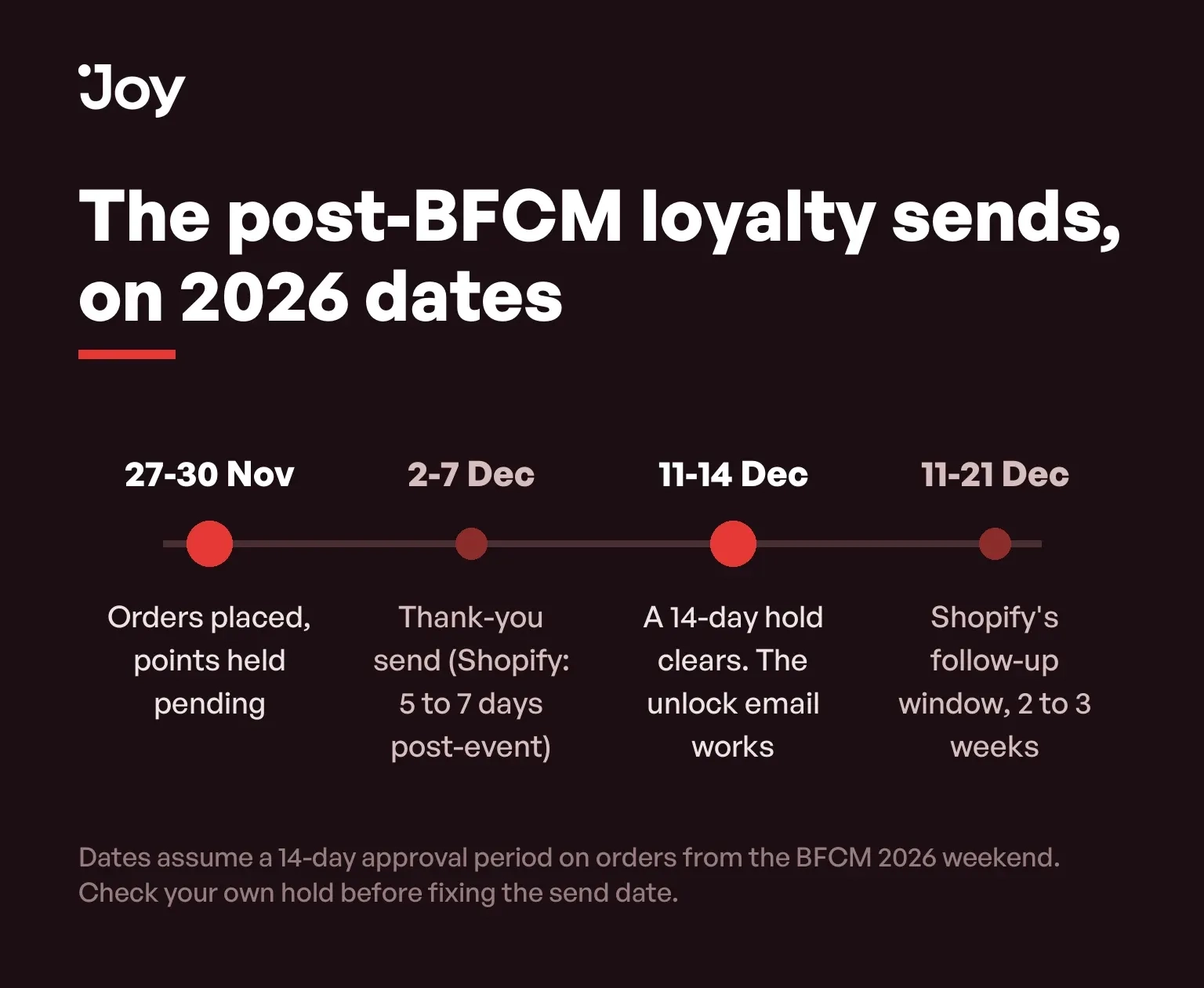
| When | The send | The message | Why then |
|---|---|---|---|
| Before 27 November | Enrolment | Join the programme | The only loyalty message with a job before the weekend. Shopify notes that customers who join a loyalty programme after a first purchase have more touchpoints and more opportunities to drive a second order. |
| 27 to 30 November | During the weekend | What you are earning | State the balance being built, not an instruction to spend it. Points from these orders are usually not spendable yet. |
| 2 to 7 December | Thank you | Gratitude plus the balance | Shopify's instruction is five to seven days post-event. Pair it with the points earned and the date they unlock. |
| 11 to 14 December | Unlock | Your points are ready | On a 14-day approval period this is the first day the message is actionable for weekend orders. Check your own hold before fixing the date. |
| 11 to 21 December | Second-order nudge | A reason that is not a discount | Shopify puts the follow-up at two to three weeks post-purchase, which overlaps the unlock. One well-timed send can do both jobs. |
| Early January | Expiry or tier reminder | What is at stake and by when | Only if you actually run expiry or tier qualification dates. A deadline you invented is a deadline customers learn to ignore. |
The one date that is not a best practice
Four of those rows come from ordinary scheduling logic. One does not. The unlock email is timed by your loyalty app's approval period — the number of days newly earned points sit pending before a customer can spend them.
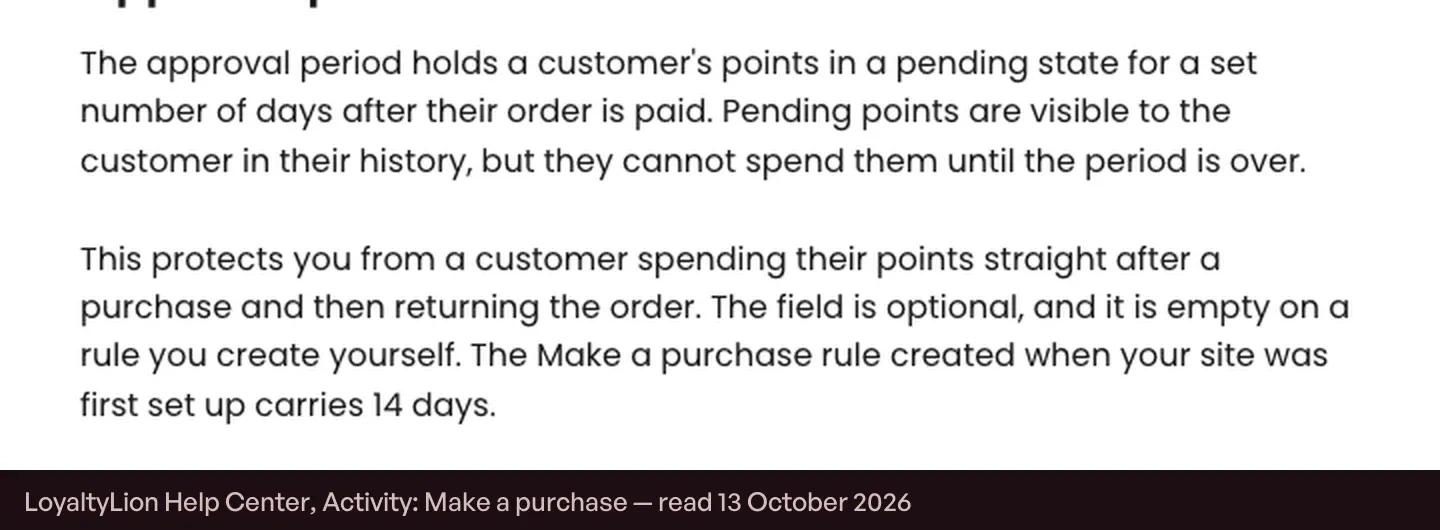
LoyaltyLion holds points "in a pending state for a set number of days after their order is paid", as its guide to the Make a purchase activity puts it. On the 14 days that its setup rule carries, points from orders placed between 27 and 30 November clear around 11 to 14 December. Send the redemption message before that and you are pointing customers at a balance the system will refuse to spend.
This is the part worth checking rather than assuming, because the default is not universal. LoyaltyLion's 14 days applies to the Make a purchase rule created when the site was first set up; on a rule a merchant creates themselves the field is empty. A store that rebuilt its earning rules may have no hold at all, in which case the unlock email has nothing to unlock and the redemption message belongs with the thank-you.
Why the thank-you and the unlock are two different emails
Shopify's Black Friday checklist is specific about the first one: "Schedule your thank you emails five to seven days post-event". For 2026 that is 2 to 7 December, and it is a good instruction. A thank-you that arrives a week later reads as considered rather than automated, and it arrives after the returns and delivery questions have settled.
The temptation is to carry the redemption call to action in that same send, because it is the only loyalty email most calendars contain. On a typical hold that send is four to nine days too early. Separating them costs one extra email and converts a dead link into a dated promise: here is what you earned, here is the day you can spend it.
A pending balance stated with a date is a better retention asset than a spendable balance stated vaguely. It gives the customer a reason to come back on a day you chose.
There is an earlier send, and it is not a campaign
Before any of this, Shopify's guide to BFCM campaigns puts the post-purchase flow much closer to the order: "Launch post-purchase emails and SMS within two to five days after a customer buys". That window is for the transaction itself — delivery, what happens next, and the enrolment ask if the customer is not yet a member.
Keeping it separate from the thank-you campaign matters in a week when every brand is sending. The post-purchase flow is triggered by the customer's own order and arrives when they are expecting to hear from you. The thank-you is a campaign and arrives when you decide. Merging them produces one email doing neither job, sent on the day your list is least able to absorb it.
Then the windows converge
Shopify's other recommendation, in the same guide to BFCM campaigns, is a follow-up "two to three weeks post-purchase", on the grounds that it gives you another touchpoint before the customer goes cold. Count three weeks from the BFCM weekend and you land in the middle of December — the same window in which a 14-day hold clears.
That convergence is useful. Rather than two sends to the same people in the same week, the unlock email can carry the second-order job: the points are now spendable, here is what they are worth, here is what we would spend them on. In a month when every list is oversent, one email doing two jobs is worth more than two doing one each.
The email to send before the weekend
Only one loyalty message has a job before Black Friday, and it is enrolment. Shopify's article on BFCM campaign strategies makes the case in its own words: customers who join a loyalty programme or community channel after their first purchase "have more touchpoints with the brand, which gives you more opportunities to drive a second order".
The weekend itself will hand you more first-time buyers than the rest of the quarter combined, and the window in which a purchase is recent enough to justify an enrolment ask is short. Put the ask in the post-purchase flow rather than in a campaign, so it reaches people on the day they buy rather than on the day you next send. Where to place the ask across channels is covered in our guide to promoting a loyalty programme.
Check the field, then set the dates
Most of this calendar is ordinary scheduling that any competent marketer would arrive at. The part that is not ordinary takes five minutes: open the earning rule, read the approval period, and fix the unlock email to the date it produces. Every other loyalty email in December depends on that one being right, and it is the only date in the sequence that no best practice can tell you.
The mechanics the weekend itself should run on are in our BFCM loyalty strategies guide, and the order of work before it is in our Black Friday checklist.
FAQs
When should I send the post-BFCM thank-you email?
Shopify's own checklist says to schedule thank-you emails five to seven days after the event, which puts BFCM 2026 at roughly 2 to 7 December. That is a gratitude message, not a redemption message.
Why can't I tell customers to spend their points right after the weekend?
Because they often cannot. Most loyalty apps hold newly earned points in a pending state for a set number of days after the order is paid, so an email sent on 2 December may point at a balance the system will not let anyone spend until the middle of the month.
How do I find my own approval period?
Open the purchase earning rule in your loyalty app and read the field. Do not assume the default: LoyaltyLion's 14 days belongs to the rule created when the site was first set up, and the field is empty on a rule a merchant creates themselves.
Should the loyalty email be separate from the retention email?
Usually not. Shopify's follow-up window of two to three weeks post-purchase overlaps the date points unlock on a typical hold, so one send can carry both the unlock and the reason to return. Two sends in the same week to the same people is how a list earns unsubscribes in December.
What about customers who bought but did not join the programme?
They are the largest segment you will ever have and the one with the shortest window. Give them the enrolment ask in the thank-you send rather than waiting for a dedicated campaign, because by January the purchase is no longer recent enough to be a reason.
Does any of this apply if I do not run an approval period?
Then your points are spendable immediately and the unlock email has no trigger, so send the redemption message with the thank-you instead. It also means a returned order can leave a customer with a negative balance, which is worth knowing before December.

Written by
Thomas Nguyen is the CEO & Co-founder of Joy, a loyalty solution for Shopify and eCommerce brands. With years of experience building high-performance Shopify apps, Thomas aims to help merchants grow through customizable and retention-focused tools.
Related reading
 Examples & Inspiration
12-day Christmas Promotion Ideas To Turn Visitors Into Higher Spending Customers
Looking for simple Christmas promotions that do more than chase discounts. These ideas help you engage visitors and quietly raise the value of every order.
 Thomas Nguyen
 How-to Guide
CRM and Loyalty Program: How to Build Lasting Customer Relationships
CRM and Loyalty Programs work hand-in-hand with each other. We will show how to leverage these tools to enhance customer retention, and drive long-term growth for online businesses
Thomas Nguyen How-to Guide
Loyalty Program Name: 80 Ideas with Explanations & How to Craft Yours
Let’s learn some simple tips and ideas to help you choose the best name for your loyalty program and make it stand out in the crowd
Thomas Nguyen Loyalty Strategy
Black Friday Marketing Strategies 2025 for Brand-Led Growth
Innovate how you reach customers to lift your BFCM AOV
Thomas Nguyen Loyalty Strategy
Promote Your BFCM Loyalty Program Across Seven Channels
EY's 2025 Loyalty Market Study puts 35% of loyalty sign-ups on the brand's own website. Seven channels for BFCM enrolment, in order.
Thomas Nguyen Examples & Inspiration
Christmas Marketing Ideas to Stand Out and Increase Conversion Rate
In a crowded Christmas market, which marketing ideas truly keep customers engaged and give them a clear reason to choose your store?
Thomas Nguyen