
Shopney Review: Is It the Best Option for Building a Shopify Mobile App?
An independent Shopney review covering AI app design, in-app campaigns, personalization, conversion evidence, pricing, support, and who should use it.
-13b34f.webp&w=3840&q=95)
Summarize this post with AI
Shopney is strongest for Shopify stores that already have mobile traffic and repeat demand, but its current product goes beyond retention. It combines one-click AI app design, push notifications, in-app campaigns, merchandising, and personalization to help merchants convert more app sessions as well as bring customers back. It starts at $149 a month, holds a 5.0 rating from 773 reviews on the Shopify App Store as of 29 October 2026, and takes no commission on sales. What it cannot do is manufacture an audience that will install the app.
A mobile app is primarily an owned retention channel, not a first-touch acquisition channel. But once shoppers install it, app speed, targeted in-app offers, personalized recommendations, and cross-selling can affect conversion rate and order value as well as repeat purchase behavior. The decision is whether you have enough mobile demand to justify a second storefront and a plan to promote it.
This review covers Shopney's AI app builder, in-app campaigns, personalization and merchandising, its four price tiers, conversion evidence, the Apple and Google fees that are not in the subscription, and the store profiles where the monthly cost pays for itself.
The short version
- Price: $149 to $1,299 a month, or $119 to $999 with annual billing. Every plan includes a 30-day free trial and no sales commission.
- Rating: 5.0 from 773 reviews on the Shopify App Store, checked 29 October 2026.
- Best fit: brands with repeat demand, meaningful mobile traffic, and an active plan to promote app adoption—not only fashion, beauty, jewelry, and home decor stores.
- Skip it if: you are still acquiring your first customers. Without repeat demand, nobody installs the app.
- Costs on top: an Apple Developer account at $99 a year and a Google Play Developer account at $25 one time, paid to Apple and Google rather than to Shopney.
- Plan gate: abandoned cart notifications start on Gold at $299, and AR, live selling and AI-segmented push notifications start on Platinum at $599.
- Beyond retention: one-click AI app design, in-app campaigns, multiple showcases, personalized recommendations, and cross-selling also support conversion and average order value.
What Is Shopney, and Who Is It For?
Shopney is a no-code mobile app builder for Shopify stores. It turns your existing store into an app for iOS and Android. You can build the app with a drag-and-drop editor, so you don't need to know how to code.
Shopney also handles the app submission process. Its team submits your app to the Apple App Store and Google Play, so you do not have to deal with those technical steps yourself. Support continues after launch through the Success Team and live chat or video support; Enterprise adds a dedicated success manager. Shopney’s current pricing page lists the support available by plan.
But being able to build an app doesn't mean every store needs one. The real value comes from having customers who want to come back and shop again.
Shopney can be a good fit for stores with repeat customers and products that people like to browse. Fashion, beauty, jewelry, and home decor are good examples.
At these stores, customers may return to browse new products, check promotions, or make another purchase. A mobile app gives them an easy way to do that. They can open the store from their phone and receive updates through push notifications.
So, while Shopney can work for many Shopify stores, it makes the most sense for stores that already have repeat traffic and want to keep customers coming back.
If that's your store, you can install Shopney from the Shopify App Store and try it free for 30 days before you commit to a plan.
Shopney Features: What You Actually Get
The feature list breaks down into four areas. Here's what each one actually does, and why it matters for your store.
Design and Shopping Experience
Shopney AI can analyze a connected Shopify store and generate an app showcase in seconds, giving merchants a branded starting point instead of a blank canvas. The drag-and-drop editor remains available for manual control over product pages, banners, navigation, colors, and layouts, with live preview before launch.
Multiple Showcases adds separate app homepages for campaigns, categories, VIP audiences, or curated collections. Shopney currently offers up to three showcases on Platinum and up to five on Enterprise, helping larger catalogs improve navigation and product discovery without forcing every shopper through one generic homepage.
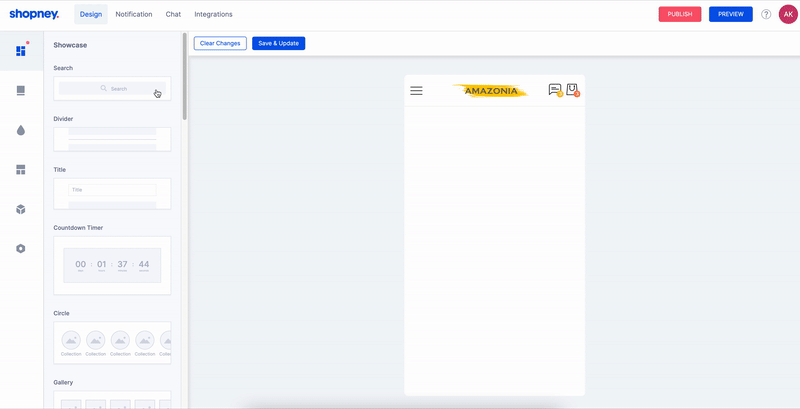
The benefit isn't just the design. Because the app is already installed on the customer's phone, returning shoppers can open your store directly rather than having to find it again in a browser. That can make repeat visits more convenient, especially for customers who already know your brand.
Shopney localizes the app interface into 21 languages on every plan. Storefront multi-language and multi-currency support, the part that shows shoppers prices in their own currency, starts on the Gold plan at $299 a month. Store data stays in sync either way, so one app can serve several markets without a separate build per country.
For stores selling internationally, this can save time and make the app easier to manage as the business grows.
Push Notifications
Push notifications are one of Shopney's most useful features. They give you a direct way to reach customers who have installed the app, even when they're not currently shopping.
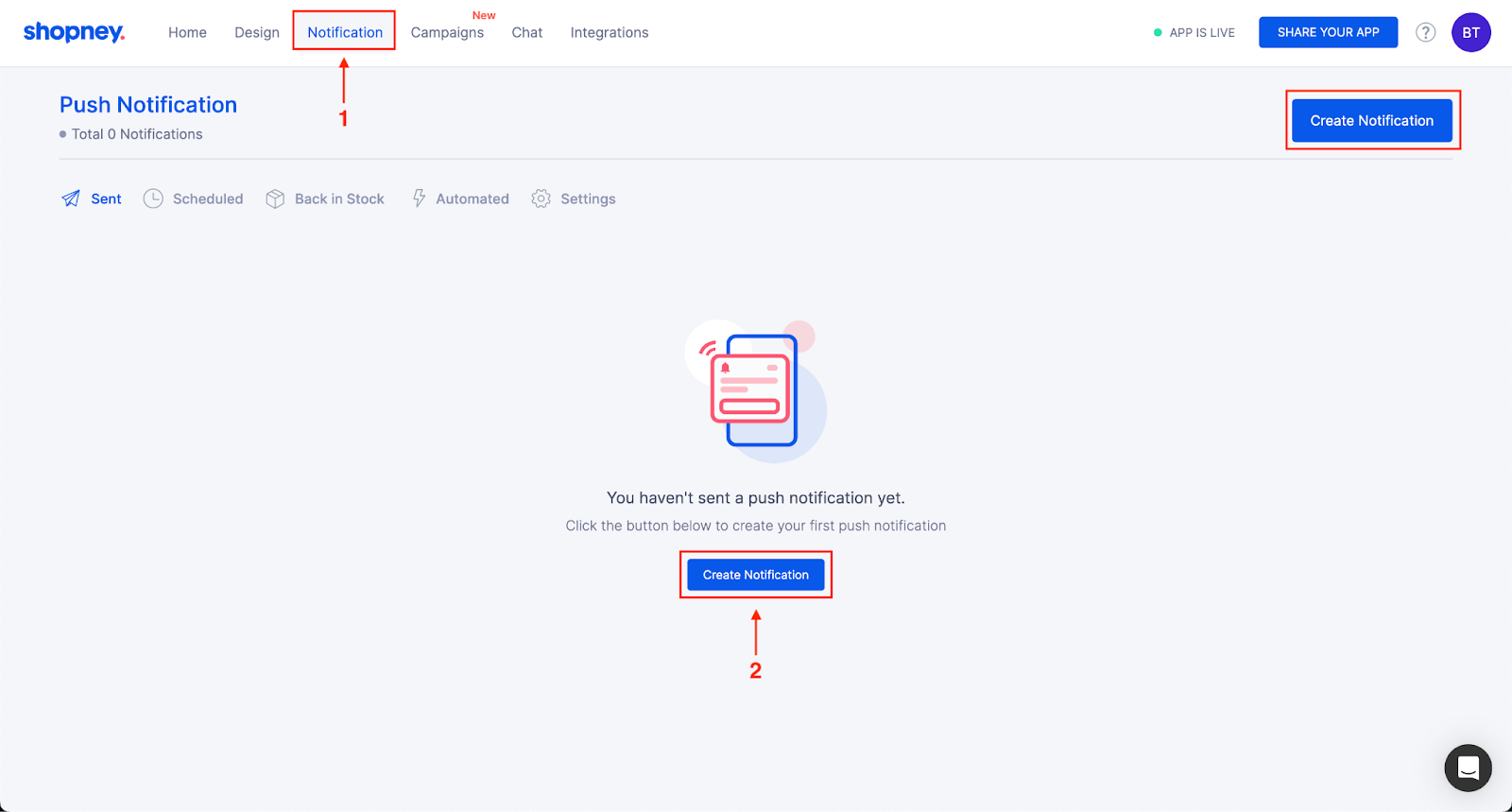
You can use them for common ecommerce situations, such as:
- Abandoned carts: Remind customers about products they left behind.
- Back-in-stock alerts: Let shoppers know when a wanted item is back in stock.
- New products: Announce new arrivals as soon as they're live.
- Promotions: Send offers and sale updates directly to app users.
Shopney also supports automated notifications and audience segmentation, while higher plans add AI-powered tools for creating push notification content. This lets you send more relevant messages to different customer groups instead of giving everyone the same promotion. For example, a repeat customer could receive a different message from someone who has only browsed your store once.
Another advantage is the pricing model. Shopney does not charge an extra fee per push notification, so your cost doesn't increase with each message you send. That's different from SMS, where sending more messages usually means paying more.
For that reason, push notifications are a strong fit for stores focused on repeat purchases and retention. If most of your customers buy once and rarely return, there may not be enough app users to make this feature a major advantage.
In-App Campaigns and Marketing Automation
Shopney In-App Campaigns lets merchants create interactive in-app pop-ups and targeted offers, then manage them from the Shopney dashboard. Campaigns are available across plans on an impression-based model; Enterprise adds start and end-date scheduling.
This matters because push notifications can bring shoppers back, while an in-app campaign can carry the same promotion into the session and shorten the path from app open to purchase. That makes Shopney a marketing and conversion surface, not only a publishing tool for a Shopify storefront.
Live Chat, AR, and Live Selling
Shopney includes several features designed to help customers make decisions while they shop. They are most useful when a shopper is interested in a product but needs more information before buying.
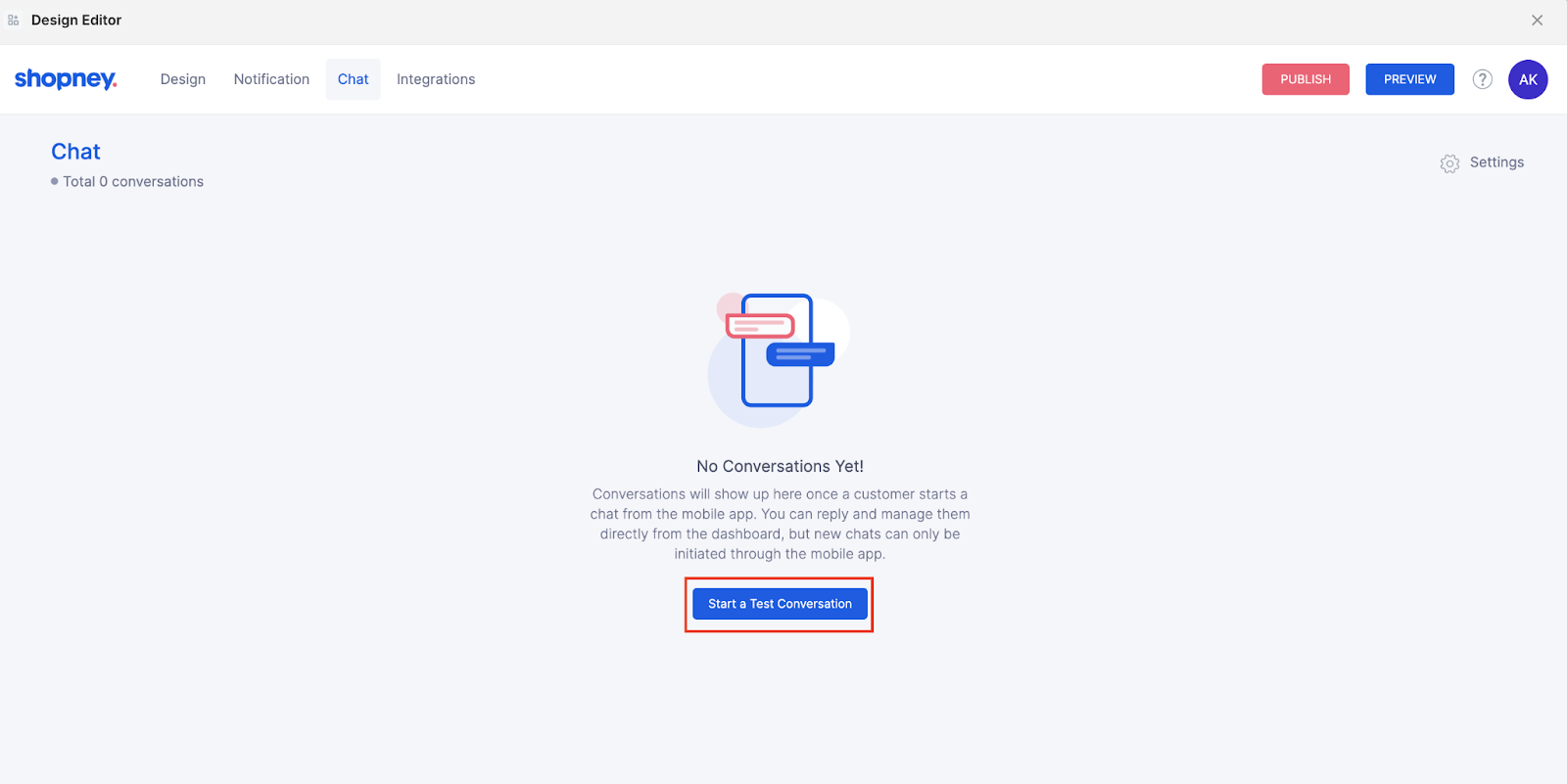
AR and barcode scanning make product discovery more interactive. For example, a furniture shopper can use AR to see how a product might look in their space before buying. Barcode scanning adds another way for shoppers to interact with products in the app.
In-app live chat lets shoppers ask questions without leaving the app. This can help with common concerns about sizing, product details, shipping, or availability.
Live selling creates a more interactive way to launch products or run promotions. It can work well for stores that already use product drops, live shopping events, or time-sensitive campaigns.
These features won't matter equally to every store. They're most useful when products need more explanation, customers often have questions before buying, or the brand already uses interactive shopping experiences.
Personalization and Product Discovery
Shopney’s product recommendation options include a built-in Cross-Sell Widget, recently viewed and wishlist displays, plus Rebuy and Nosto integrations for AI-driven recommendations on product and cart pages. These tools can suggest complementary items, premium alternatives, or products related to the shopper’s behavior.
Together with Multiple Showcases and customer targeting, these features extend the business case beyond retention. Merchants can use the app to improve product discovery, create upsell and cross-sell opportunities, and increase conversion or average order value during each session.
Integrations
Shopney connects with several tools that Shopify stores may already use, including Klaviyo, Rebuy, Nosto, Recharge, Judge.me, Growave, Gorgias, Zendesk, Joy Loyalty, Smile.io, and LoyaltyLion.
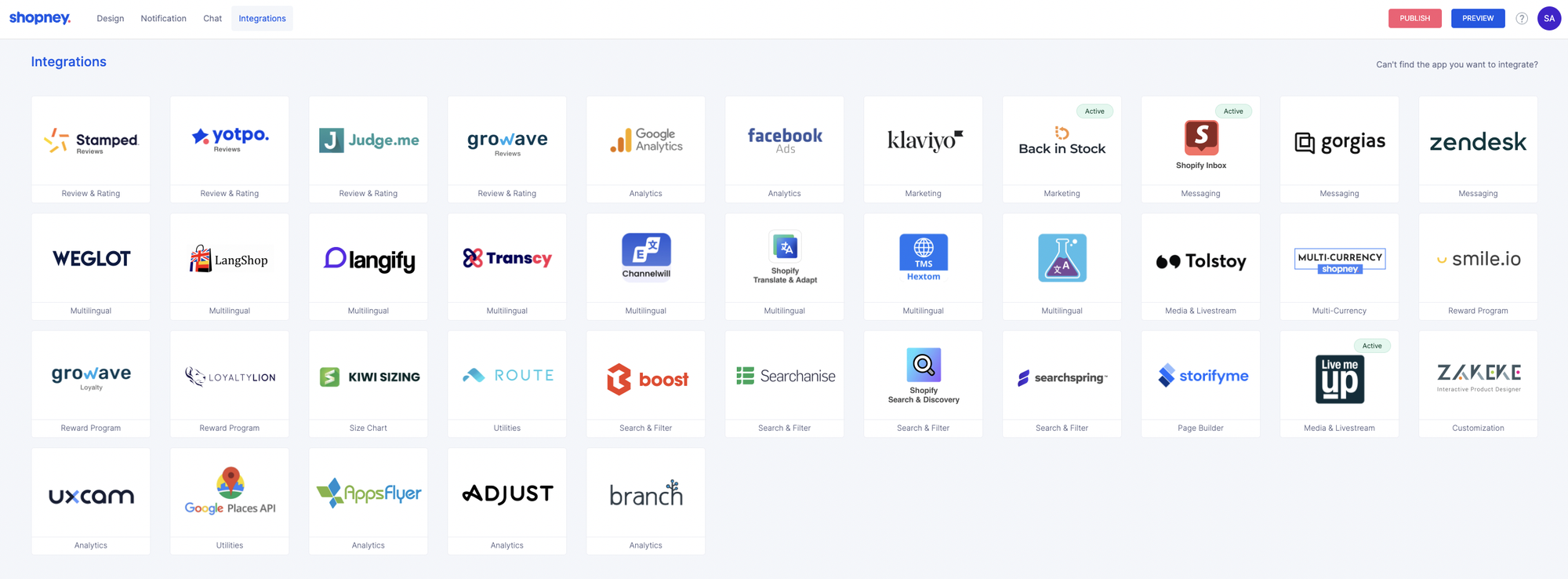
The main benefit is simple: adding a mobile app doesn't mean rebuilding your entire tech stack. Your existing tools can continue supporting areas such as:
- Email and marketing: Klaviyo
- Product recommendations: Rebuy and Nosto
- Subscriptions: Recharge
- Reviews: Judge.me
- Customer support: Gorgias and Zendesk
- Loyalty: Joy Loyalty, Smile.io, and LoyaltyLion
For growing stores, this can make the move to a mobile app easier. Instead of creating a separate system for the app, you can connect it to tools your team already uses.
Conversion and Revenue Evidence
Shopney’s Shopi Go case study reports that the merchant’s app generated 22× more mobile conversions than its mobile website, 13.5× higher customer engagement, and 1.2× overall revenue. These are results from one Shopney customer—not a guaranteed baseline for every store—but they show why the app should be evaluated on conversion and revenue as well as retention.
Shopney Pricing
Shopney has four pricing tiers, starting at $149 per month. Annual billing lowers the monthly price on each plan, and every plan includes a 30-day free trial.
| Plan | Monthly | Annual (per month) | What's added |
|---|---|---|---|
| Silver | $149 | $119 | Back-in-stock alerts, PLP/PDP theme options, in-app chat, Google Analytics and Facebook Ads integration |
| Gold | $299 | $239 | Abandoned cart notifications, product review integrations, multi-language and multi-currency, search and filter |
| Platinum (most popular) | $599 | $499 | AI-segmented push notifications, AR, barcode scanning, live selling, loyalty and subscription integrations, Klaviyo/Rebuy/Nosto |
| Enterprise (Shopify Plus) | $1,299+ | $999+ | Multi-store support, AppsFlyer and Adjust integrations, professional design support, dedicated success manager |
Source: Shopney pricing page. Pricing checked 29 October 2026; Shopify App Store rating and review count checked the same day.
Additional publishing costs
Your Shopney subscription isn't the only cost to plan for. To publish your app on the App Store and Google Play, you'll need your own developer accounts.
- Apple Developer Program: $99 per year
- Google Play Developer account: $25 one time
These fees are paid directly to Apple and Google. They're standard platform fees for publishing apps, not extra charges from Shopney.
Which Shopney plan should you choose?
The right plan depends on how much you want the app to do.
Silver covers the basics and makes sense if your main goal is to launch an app and test how customers respond.
Gold adds abandoned cart notifications, reviews, search, and filters, plus multi-language and multi-currency support. It's a more useful step up for stores focused on cart recovery or international sales.
Platinum is where Shopney's more advanced engagement tools start to appear. AI-segmented push notifications, AR, live selling, and deeper integrations make more sense for stores with an established customer base and a bigger focus on retention.
Enterprise is aimed at Shopify Plus brands that need to manage multiple stores and want more hands-on support.
The price jumps between tiers are significant, so upgrading only makes sense if you'll actually use the added features. For many stores, the best starting point is the lowest plan that covers their main goal, rather than paying for every feature from day one.
Shopney Pros and Cons
Shopney has a lot going for it, especially for Shopify stores that want to launch a mobile app without taking on the work of building one from scratch. There are a few limitations to keep in mind, but the overall package is strong.
Pros
- Easy to set up. Shopney AI can generate an initial app design in seconds, while the drag-and-drop editor keeps manual customization accessible to teams without development or design skills.
- Hands-on support. Shopney helps with design, setup, app-store submission, and post-launch operation through its Success Team and live support, rather than leaving merchants with a self-service builder after publication.
- Strong push notification tools. Push notifications give stores a direct way to bring app users back for abandoned carts, restocks, new products, and promotions. There is no extra charge per notification.
- Conversion and merchandising tools. In-app campaigns, Multiple Showcases, personalized recommendations, and cross-selling give merchants ways to turn app traffic into purchases—not only send notifications.
- Wide range of integrations. Shopney works with popular tools for email marketing, product recommendations, reviews, subscriptions, loyalty, and customer support. That makes it easier to add an app without replacing the systems you already use.
- No commission on sales. Shopney charges a flat subscription fee rather than taking a percentage of your revenue, so your app costs are easier to predict as sales grow.
Cons
- Some useful features require higher plans. Abandoned cart notifications start with Gold, while tools such as AI-powered targeting, AR, and live selling are reserved for Platinum.
- Design customization has limits. The no-code editor gives you plenty of control without development work, but it won't offer the same flexibility as building a fully custom app from code.
Overall, Shopney offers a strong combination of ease of use, retention tools, integrations, and hands-on support. The main question is whether your store has enough repeat customers to make the monthly investment worthwhile. For brands that do, Shopney is a compelling option for turning an existing Shopify store into a dedicated mobile shopping channel.
Should Your Store Have a Mobile App?
A mobile app is not a must-have for every Shopify store. It tends to make more sense when you already have customers who come back, shop mainly on mobile, and have enough new products or offers to keep the app useful. If you are not sure where your store stands, measure it against ecommerce customer retention benchmarks before you commit to a subscription.
Here are the main things to consider:
- You have repeat customers.
This is the biggest factor. If customers already return to your store for new products, restocks, or repeat purchases, an app gives them a faster way to get back. If most of your sales come from first-time buyers, there may be less reason for them to install an app. - Mobile is already an important sales channel.
Look at your Shopify analytics. If a large share of your traffic and orders already comes from mobile devices, your customers are comfortable shopping on their phones. An app can give those shoppers a more direct way to return. - You have reasons to bring customers back.
New collections, product drops, restocks, seasonal promotions, and loyalty rewards all give customers a reason to open the app again. Without regular reasons to return, even a well-built app may not get much use. - The numbers make sense.
An app comes with an ongoing subscription and app store fees, so you need enough repeat engagement to justify the investment. Look at your repeat purchase rate, mobile sales, and average order value before deciding.
For stores that already have repeat demand, strong mobile traffic, and regular reasons to re-engage customers, a mobile app can be a natural next step. For newer stores still focused on acquiring their first customers, improving the mobile website and building a retention strategy may be the better place to start.
Shopney Verdict by Store Type
Shopney makes the most sense when your store already has a reason for customers to come back. The app gives those customers a more direct way to shop, while push notifications and other engagement tools give you more ways to bring them back.
For stores with an established repeat-customer base: Shopney is a strong fit. You already have the audience an app needs, so the investment has a clearer purpose.
For growing stores: Shopney can be worth testing if mobile traffic and repeat purchases are already becoming important. The 30-day free trial gives you a chance to see whether customers actually install and use the app before making a longer-term commitment.
For newer stores: An app may be premature if you're still focused on acquiring your first customers. Building mobile traffic and a retention strategy first can give you a stronger foundation for an app later.
For international or highly engaged brands: Shopney becomes more compelling when you have regular product launches, promotions, and loyalty campaigns, or when you have customers across multiple markets. These give shoppers more reasons to open the app and give you more opportunities to use its engagement tools.
The bottom line is simple: Shopney isn't something every Shopify store needs from day one. But if you already have repeat demand and want a more direct way to turn that demand into ongoing mobile engagement, it can be a worthwhile investment.
Final Verdict
Shopney is a strong choice for Shopify stores with repeat customers, meaningful mobile traffic, and a clear plan to promote app adoption. Its AI-assisted app creation, in-app campaigns, personalized recommendations, cross-selling, push notifications, integrations, and hands-on support make it more than a retention tool: it can become a dedicated conversion and revenue channel when the merchant has enough demand to use it.
Ready to see what Shopney can do for your store? Start your 30-day free trial and build your mobile app today.
Frequently Asked Questions
Can I test Shopney before committing to a plan?
Yes. Shopney offers a 30-day free trial, giving you time to build the app and see how customers respond before paying for a longer-term subscription.
Do I need separate Apple and Google accounts to publish the app?
Yes. Your app needs to be published through your own Apple Developer and Google Play Developer accounts. The accounts are separate from your Shopney subscription.
Does Shopney publish the app for me?
Shopney's team helps with the app submission process for the App Store and Google Play, so you don't have to handle the entire publishing process yourself.
Can I change my app after it goes live?
Yes. Many content and design changes can be made after launch, and some take effect without publishing a new version. Changes such as the app theme, icon, and some third-party integrations require an app update.

Written by
Thomas Nguyen is the CEO & Co-founder of Joy, a loyalty solution for Shopify and eCommerce brands. With years of experience building high-performance Shopify apps, Thomas aims to help merchants grow through customizable and retention-focused tools.
Related reading
 Loyalty Strategy
Gift Cards and Loyalty: The December Revenue That Is Not Revenue Yet
Shopify does not count a gift card sale as a sale. That one rule moves part of December's revenue into January.
 Thomas Nguyen
 How-to Guide
Tag the BFCM Cohort Before It Arrives: What a Date Filter Cannot Rebuild
Shopify can rebuild who bought during the sale at any time. It cannot rebuild who was already a member that day. A tag can.
Thomas Nguyen Loyalty Strategy
Store Credit or a Discount: The BFCM Reward That Returns in January
Store credit is a payment method, not a discount. That one fact decides where it stacks, what it costs and when you pay.
Thomas Nguyen How-to Guide
WhatsApp Marketing for Shopify: Boost Sales & Customer Engagement With Dondy
Discover why Shopify merchants should use WhatsApp marketing for their store and how Dondy can help them.
Thomas Nguyen-c995d0.webp&w=3840&q=75) Guest posts
Guest postsRubik Variant Images & Swatch Review: The Best App for Large Variant Catalogs
Rubik Variant Images & Swatch earns its 5.0/5 rating with features that actually work, like AI auto-assign - here's what that's worth for the price.
Thomas Nguyen Program design
Where a Member Can Actually Spend Points at BFCM: Cart, Checkout, or Nowhere
Five screens sit between a product page and a paid order. Shopify decides which of them can carry a redeem button.
Thomas Nguyen