
Shopify Discount Combinations: Why Your Loyalty Reward Will Not Stack
Shopify does not combine discounts by default, and the setting only reaches reward codes issued after you change it.
Summarize this post with AI
A customer earns a $10 reward in October, holds it for your Black Friday sale, and at checkout gets Discount couldn't be used with your existing discounts. Nothing warned you in the Shopify admin. Nothing warned you in the loyalty app. You find out from a support ticket on the busiest trading day of your year, and only from the customers who bothered to write in.
The cause is almost never the app. It is that your sitewide sale and your loyalty reward are the same class of discount, and Shopify's guide to combining discounts is explicit about what happens then: "No, discounts don't automatically combine". Each discount has to be told, separately, that it will tolerate the other.
This page is the mechanism, the ceilings, what the four largest loyalty apps do by default, and a ten-minute test you can run today. The deadline is not Black Friday. It is the day you issue the first reward code that a customer will hold until Black Friday, because the setting is not retroactive and almost nobody writes that down.
Key Takeaways
- Shopify does not combine discounts by default. Both the sale and the reward have to opt in, one at a time, before a customer can use them together.
- A sitewide money-off sale and a money-off loyalty reward are usually the same class of discount, and Order plus Order is the one pairing Shopify restricts to eligible stores.
- Joy, Smile and Rivo all state that a change to the combination setting applies only to codes issued after the change. Codes already sitting in customer accounts keep the old behaviour.
- The ceilings are 25 active automatic discounts, and 5 product or order codes plus 1 shipping code on a single order.
- If your store cannot combine Order with Order, run the markdown as a price change rather than a discount. A price is not a discount object, so there is nothing to combine.
Published 12 October 2026. Every limit and default on this page was read from the vendor's own live documentation on that date, and each one is linked. Shopify and the loyalty apps change these pages without notice, so re-read them before you rely on a number.
Both discounts in a Black Friday cart are usually the same class
Shopify sorts every discount into one of three classes, and the class is what decides whether two discounts can meet in the same cart.
| Class | What it is | What it looks like during BFCM |
|---|---|---|
| Order discount | A money-off or percentage-off discount applied to the whole order subtotal | A sitewide "20% off everything" built as Amount off order. A "$10 off" points reward. |
| Product discount | A discount applied to selected products or collections | A markdown on one collection. A free-product reward. |
| Shipping discount | A free or reduced shipping discount | A free-shipping reward or a free-shipping threshold offer. |
Read the third column again. A sitewide money-off promotion built the ordinary way is an order discount. A points reward worth $10 off is also an order discount, because taking a fixed amount off the whole order is the only thing it can be: a product discount has to name the products it applies to. So the most common BFCM cart in this category is Order plus Order.
That matters because Shopify does not treat the pairings equally.
| Pairing | Who can use it | The cart it describes |
|---|---|---|
| Order + Shipping | Every store | A points reward plus free shipping works without any eligibility check. |
| Product + Shipping | Every store | A collection markdown plus free shipping. |
| Product + Product, different items | Every store | Two markdowns that never touch the same item. |
| Product + Order | Eligible stores only | A collection markdown plus a points reward. |
| Order + Order | Eligible stores only | A sitewide sale plus a points reward. The usual BFCM cart. |
| Product + Product, same item | Shopify Plus only | Two markdowns stacking on one product. |
Order plus Order and Product plus Order are both restricted to eligible stores. A store is eligible when it meets two conditions, both stated on Shopify's page: it must not use any checkout.liquid customizations or features, and it must not be using the Licensify app. LoyaltyLion's article on reward and discount combinations documents the same gate for its own rewards and names a second app, Global-e. If your store fails either condition, no setting inside any loyalty app will make a money-off reward stack with a money-off sale.
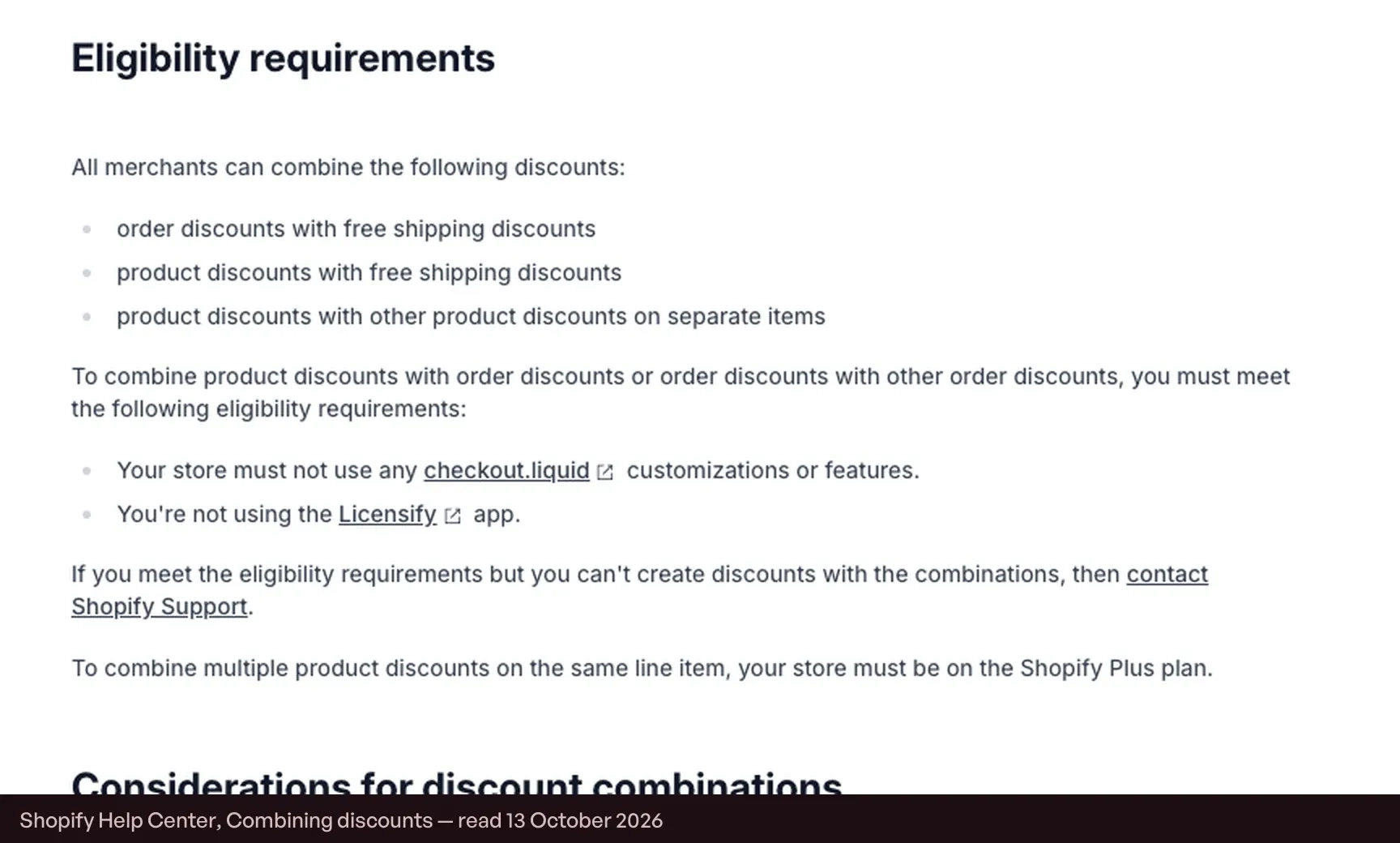
One more asymmetry worth knowing before you plan a collection markdown: two product discounts on separate items combine on every store, but two product discounts on the same item are Shopify Plus only.
Nothing combines until both sides opt in
The second half of the rule is the half that burns merchants who are eligible and assume that settles it. Eligibility only makes the pairing possible. Each discount still has to allow the other's class, and the settings live in two different places: the sale's combination settings sit in the Shopify admin, and the reward's sit inside the loyalty app.
Smile's guide to configuring discount combinations states the consequence directly: "For discounts to stack, each discount must allow combinations", and advises making sure both the Smile reward and any other Shopify discounts are configured to allow combining. LoyaltyLion puts it the same way from the other side: its article on reward and discount combinations says its loyalty discounts combine with a store's own discounts only if combinations are enabled on the Shopify discount itself.
In practice this means a two-person failure. The person who builds the November promotion is often not the person who configures the loyalty program, and each of them can finish their own job correctly while the cart still fails.
The ceilings you can reach on one cart
| Limit | Ceiling | What it means in November |
|---|---|---|
| Active automatic discounts | 25 | Includes discounts created by apps, so a loyalty app's automatic rules count against the same 25. |
| Automatic discounts on one order | 25 | The same ceiling applies per order. |
| Product or order discount codes on one order | 5 | LoyaltyLion states the app-side consequence plainly: Shopify only allows a maximum of 5 vouchers to be applied to any one cart. |
| Shipping discount codes on one order | 1 | Multiple shipping discounts cannot apply to the same order. |
The five-code ceiling is the one that actually bites, and it is easier to reach than it sounds. A welcome code, a points reward, a sitewide code and a code from a creator partnership are four of the five before anything unusual has happened. The 25-discount ceiling matters for a different reason: it counts app-created discounts too, so a loyalty program running automatic rules is spending part of the same allowance.
What the four largest loyalty apps do by default
Defaults differ, and so does how much each vendor documents. The table below reports only what each vendor's own help page states; where a page is silent, the cell says so rather than guessing.
| App | Default | Where it is set | Plan requirement | Does changing it fix codes already issued? |
|---|---|---|---|---|
| Joy | Chosen per redeem program | Redeem Programs, then the discount method's combination setting | Essential, Advanced and Ultimate plans | No. It can only be applied to the newly redeemed discount after the setting change |
| Smile | Off. Smile online discount codes cannot be combined by default | The Combinations card, per reward | Not stated on the page | No. Changes apply only to new discount codes generated after you save |
| LoyaltyLion | On for voucher-based rewards that are set to combine | Per reward, plus one program-wide setting for Seamless Free Product | Not stated on the page | Not stated on the page |
| Rivo | Applied to all Rivo-generated codes once configured | Settings, then Orders, then Discount Combinations | Not stated on the page | No. Existing unused discount codes retain their original combination settings |
Two columns are worth dwelling on. The first is the default: Smile's online discount codes cannot be combined until a merchant changes that, which is a safe default and an expensive one in November if nobody revisits it. The second is the last column, and it is the reason this page exists.
The setting is not retroactive, and three vendors say so
Changing the combination setting does not reach backwards. It applies to codes issued afterwards. Three of the four apps document this in almost the same words:
- Joy, in its guide to discount combination: "It can only be applied to the newly redeemed discount after the setting change"
- Smile, in its guide to configuring discount combinations: "Changes apply only to new discount codes generated after you save your settings"
- Rivo, in its article on discount combinations and stacking: "Changes only apply to newly generated discount codes", and existing unused codes retain their original combination settings
Now put a calendar against it. A loyalty program issues rewards continuously, so by late November a share of your outstanding rewards were redeemed into codes weeks earlier, under whatever setting was live at the time. Discover the problem on 26 November, fix the setting that afternoon, and every one of those codes still fails. The fix works perfectly for codes generated from that moment on, which is why a merchant can test it, see it work, and still field tickets all weekend.
Worse, the customers holding a saved reward are not a random sample. They are the ones who earned enough to redeem and then waited for your biggest sale, which is the behaviour a loyalty program is built to produce. The volume follows them: Songmont recorded 5x redemption over Black Friday on Joy, so a setting that fails quietly for eleven months fails loudly in the one week it is used most.
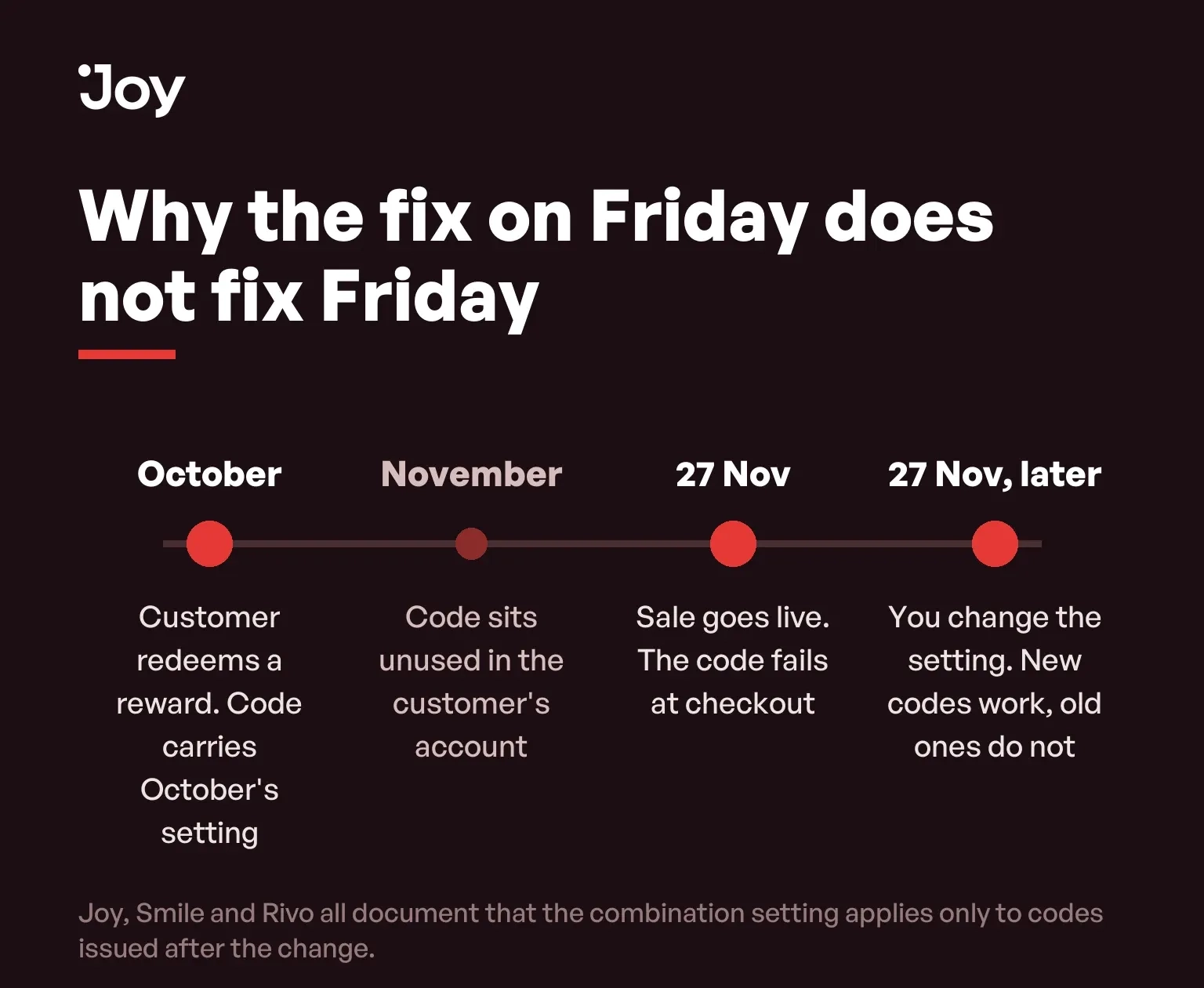
So the real deadline is not the sale. It is the last date on which you can still issue codes under the right setting. Set the combinations before the October and early November earn campaigns go out, not after.
Three rules that are not on anyone's checklist
Three more rules sit on the same Shopify page and almost never appear in the loyalty conversation. Each of them has a November version.
A single discount can belong to more than one class
Apps can create one discount that carries several savings at once, and Shopify's combining discounts page is explicit about what that does: "When a single discount includes multiple classes, it can combine only with other discounts that allow combinations with all of the included classes". So a reward that bundles a product saving with free shipping needs the other discount to allow both, and a sale configured to allow order and product but not shipping will refuse it. This is the most common reason a merchant says the settings look right and the cart still fails.
Combinations only work on three surfaces
Shopify's guide to combining discounts limits stacking to three surfaces: "Discounts can only be combined on orders that are made through the Online Store, Storefront API, and Shopify POS". If part of your November volume goes through a headless surface that is none of those, or through a channel integration, the stacking you tested on the storefront is not what those customers will get.
Buy X get Y eats your product discounts, unless you are on Plus
BOGO is a staple of the weekend, and on every plan except Shopify Plus, all products that are part of a Buy X get Y discount are ineligible for further product discounts. If a customer enters a code that touches those products, Shopify's rules for combining discounts apply the best overall value rather than both. Plan a BOGO and a points reward in the same weekend and you have designed a cart that quietly drops one of them.
One exception worth knowing in the other direction: Shopify's combining discounts page says custom discounts applied manually to an order always apply regardless of any combination settings. The same page still lists discounts added through the Scripts API alongside them, and that route is closed: Shopify's page on Scripts and the Script Editor records that Scripts were deactivated on 30 June 2026, which makes this the first BFCM in which a Plus store cannot lean on a script to force two discounts together. If your support team is fixing failed carts by applying a manual discount, that is why it works, and it is not a fix you can scale across a weekend.
If your store cannot combine Order with Order
Plenty of stores fail the eligibility test and cannot change it quickly, because removing checkout.liquid customizations is a project rather than a setting. There are two clean ways out, and one of them is better than it looks.
Run the markdown as a price change, not a discount
A compare-at price markdown is not a discount object. It consumes none of the five code slots, has no combination settings to opt into, cannot conflict with a reward code, and cannot be affected by the eligibility rules at all, because there is only one discount in the cart: the reward. The storefront still shows a struck-through price, which is what shoppers respond to.
It has a second effect, and whether it is welcome depends on your arithmetic. Points are earned on what the customer pays, so a price change lowers the earning base along with the price. That reduces the program's cost per order at exactly the moment margin is thinnest, which is the argument we set out in full in our BFCM loyalty strategies guide. If your earning base is configured to award on the pre-discount price instead, this is the week to find that out.
Or make the reward a shipping discount
Order plus Shipping and Product plus Shipping combine on every store, no eligibility required. A free-shipping reward therefore stacks with a sitewide sale on a store that could never stack a money-off reward. It is also the reward most merchants under-use, and on a discounted order it is often the cheaper one to give.
The ten-minute pre-flight test
Do this on the live store, before you issue codes, with the promotion built the way you will actually run it. A test that uses a simplified discount proves nothing, because the class is the variable.
- Build the November promotion exactly as planned, including whether it is an automatic discount or a code, and note which class it is.
- In your loyalty app, open the redeem program a customer will use most and set its combinations to allow that class. Save.
- Redeem a reward on a test account after saving, so the code is issued under the new setting. A code you generated earlier will not test what you think it tests.
- Add a real product to the cart, apply both the promotion and the reward, and read the order summary. Both lines should appear, with the totals you expect.
- Repeat with a second reward in the same cart if customers can hold more than one, to check the five-code ceiling against your actual mix.
- Then redeem one more reward from an account that redeemed before you changed the setting, if you have one. If that code fails while the new one works, you have found the retroactivity problem while you can still act on it.
If step four fails and both settings look right, the store is almost certainly not eligible for that pairing. Go back to the previous section rather than hunting through the app.
Decide this with the earning base, in one sitting
Discount combinations and the points-earning base are two settings, in two products, that are usually configured months apart by different people, and they produce one customer experience. Settling them in the same sitting takes under an hour, and it is the cheapest hour in the whole BFCM preparation, because the alternative is discovering the interaction through support tickets on the weekend you least want them.
Two pages pair with this one. Our Black Friday checklist sets the order of work for the weeks before the weekend, and our guide to what a loyalty point actually costs covers the earning-base decision this page keeps pointing at. If you are still assembling the stack itself, our BFCM app guide covers what each app's free plan caps.
Run the test before you issue the codes
Discount combinations are not a loyalty problem or a promotions problem. They are the seam between the two, which is why neither team checks them and why the error surfaces in a customer's cart rather than in anyone's admin. The mechanism is small enough to hold in your head: the classes decide what is possible, the eligibility rules decide whether your store may do it, both sides have to opt in, and the opt-in only reaches codes issued afterwards.
Joy exposes the combination setting on each redeem program, so you can allow order discounts on the reward customers will actually bring to a November sale and leave the others alone. Set it before the earn campaigns go out, using Joy's guide to discount combination, then run the test above.
FAQs
Why does my customer see "Discount couldn't be used with your existing discounts"?
Because one of the two discounts in the cart has not been set to combine with the other's class, or because the store is not eligible for that pairing. The message is the same in both cases, which is why the pre-flight test below checks the pairing itself rather than the setting.
Does turning on discount combinations fix the codes my customers already have?
No. Joy, Smile and Rivo all document the same behaviour: the setting applies to codes issued after the change. A code sitting in a customer's account since October carries October's setting into the Black Friday cart.
How many discounts can one order carry?
Five product or order discount codes plus one shipping code, and a maximum of 25 automatic discounts. The code ceiling is the one merchants hit, because a loyalty reward, a welcome code and a sitewide code are three of the five before a customer has done anything unusual.
Can I stack two loyalty rewards on the same order?
Only if both are set to combine with each other's class, and only up to the five-code ceiling. Two money-off rewards are both order discounts, so the pair needs the same Order plus Order eligibility a sale would need.
What if my store uses checkout.liquid customizations?
Then Order plus Order and Product plus Order are both unavailable to you, and no app setting changes that. Run the markdown as a price change instead of a discount, or make the reward a shipping discount, which combines with order and product discounts on every store.
Does a discount change how many points the order earns?
It can, and the two decisions are usually made by different people. A product discount lowers the subtotal the points are calculated on; an order discount may or may not, depending on the app's earning base. Settle the earning base in the same sitting as the combination setting.

Written by
Thomas Nguyen is the CEO & Co-founder of Joy, a loyalty solution for Shopify and eCommerce brands. With years of experience building high-performance Shopify apps, Thomas aims to help merchants grow through customizable and retention-focused tools.
Related reading
 How-to Guide
Set Up Your BFCM Loyalty in 15 Minutes
Set up BFCM loyalty in fifteen minutes, then spend a sixteenth placing one real order with both the sale discount and a reward on it.
 Thomas Nguyen
 How-to Guide
Shopify BFCM Guide: Black Friday 2026 Is 27 November
Black Friday 2026 is 27 November and Cyber Monday is 30 November. Shopify changed how it counts BFCM customers, so 81M is not growth.
Thomas Nguyen Program design
VIP Early Access on Shopify: Three Ways to Gate a Sale Before It Opens
Shopify can limit an automatic discount to a customer segment. Three ways to gate a VIP sale, and where each one leaks.
Thomas Nguyen How-to Guide
Online + POS Loyalty: Identity, Receipts, and Reconciliation
Design one loyalty ledger across ecommerce, POS, and retail receipts with identity controls, idempotency, refunds, and reconciliation.
Thomas Nguyen How-to Guide
Should Customers Earn Loyalty Points on Bundles and Subscription Orders?
A policy framework for points, VIP spend, redemptions, refunds, and multipliers on bundle and subscription orders.
Thomas Nguyen How-to Guide
Building Brand Loyalty for Ecommerce Brands in 2026: A Complete Playbook
Building brand loyalty is how smart ecommerce brands grow without chasing ads. Learn simple ways to turn buyers into repeat fans.
Thomas Nguyen