
What Does a Discounted Order Earn? Four Apps, Four Answers
A $100 jacket at 40% off: does it earn 100 points or 60? Four loyalty apps, four answers, and one test that settles it.
Summarize this post with AI
A customer buys a $100 jacket at 40% off during your Black Friday sale. How many points do they earn: 100, or 60? Most merchants do not know, and the answer is not the same in every app. On an ordinary week the difference is trivial. On the weekend when every order is discounted, it is the difference between a loyalty program that costs you 3% of gross margin and one that costs 5%.
This page is what each of the four largest apps documents about the earning base, where the documentation stops, and the one test order that settles it for your store in about ten minutes.
Key Takeaways
- Every loyalty app calculates points on a base, and the apps do not agree on what goes into it. The differences are largest on exactly the orders a BFCM weekend produces.
- LoyaltyLion states plainly that points are calculated after discounts. Smile calculates on the order subtotal and only excludes the discounted portion if you enable a setting that applies to discount codes alone.
- Shopify treats gift cards and store credit as payment methods rather than discounts, so Smile documents that they are never excluded from the rewardable total. A customer paying with credit you funded still earns points on the full order.
- A sitewide BFCM promotion built as an automatic discount is neither a discount code nor a compare-at price, which is the gap between the two levers most apps give you. Test it rather than assume it.
- Joy documents the subtotal and an option to include tax and shipping, and does not document discount treatment. Neither does most of the category, which is why one test order in October is worth more than any help page.
Published 24 October 2026. Every behaviour below was read from the vendor's own help centre on 13 October 2026 and is linked. Where a vendor does not document something, the table says so rather than filling the gap.
"Subtotal" is doing a lot of work in that sentence
Nearly every loyalty app describes its earning base as the order subtotal, which sounds settled until you ask what the subtotal contains on a discounted order. Shopify builds an order from line items, line-level discounts, order-level discounts, shipping, tax and payments, and "subtotal" can reasonably mean the figure before or after some of those.
So two apps can both say they award points on the subtotal and award different numbers for the same cart. The useful question is never what the base is called. It is which of those lines are inside it.
It is worth being concrete about what Shopify itself puts in that figure, because the apps inherit it. Smile's guide to Shopify order settings states the composition plainly: the order subtotal is "the sum of your line items, excluding taxes, shipping, and any discount codes applied". Line items, then, are the floor. Everything else — tax, shipping, discount codes, automatic discounts, gift cards, store credit — is a decision somebody made about whether it counts.
Count the decisions and you get six, in two products, usually made by different people at different times. That is why two stores running the same app on the same catalogue can award different points for the same cart, and why the only answer that matters is the one your own test order produces.
Four apps, four answers
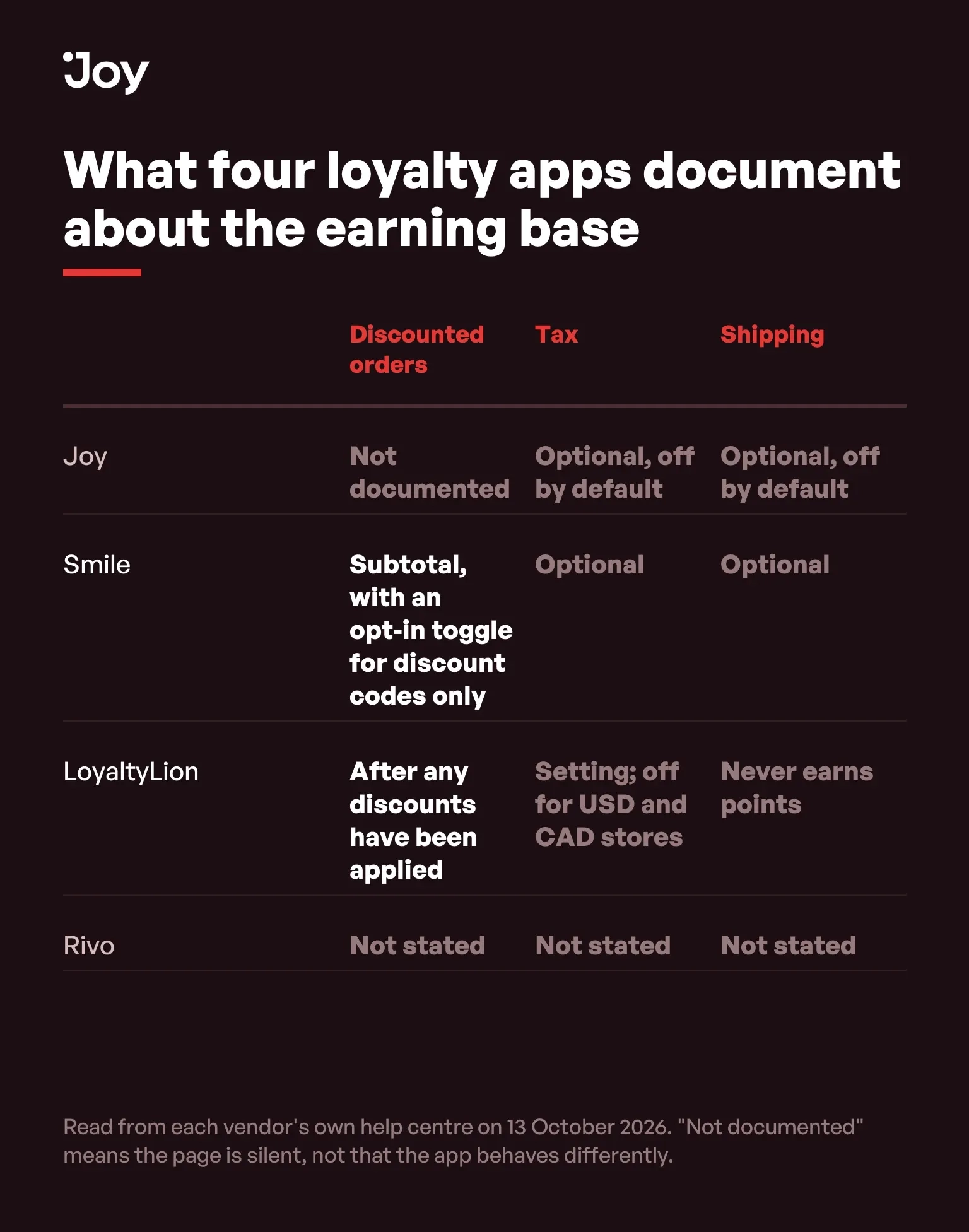
| App | Stated base | Discounted orders | Tax and shipping | Exclusion levers |
|---|---|---|---|---|
| Joy | Order subtotal in the store's primary currency | Not documented | Excluded by default, with an option to include them | Not documented on the place-order page |
| Smile | Order subtotal | Earned on the full subtotal unless you enable Exclude coupon discounts used, which "only applies to discount codes" | Excluded by default, each can be included by setting | Manual product selection, or any variant whose compare-at price is higher than its current price |
| LoyaltyLion | Price of the items in the order | "after any discounts have been applied" | Shipping never earns points on any plan or platform; tax follows a setting that starts off for USD and CAD stores | Not covered on this page |
| Rivo | Order value | Not stated on the exclusions page | Not stated on the exclusions page | Order tags, and product IDs; product tags cannot be used |
Two rows deserve reading slowly. LoyaltyLion is the clearest in the category, in its article on the Make a purchase activity: "Points are calculated from the price of the items in the order, after any discounts have been applied". There is nothing to configure and nothing to get wrong, and a merchant reading that sentence knows exactly what a discounted order costs them.
What the page does not say is what happens when you leave that switch alone. It describes the base as the order subtotal, "the sum of your line items, excluding taxes, shipping, and any discount codes applied" — which reads as though discounts are already out. Then it explains the switch with an example in which a $10 code on a $100 purchase earns on $90 once enabled, which only makes sense if the default earns on $100.
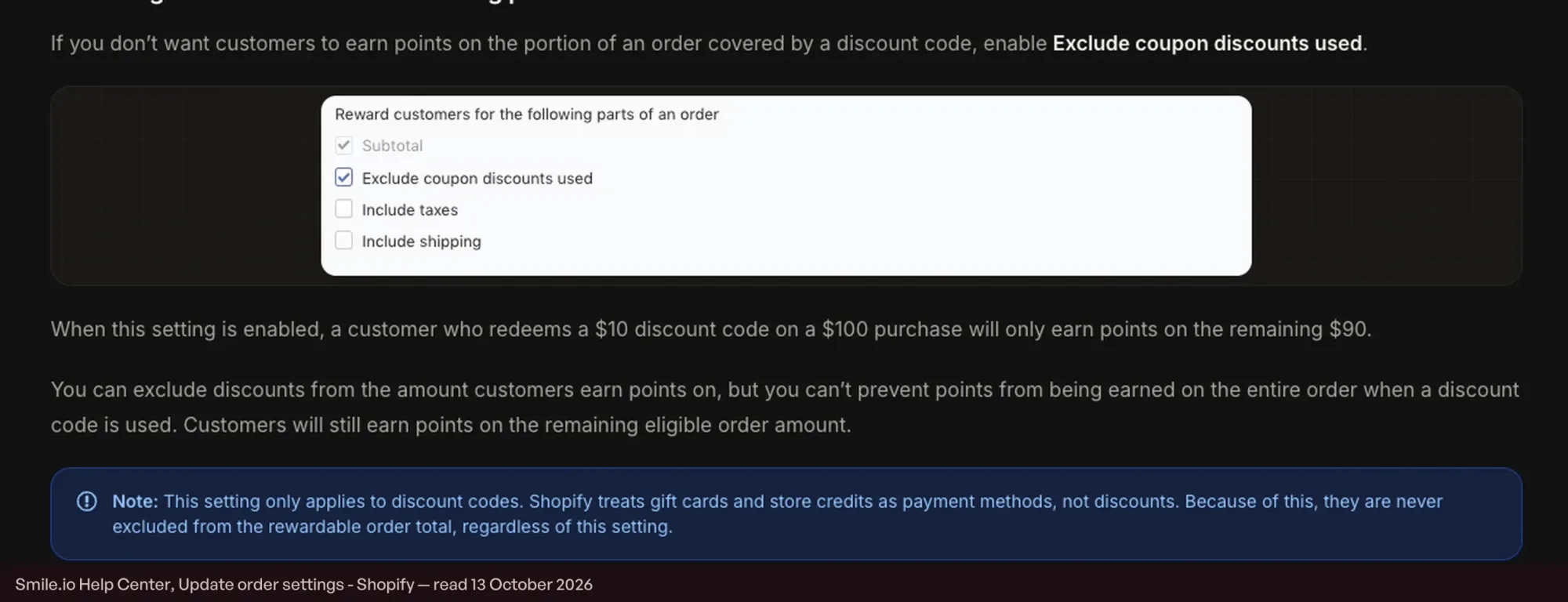
Both sentences are on the same page and they cannot both be right. We are not going to resolve it for you by guessing, and that is exactly why the test order below exists: ten minutes on your own store settles a question the documentation leaves open.
Joy documents the base, in its guide to the Place order earning program, as the order subtotal in the store's primary currency, with tax and shipping excluded unless you choose to include them, and does not document how discounts are treated. We would rather say that than let you infer it: if the behaviour matters to your November plan, settle it with the test below rather than with a help page, ours included.
The hole in the middle: a sitewide automatic discount
Here is the case that matters in November and that no vendor documentation in this research addressed directly. A typical BFCM promotion is 20% off everything, built as an automatic discount. It is not a discount code, because the customer types nothing. It is not a compare-at price, because the product's own price has not changed.
Now look at the two exclusion levers the category gives you. Smile's coupon exclusion applies to discount codes alone. Smile's other lever, set out in its guide to excluding products from earning points, excludes "any variant that has a compare-at price higher than its current price" — at variant level, so other variants of the same product keep earning, and only when the Place an order earning method is set to increments of points rather than a fixed amount. An automatic order-level discount sits between the two.
We are not going to tell you what happens, because the documentation does not say and asserting it would be the same mistake every roundup in this category makes. What we can tell you is that this is the single highest-value thing to test before November, because it is the shape of the promotion most merchants will actually run.
Store credit and gift cards are never excluded
This one is documented, and it is the trap with the clearest mechanism. Shopify treats store credit as a payment method rather than a discount — customers apply it only when signed in through customer accounts — and Smile's article on order settings spells out the consequence for the earning base: "Shopify treats gift cards and store credits as payment methods, not discounts", so "they are never excluded from the rewardable order total, regardless of this setting".
Follow that through on a November order. A customer redeems $25 of store credit you issued, pays $75, and earns points on the full $100. You funded the credit, you fund the points, and the second cost is invisible because nobody reports it. It is small per order and it compounds across a weekend built on exactly this behaviour.
It is also an argument for choosing the instrument deliberately. If you are going to reward with store credit, know that the credit returns to you as an order that earns again, and price that in.
Why four apps can disagree about the same cart
The disagreement is not carelessness. A Shopify order is not a price; it is a stack of lines. There are line items, discounts applied at line level, discounts applied at order level, shipping, tax, and then the payments that settle it, which may include a gift card or store credit. Any loyalty app has to choose which of those lines to sum, and the choices are all defensible.
Award on the pre-discount line items and you reward the customer for what they chose rather than for what they paid, which is generous and easy to explain. Award after discounts and you reward money actually received, which is what a finance team expects. Include tax and shipping and the number moves again, by different amounts in different countries, which is why LoyaltyLion's tax setting, as its purchase activity documentation shows, starts off for US and Canadian dollar stores and on elsewhere.
The reason it matters in November rather than in May is that discounts in May are small and occasional. In November every order carries one, so a choice that was worth a rounding error all year becomes the second-largest variable in the program's cost, behind only the multiplier.
And then a share of those orders comes back
Points awarded on a BFCM order are not final, which is the half of the picture the earning-base conversation usually leaves out. LoyaltyLion removes points automatically when an order is refunded, proportionally on a partial return, and, as its article on refunds and returns puts it, does so "regardless of whether the customer has points in their account" — so a customer who has already spent them goes negative.
That is the risk the pending period exists to manage: points sit unusable for a set number of days after the order is paid, and LoyaltyLion's advice, in its Make a purchase guide, is to "Set the approval period to match your returns policy". Rivo offers the same control as a delay measured in seconds, up to a maximum of 60 days documented in its article on excluding orders and adding points delays.
For a BFCM cohort that creates a scheduling problem worth knowing about now: a 14-day hold on orders placed over the weekend of 27 to 30 November makes those points spendable around the middle of December. If your December campaign is built around spending them, the campaign and the setting have to be planned together.
The ten-minute test that settles it
| Step | Do this | Why |
|---|---|---|
| 1 | Build the November promotion exactly as planned | Automatic discount or code, sitewide or collection — the class and the mechanism are the variables that decide everything below. |
| 2 | Place one test order at that discount | A real order, not a draft. Note the subtotal Shopify records and the price the customer actually paid. |
| 3 | Read the points awarded | Divide by your earn rate. The result tells you which number the app used, and it will be one of three: the pre-discount price, the amount paid, or something in between. |
| 4 | Repeat with store credit or a gift card as the payment method | This is the case that surprises people, because the order is partly paid with money you already gave away. |
| 5 | Repeat on a product carrying a compare-at price | If you run markdowns as price changes rather than discounts, this is the path your November orders will actually take. |
| 6 | Write the answer down where the November plan lives | The person building the promotion is rarely the person who configured the loyalty app. The finding is useless if it stays in one head. |
Step three is where the answer lives. Points divided by your earn rate gives you the base the app used, and comparing that against the Shopify order's own subtotal and total tells you precisely which lines are inside it. No help page can give you that, because no help page knows how your promotion is built.
What to settle before November
Three decisions, and they take one sitting. First, the base: whether points are earned on what the customer paid. Second, the exclusions: which doorbuster SKUs, if any, earn nothing, and by which mechanism. Third, the multiplier, if you are running one, and what it is calculated against.
The arithmetic behind the third decision — what a multiplier costs on an order whose margin a discount has already halved — is the subject of its own page in this series. The eight mechanics that work on a loyalty base during the weekend, and when a non-margin instrument beats a points one, are in our BFCM loyalty strategies guide. The order of work for the weeks before the weekend is in our Black Friday checklist.
One order, in October
The earning base is the least discussed and most expensive setting in a loyalty program, and the category documents it unevenly enough that reading about it is not a substitute for testing it. One test order now, at the discount you actually plan to run, converts a question nobody on your team can answer into a number you can put in the November plan.
FAQs
Should points be earned on the amount paid or the full price?
On the amount paid, in almost every case. Awarding on the pre-discount price means the deeper the discount, the larger the reward you add on top of it, which is the opposite of what you want on the thinnest-margin orders of the year. The exception is a deliberate, time-boxed promotion you have priced.
Does a customer earn points when paying with store credit?
On Smile, yes, and the documentation is explicit about why: Shopify treats gift cards and store credit as payment methods rather than discounts, so they are never excluded from the rewardable total. Check your own app, because this is the case where a merchant pays twice for the same order.
What about a sitewide automatic discount?
This is the gap. An automatic discount is not a discount code, so a code-only exclusion will not catch it, and it is not a compare-at price, so a compare-at exclusion will not catch it either. Whether your app's exclusion covers it is a question for a test order, not for a help page.
Do taxes and shipping earn points?
It depends on the app and sometimes on your currency. Smile excludes both by default and lets you include them. LoyaltyLion says shipping never earns points on any plan or platform, and that tax follows a setting which starts off for US and Canadian dollar stores. Joy excludes both by default with an option to include them.
Can I exclude my doorbuster products from earning points?
Usually yes, and the mechanism differs. Smile can exclude chosen products, or every variant whose compare-at price is higher than its current price. Rivo excludes by order tag or by product ID, and notes that product tags cannot be used for product exclusions.
My test shows points are awarded on the pre-discount price. What now?
You have three options and they are not equally good. Change the base if the app lets you, which is the clean fix. Exclude the deepest-discount SKUs, which fixes the worst orders and leaves the rest. Or accept it, price it, and lower the multiplier to compensate, which is the honest version of doing nothing.
Does this change how points are displayed to the customer?
It changes the number they see earned, which is the part that generates support tickets if you change it mid-season. Settle the base before the campaigns go out rather than after, and if you must change it during a promotion, expect to explain the difference to anyone who ordered on both sides of the change.
Can I exclude a promotion rather than a product?
Not cleanly, in anything documented. Exclusions in this category are built around products and orders, not date ranges. The nearest approach is tagging orders placed during the promotion and excluding that tag, which means an automation you build and test yourself.

Written by
Thomas Nguyen is the CEO & Co-founder of Joy, a loyalty solution for Shopify and eCommerce brands. With years of experience building high-performance Shopify apps, Thomas aims to help merchants grow through customizable and retention-focused tools.
Related reading
 How-to Guide
Shopify Discount Combinations: Why Your Loyalty Reward Will Not Stack
Shopify does not combine discounts by default, and the setting only reaches reward codes issued after you change it.
 Thomas Nguyen
 How-to Guide
Should Customers Earn Loyalty Points on Bundles and Subscription Orders?
A policy framework for points, VIP spend, redemptions, refunds, and multipliers on bundle and subscription orders.
Thomas Nguyen How-to Guide
Online + POS Loyalty: Identity, Receipts, and Reconciliation
Design one loyalty ledger across ecommerce, POS, and retail receipts with identity controls, idempotency, refunds, and reconciliation.
Thomas Nguyen How-to Guide
Set Up Your BFCM Loyalty in 15 Minutes
Set up BFCM loyalty in fifteen minutes, then spend a sixteenth placing one real order with both the sale discount and a reward on it.
Thomas Nguyen How-to Guide
BFCM Readiness: Shopify Tests Checkout, Nobody Tests Your Widget
Shopify scale-tests checkout at 80,000 a minute. The risk you own is the storefront, measured on the signed-in path.
Thomas Nguyen Program design
Free Shipping Rewards: The One Loyalty Reward Every Shopify Store Can Stack
Every Shopify store can stack a free shipping reward on a sale. Three published rules decide whether yours actually will.
Thomas Nguyen