
Your Thank-You Page Changed on 26 August. Check the Loyalty Sign-Up Still Shows.
Shopify replaced every remaining Thank you page on 26 August 2026. Check that your loyalty sign-up block survived it.
Summarize this post with AI
There is one page in your store that you cannot visit. Shopify describes the Thank you page as "a one-time page that the customer can't access again", and the merchant is in the same position: it appears for the person who has just paid, once, and then it is gone.
On 26 August 2026 that page was replaced on every store that had not already replaced it, and whatever had been added to the old one went with it. On a store with a loyalty program, one of the things that used to sit there was the invitation to join.
Key Takeaways
- 26 August 2026 was Shopify's deadline for the new Thank you and Order status pages. Stores that had not upgraded by then were upgraded automatically.
- Upgrading replaces the old pages along with any existing customizations on them, and additional scripts are not supported on the new versions.
- A loyalty sign-up prompt now exists on that page only as an app block that somebody added in the checkout editor.
- The surface is open to nearly every store: post-purchase extensions are available on all plans except Shopify Starter, while extensions inside the checkout steps are limited to Shopify Plus.
- A store that upgraded on time and placed its blocks is unaffected. Finding out which store you are takes one guest test order.
Published 19 October 2026. Platform behaviour was read from Shopify's, Smile's and Joy's own documentation on 13 October 2026 and is linked. Shopify has published no figure for how many stores were upgraded automatically, and none is given here.
What happened on 26 August
Shopify's page on upgrading the Thank you and Order status pages now reads in the past tense: "August 26, 2026 was the deadline to upgrade and replace your Thank you and Order status pages. Stores that weren't upgraded by that date were upgraded automatically".
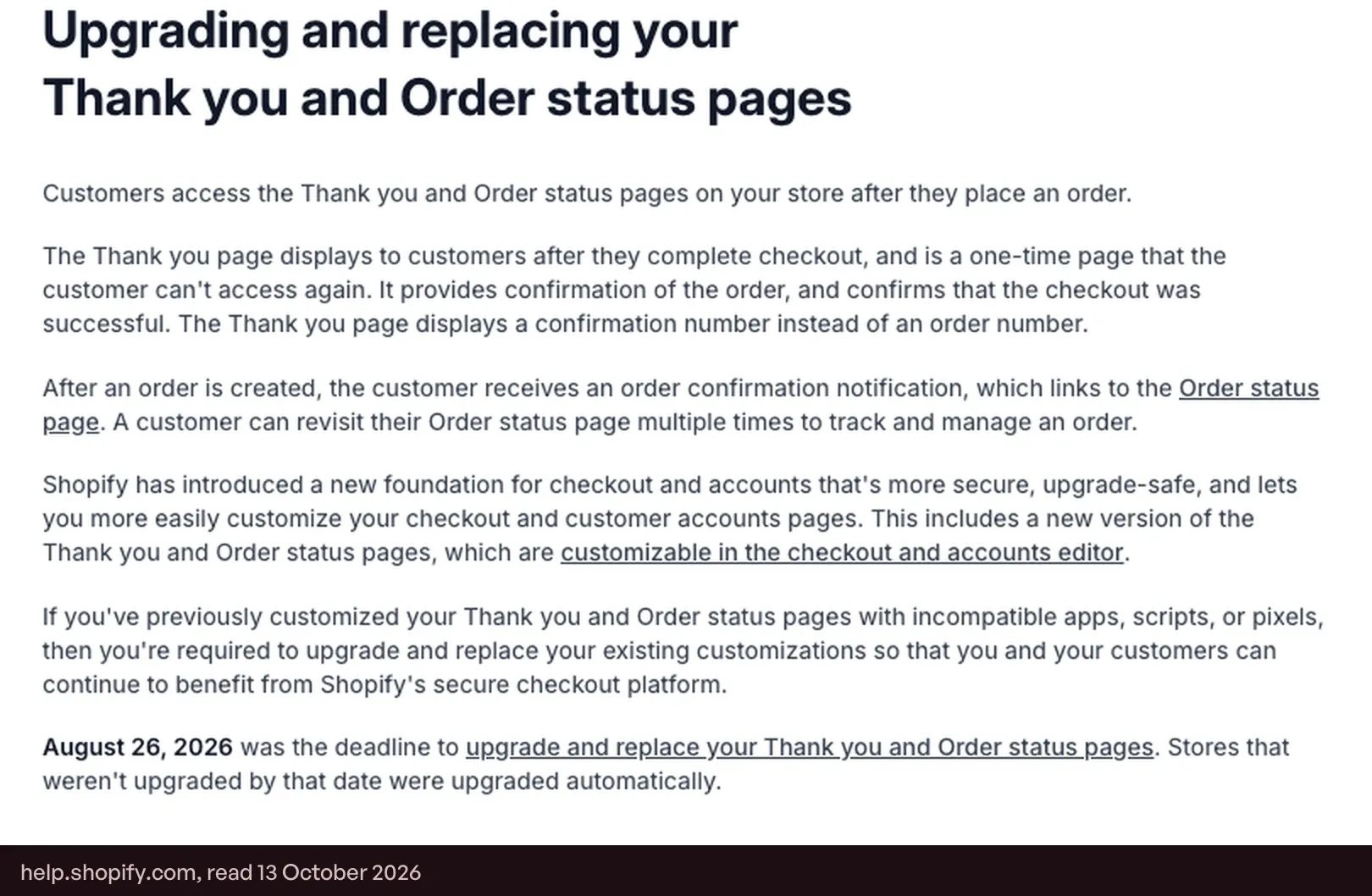
Shopify's upgrade guide for stores below Plus spells out what an upgrade does: "When you upgrade, your existing Thank you and Order status pages and any existing customizations on those pages are replaced with the new versions of those pages". The same guide notes that the Additional scripts box had been view-only since 28 August 2025, and that a store which is paused has its pages upgraded automatically and permanently.
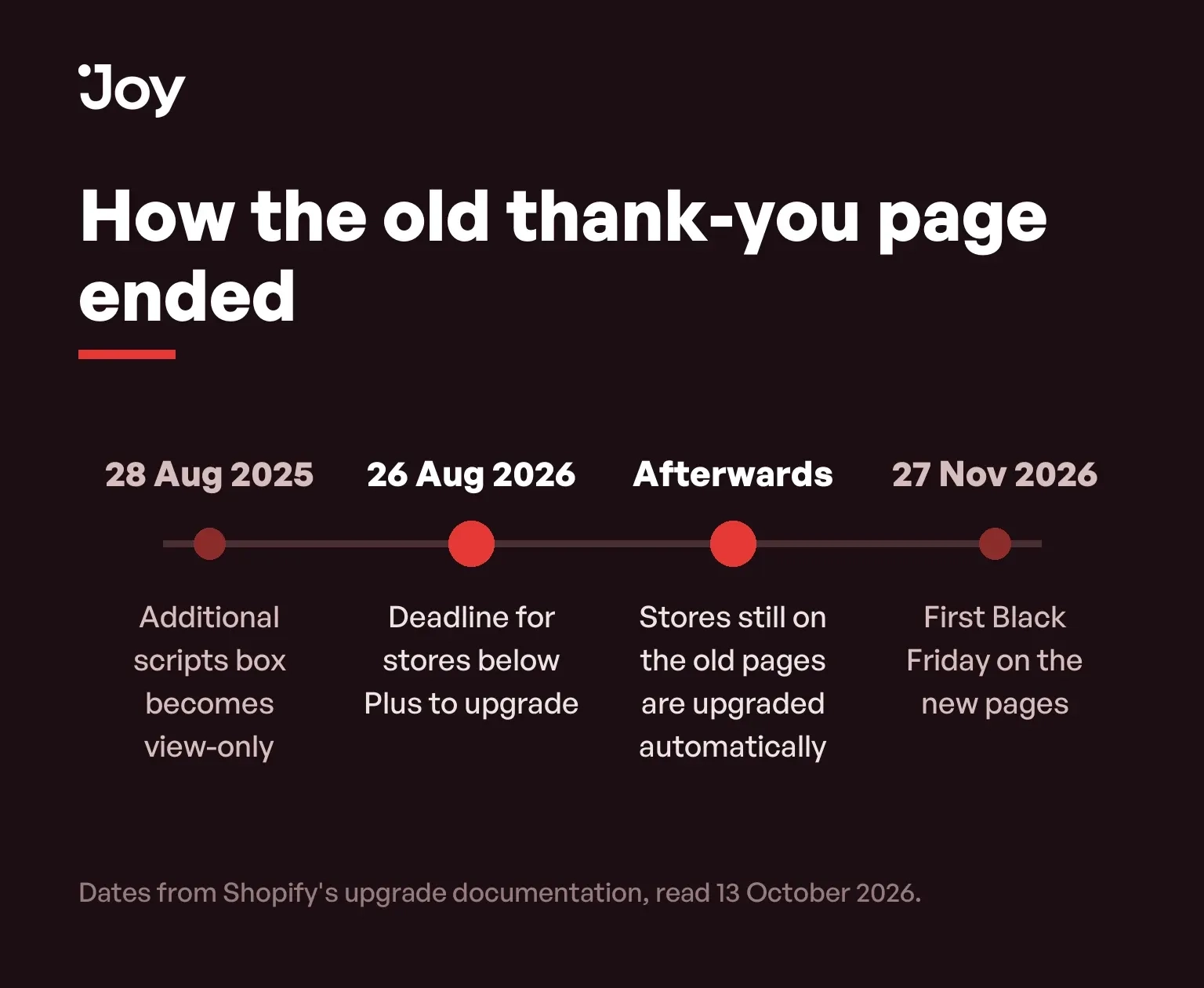
None of this was a merchant's decision. The date was Shopify's, the replacement ran whether or not anyone was watching, and for a store that did nothing the first sign of it may be a number that drifts: loyalty enrolment from new buyers a little lower in September than it was in July.
Why a loyalty prompt is the kind of thing that went missing
Before app blocks existed for these pages, the common way to put anything on the order confirmation screen was a snippet pasted into Additional scripts. Shopify's instruction on that, in its guide to reviewing and replacing additional scripts, is now flat: "Additional script customizations aren't supported on the new Thank you and Order status pages", and after the upgrade "you can't reactivate your additional script".
A prompt supplied by an app was not carried over on its own either. Shopify's guide says the app "must be updated by the app developer so that you can recreate the customization using blocks or pixels", and describes adding those blocks as a step the merchant performs in the upgrade guide for non-Plus stores. It does not describe blocks being placed for you. A store that was upgraded automatically had nobody performing that step.
So the exposed store is a specific one: it added a join-the-program prompt some years ago, has not opened the checkout editor since, and did not run the upgrade itself. How many of those exist is not known, because the count of automatic upgrades was never published.
Why the page earns its place in November
A BFCM weekend is built to bring in buyers who have never ordered from you, and a first-time buyer has no account to be signed in to. The Thank you page is the one screen every one of them is guaranteed to see as a customer, and it is seen once.
The Order status page works differently. Shopify's page on the upgrade notes that the confirmation email links to it and that a customer "can revisit their Order status page multiple times to track and manage an order". In a week when parcels run late, that is the page a new customer returns to while they wait.
Which of the two a loyalty block belongs on is not obvious, and vendors answer it differently. Smile's setup steps for showing points after a purchase say to choose Thank you if the store uses legacy customer accounts and Order status if it uses Shopify's current customer accounts, and add that logged-out customers see the message without a points total. The account system you run changes where the block has to live.
What a store is allowed to put there, by plan
In its developer page on checkout app extensions, Shopify splits the checkout into two territories. Inside the steps themselves, "Checkout UI extensions that render on the information and shipping and payment steps in checkout are available only to stores on a Shopify Plus plan". After the purchase the rule relaxes: "Extensions that appear after a purchase has been completed will be available to all plans except Shopify Starter".
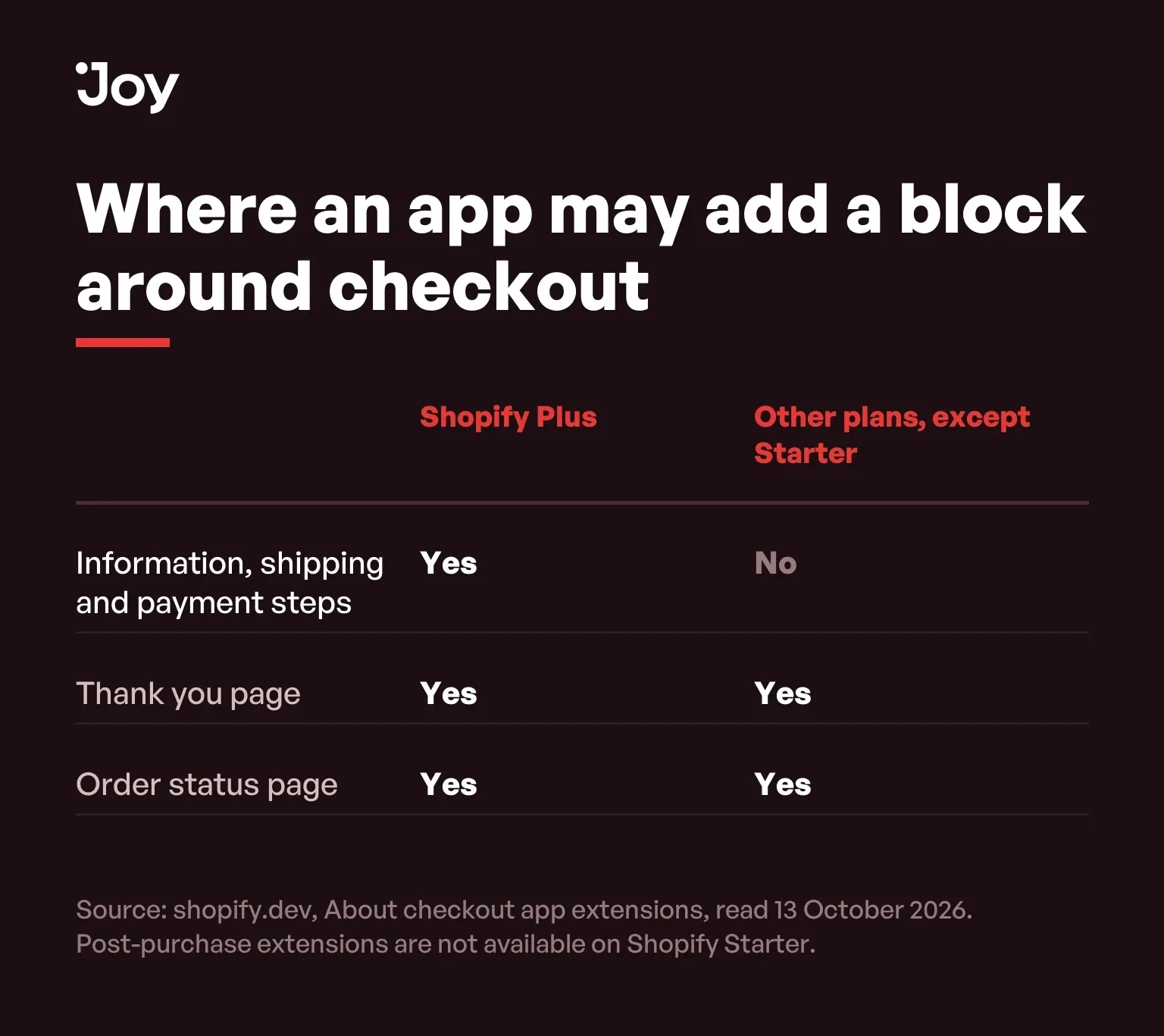
For a store on any plan below Plus, the post-purchase pages are the only part of checkout a loyalty app is permitted to touch. Losing the block there means losing the whole of it.
What belongs on the page
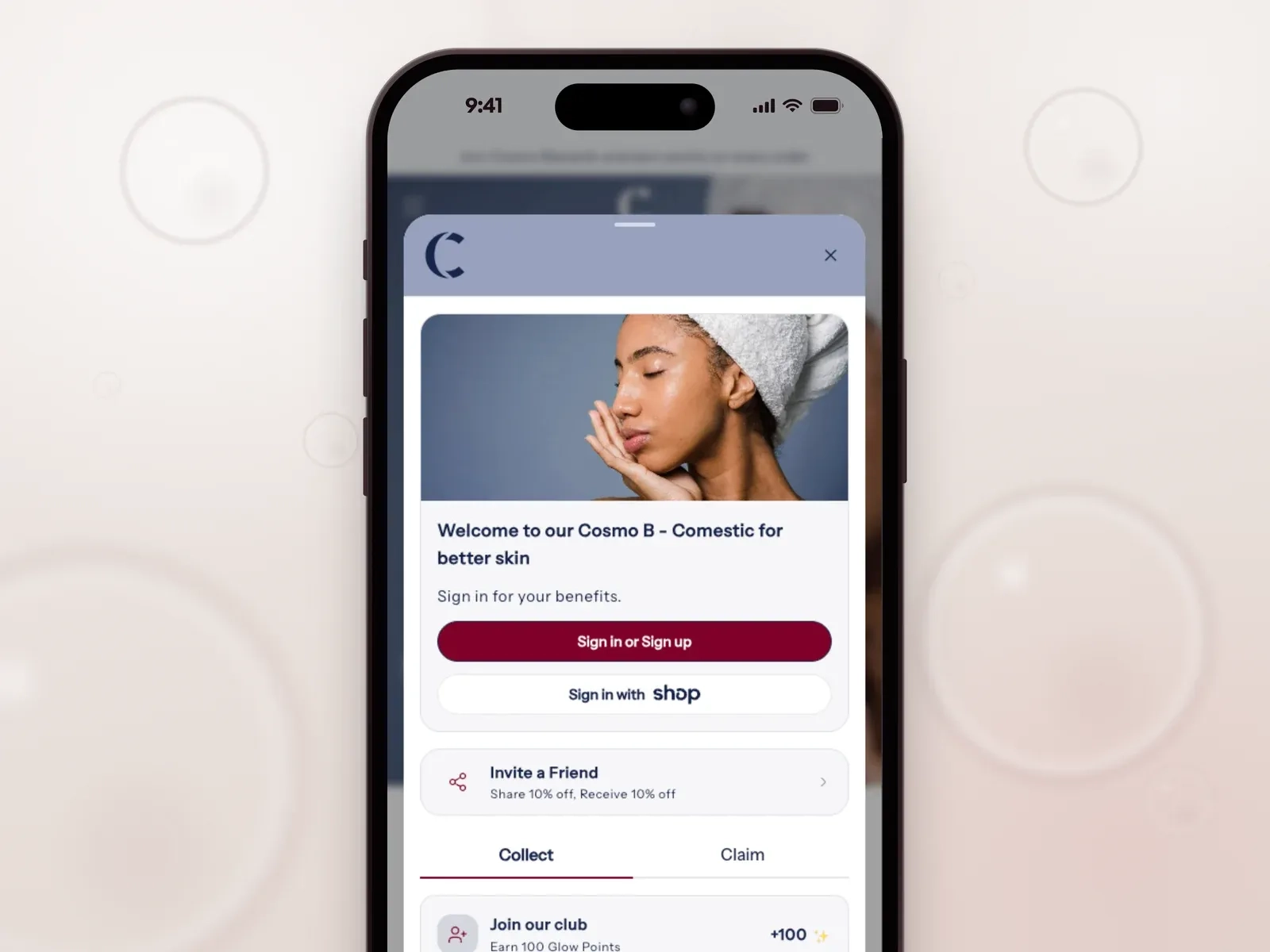
Joy offers four blocks for it, listed in its guide to the Thank you page: a sign-up block for guests and non-members, a reward celebration that shows the points the order earned, a referral block, and a tier progress block for members who are signed in. The sign-up block is available on all plans and, as Joy's sign-up block guide shows, is added in Shopify's editor as Joy: Sign up block; the reward celebration is on Essential and above and shows guests an invitation to sign up in place of a points figure, per Joy's reward celebration guide.
For a BFCM cohort the sign-up block carries the most weight, since the buyers you most want to reach are the ones who are not yet members. One block that says what the order would have earned, and what joining takes, does more on that page than four blocks competing for a screen the customer is about to close.
If you upgraded on time, close this tab
A store that ran the upgrade itself, worked through Shopify's guide and placed its app blocks lost nothing on 26 August. If that is you, and you have seen the block on a real order since, there is nothing here to act on.
And if your purchase tracking stopped on the same day, repair that first. Shopify's article on replacing additional scripts warns that after scripts are replaced with pixels a store may see "a decrease in events received by the third-party platform". A missing sign-up block costs you some members. A missing purchase event means you will not be able to read the weekend at all.
The check
- In your Shopify admin, go to Settings, then Checkout, and open the editor from the Configurations section. Switch the page selector to Thank you, then to Order status.
- On each, look for your loyalty app's blocks in the list of sections. If there are none, that is your answer.
- Add the block your app documents for that page and save.
- Place a test order as a guest, with an email address that is not already a member, and watch what the confirmation screen shows.
- Open the link in the order confirmation email and look at the Order status page as well.
It is a five-minute job and it changes nothing a shopper sees until they have paid, which makes it one of the few edits that is still safe to make inside a code freeze. The rest of the pre-weekend sequence is in our Black Friday checklist, and the shortest path to a working program is in BFCM loyalty in 15 minutes.
Buy something from yourself
The page you cannot visit is still the first thing a November customer sees after paying. Put one item in your own cart, check out as a guest under an address you have never used with the store, and read the screen that comes up under the confirmation number.
FAQs
Did every store's thank-you page change on 26 August 2026?
No. That was the deadline, and stores that had already upgraded saw no change that day. Shopify's own upgrade documentation states that stores which were not upgraded by the date were upgraded automatically.
What happened to scripts in the Additional scripts box?
Shopify's documentation on additional scripts says they are not supported on the new pages, for tracking or for page customizations, and once a store's pages are upgraded an additional script cannot be reactivated.
Do I need Shopify Plus to show a loyalty block on the thank-you page?
No. Shopify's developer documentation on checkout extensions says extensions that appear after a purchase are available to all plans except Shopify Starter. Plus is required for blocks inside the information, shipping and payment steps.
Thank you page or Order status page: which one should carry the block?
It depends on what the block needs to know. Smile's guide to showing points earned after purchase tells merchants to place the points block on the Thank you page if the store uses legacy customer accounts and on the Order status page if it uses the current ones. Check your own app's instruction and do not assume the two pages behave alike.
How do I see my own thank-you page?
Place an order. Open the checkout editor to see which blocks are placed, then complete a guest test order to see what a first-time buyer is actually shown, because the editor preview and a real signed-out session are not the same thing.
How many stores were upgraded automatically?
Shopify has not published a number, and this page does not guess at one.

Written by
Thomas Nguyen is the CEO & Co-founder of Joy, a loyalty solution for Shopify and eCommerce brands. With years of experience building high-performance Shopify apps, Thomas aims to help merchants grow through customizable and retention-focused tools.
Related reading
 How-to Guide
Shopify BFCM Guide: Black Friday 2026 Is 27 November
Black Friday 2026 is 27 November and Cyber Monday is 30 November. Shopify changed how it counts BFCM customers, so 81M is not growth.
 Thomas Nguyen
 How-to Guide
Set Up Your BFCM Loyalty in 15 Minutes
Set up BFCM loyalty in fifteen minutes, then spend a sixteenth placing one real order with both the sale discount and a reward on it.
Thomas Nguyen How-to Guide
BFCM Readiness: Shopify Tests Checkout, Nobody Tests Your Widget
Shopify scale-tests checkout at 80,000 a minute. The risk you own is the storefront, measured on the signed-in path.
Thomas Nguyen How-to Guide
Shopify Discount Combinations: Why Your Loyalty Reward Will Not Stack
Shopify does not combine discounts by default, and the setting only reaches reward codes issued after you change it.
Thomas Nguyen How-to Guide
Black Friday Checklist That Turns Traffic Into Revenue
Four settings on a Black Friday checklist take days, not minutes. A 14-day points approval period lands BFCM points on 11 December.
Thomas Nguyen-d82615.webp&w=3840&q=75) How-to Guide
How-to GuideB2B Referral Program: How to Build One That Drives Revenue
Most B2B brands already get referrals by accident. Here’s how to turn them into a system: readiness checks, a 5-step build, and why most programs stall.
Thomas Nguyen