
VIP Early Access on Shopify: Three Ways to Gate a Sale Before It Opens
Shopify can limit an automatic discount to a customer segment. Three ways to gate a VIP sale, and where each one leaks.
Summarize this post with AI
At seven on the morning your early access opens, a Gold member taps the link in your email. She is on her phone, in a browser that has never signed in to your store. The sale page loads at full price.
Nothing is broken. Every way of gating a sale on Shopify works by recognising the customer first, and she has not been recognised yet. Where that recognition happens is the whole design question in VIP early access, and Shopify changed the answer in August 2025 while most of the published advice stayed where it was.
Key Takeaways
- Since 6 August 2025, Shopify has let an automatic discount apply to selected customer segments, so a VIP price no longer needs a code or a separate discount app.
- A segment-gated discount recognises the customer at checkout, by email address or phone number. What a member sees before that point is the thing to test.
- A code linked to one customer is tighter and narrower. Smile documents that the customer must be logged in to the linked account for it to work.
- Restricting the products themselves is the only one of the three that hides the sale rather than the price, and it relies on the member being signed in.
- All three fail in the same place, on a member who is signed out, so the sign-in path deserves more of your week than the choice of gate.
Published 16 October 2026. Platform behaviour was read from Shopify's, Smile's and Joy's own documentation on 13 October 2026 and is linked. Nothing here was measured on a live store; the test near the end is how you find out what yours does.
The gate Shopify added while nobody was writing about it
For years the standard method was a code sent to a list, or a collection hidden behind a tag check in the theme. A price that applied itself to the right customers, with no code, needed a third-party discount app.
Then Shopify shipped this, on 6 August 2025: "Now you can specify whether your automatic discount applies to all customers, selected segments, or individual customers", with "targeted promotions for VIPs, loyalty-program members, and more" named as the use in its changelog entry on customer eligibility for automatic discounts.
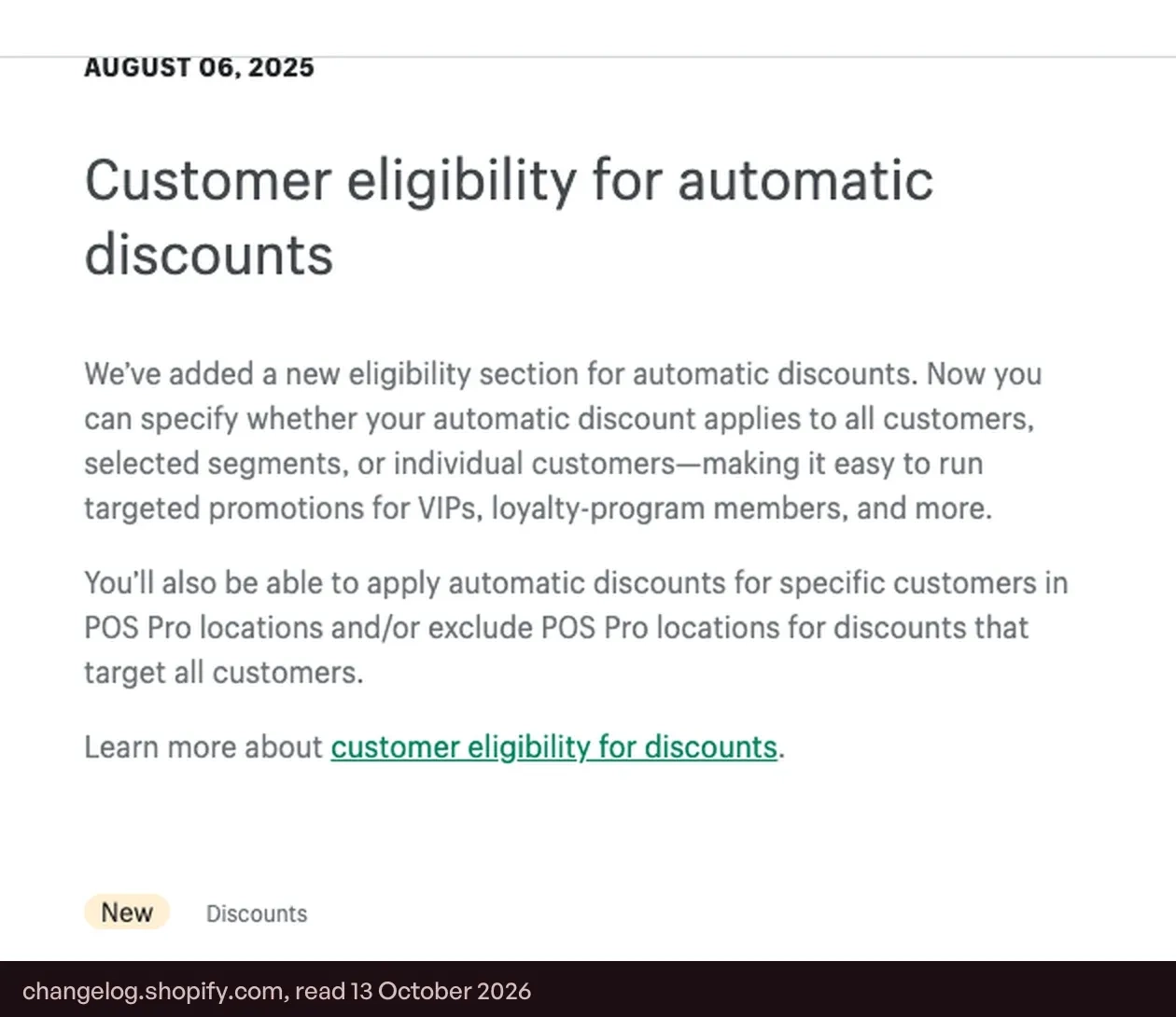
It arrived a few months before BFCM 2025, so this is the second peak season with it available. Merchants did not ask for it on that date and did not schedule it; it changed what early access costs to build, and a store that set up its VIP sale in 2024 is probably still running the old design.
Gate one: an automatic discount limited to a segment
In the discount's Eligibility section you choose all customers, markets, customer segments or specific customers. Shopify's guide to managing and editing discounts sets out the limits: one automatic discount can target up to five segments, a discount code up to 100, and a discount takes one kind of eligibility only.
The segment needs something to filter on, so the tier has to exist inside Shopify first. Shopify's own example for the tag filter, in its reference guide to customer segment filters, is customer_tags CONTAINS 'GoldStatus', and segments update themselves: Shopify's guide to customer segmentation says customers are "automatically added or removed to the segment list based on whether they meet the segment criteria".
Loyalty apps supply that data in different ways. Smile stores each customer's tier name as a metafield on its Growth, Plus and Enterprise plans, and documents the segment query against it in its guide to configuring ongoing VIP discounts. Joy pushes Point Balance and VIP Tier name into customer metafields on its Essential plan and above, and Joy's documentation on metafield settings says they update "in real time when a customer's points or tier changes". Joy also writes member and non-member customer tags on all plans, as its article on auto-tagging customers describes, and those tags are enough for the simplest gate of all: members before everyone else, with no tiers involved.
Where gate one is weak
Start with recognition. Shopify's page on managing and editing discounts says customers in a segment "can be identified when they check out using a valid email address or phone number". That sentence tells you where the customer is identified. It does not tell you what the member in the opening paragraph sees on the product page and in the cart before she gets there, and an early-access email that leads to a full-price page reads as a broken promise even when checkout later corrects it.
The data underneath the segment has two documented traps. Smile's own setup guide for ongoing VIP discounts warns that "Some third party apps allow customers to edit metafield values from the customer account", and that a tier renamed in Smile leaves the Shopify segment filter pointing at the old name until you update it by hand. A segment built in September on a tier called Gold stops matching the day marketing renames it Gold Circle.
The third is a ceiling. Shopify allows "a maximum of 25 active automatic discounts", and its page on automatic discounts adds: "This total includes app-based discounts". Ongoing tier perks draw on the same allowance: Joy's guide to tier privileges notes that each discount privilege on a tier "creates its own automatic discount in Shopify". Count what is already live before November adds a sitewide sale, a doorbuster, a free-shipping threshold and an early-access price on top.
Gate two: a code only one customer can use
The older design still has a place, in a stricter form. Smile lets a reward's code be tied to the person who redeemed it, and its article on linking discount codes to customer accounts explains: "At checkout, Shopify ensures only that customer can use the discount code. Customers must be logged in to the linked account to use the discount code".
Joy has the same control under a different name, documented in its guide to scheduling programs and controlling who can redeem. A redeeming program's Who can use setting takes Everyone, Only customer who redeemed, or Specific customer segments, and the program itself takes a start and an end date. The default matters here. Joy's own FAQ on coupons that still apply after logout explains that with the setting on Everyone a redeemed coupon "can be used by anyone, even anonymously".
A linked code cannot be passed around a deal forum, which a general early-access code can. The price you pay is that it is still a code. It occupies the code box at checkout, it is subject to your discount combination settings alongside whatever automatic sale is running, and the member has to fetch it before she can use it.
Gate three: products only a tier can buy
The first two gates change a price. The third decides who is allowed to buy. Joy's exclusive products perk restricts chosen products or whole collections to a tier, runs the rule through Shopify Functions inside checkout, and shows everyone else an unlock message in place of the buy button, as Joy's guide to exclusive products for VIPs describes. Joy's page on VIP tier privileges lists it with the other privileges on the Advanced and Ultimate plans.
This is the gate for limited stock. If the reason for early access is that the best items sell through before your regulars arrive, a lower price for them does not solve it and a reserved collection does.
Two things to plan for. The same page says exclusive access "works best when customers are encouraged to log in (so Joy can identify their tier)", which is the recognition problem again. And the page describes no end date for the restriction, so opening the collection to everyone on the Friday is a change a person makes. Check that in the app and write it into the launch plan.
If your gate is membership instead of tier, Joy's Member exclusive deal puts a members-only offer on the product page with a fixed start and end date, and shows non-members what joining would unlock, according to Joy's guide to the Member exclusive deal. It is available on Essential, Advanced and Ultimate, and a store can run up to five such deals.
Three gates, side by side
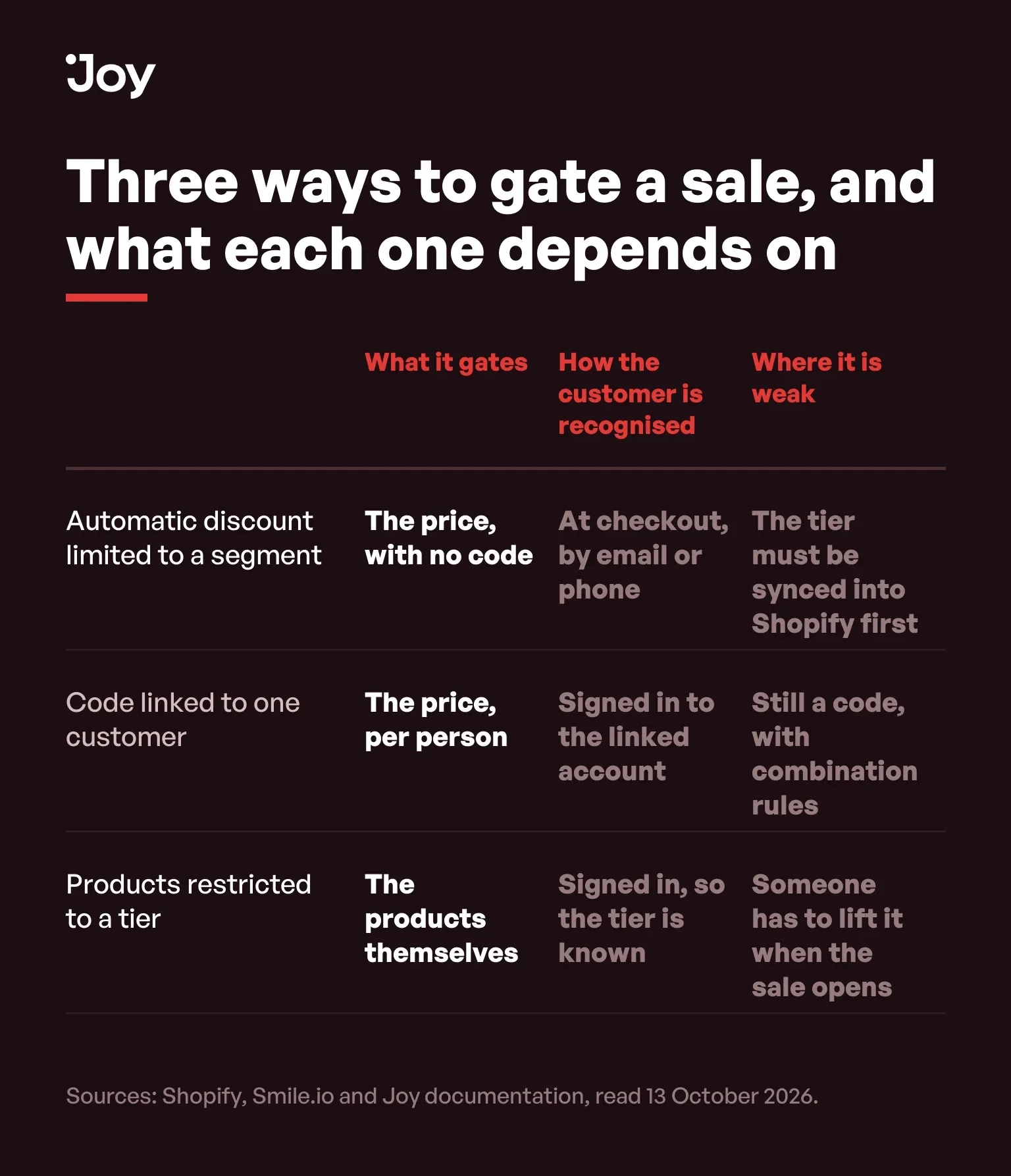
Read down the middle column. The mechanisms differ and the dependency does not: each one needs to know who the customer is before it can do anything for her.
The sign-in path is the real project
On Shopify's current customer accounts, signing in means entering an email address and receiving "a one-time 6-digit verification code", with no password, per Shopify's guide to customer accounts. That is quick for someone at a desk with their inbox open and slower for someone on a phone at seven in the morning, switching apps to find a code.
Shortening it is worth more than refining the gate. Joy's widget offers Sign in with Shop on every plan, which signs a Shop app user in without a page reload; Joy's guide to customer login in the loyalty widget adds that the widget's other methods (email code, Google, Facebook) depend on Shopify Plus with legacy customer accounts. Whatever your app offers, turn it on before the email goes out.
Then write the email around it. Say in the first line that the price appears once the member is signed in, and put the sign-in link above the link to the sale. A member who knows why she is seeing full price signs in. A member who does not knows only that the offer did not work.
When none of this is worth building
If your top tier is forty people, or you have no tiers at all, send them a code and a link to the collection. It will leak a little. It also takes ten minutes, and a segment, a metafield sync and a test plan for forty customers is a poor use of the last fortnight of October.
A test that takes ten minutes
- Put a test customer in the tier and confirm they appear in the segment in your Shopify admin.
- On a phone, in a private window, open the sale link signed out. Write down the price on the product page, in the cart, and at checkout after entering the test customer's email.
- Sign in and repeat the three readings.
- With your public BFCM discount active on a test product, check which discount the member ends up with when both apply.
- Move the test customer out of the tier and confirm the segment drops them and the price goes with it.
Five readings, and the second is the one that decides the wording of your email. The order of the wider pre-BFCM work is in our Black Friday checklist, and the other loyalty mechanics for the weekend are in our BFCM loyalty strategies guide. If you are still deciding what the top tier is for, start with the VIP loyalty program guide.
Send yourself the email first
The member at seven in the morning is going to do exactly what your email tells her to, in the order it tells her. Schedule the early-access email to your own address a week ahead and open it on your phone, in a private window, before she does.
FAQs
Can Shopify limit a discount to VIP customers without an app?
Yes. Since 6 August 2025, when Shopify announced customer eligibility for automatic discounts, an automatic discount has an eligibility section that accepts customer segments or specific customers. You still need something to put the tier into Shopify, as a customer tag or a metafield, because a segment can only filter on data Shopify holds.
Does the customer have to be logged in for a segment discount?
Shopify's manual page on managing discounts says customers in a segment can be identified when they check out using a valid email address or phone number. It does not describe what a signed-out member sees on the product page or in the cart, which is why the test at the end of this page exists.
How many segments can one automatic discount target?
Five, and a discount code can target up to 100, both limits stated in Shopify's documentation on managing discounts. A discount also takes one kind of eligibility only, so the same discount cannot be limited to a segment and to a market at once.
Is this new for BFCM 2026?
No. It shipped in August 2025, so this is its second peak season. What is still common is advice written before that date, which assumes a code.
What is the difference between gating a price and gating a product?
A gated price shows everyone the product and gives some customers a lower number. A gated product stops a non-member buying the item at all and shows an unlock message instead. The first protects margin; the second protects stock.
When should the early-access gate come off?
When the public sale opens, and somebody should own that step. A segment discount has an end date you set in Shopify. A product restriction stays until it is removed, so put the removal in the launch runbook next to the public discount going live.

Written by
Thomas Nguyen is the CEO & Co-founder of Joy, a loyalty solution for Shopify and eCommerce brands. With years of experience building high-performance Shopify apps, Thomas aims to help merchants grow through customizable and retention-focused tools.
Related reading
 How-to Guide
Shopify Discount Combinations: Why Your Loyalty Reward Will Not Stack
Shopify does not combine discounts by default, and the setting only reaches reward codes issued after you change it.
 Thomas Nguyen
 How-to Guide
Set Up Your BFCM Loyalty in 15 Minutes
Set up BFCM loyalty in fifteen minutes, then spend a sixteenth placing one real order with both the sale discount and a reward on it.
Thomas Nguyen Program design
The Points Approval Period Is a Strategy Decision, Not a Fraud Setting
A 14-day hold makes BFCM points spendable in mid-December, after most calendars send the email telling customers to spend them.
Thomas Nguyen Program design
Free Shipping Rewards: The One Loyalty Reward Every Shopify Store Can Stack
Every Shopify store can stack a free shipping reward on a sale. Three published rules decide whether yours actually will.
Thomas Nguyen How-to Guide
Shopify Scripts Deprecation: The First BFCM Without Them
Shopify Scripts stopped running on 30 June 2026. The scripts written only for last year's sale are the ones not yet missed.
Thomas Nguyen Program design
Your Thank-You Page Changed on 26 August. Check the Loyalty Sign-Up Still Shows.
Shopify replaced every remaining Thank you page on 26 August 2026. Check that your loyalty sign-up block survived it.
Thomas Nguyen