
BFCM Readiness: Shopify Tests Checkout, Nobody Tests Your Widget
Shopify scale-tests checkout at 80,000 a minute. The risk you own is the storefront, measured on the signed-in path.
Summarize this post with AI
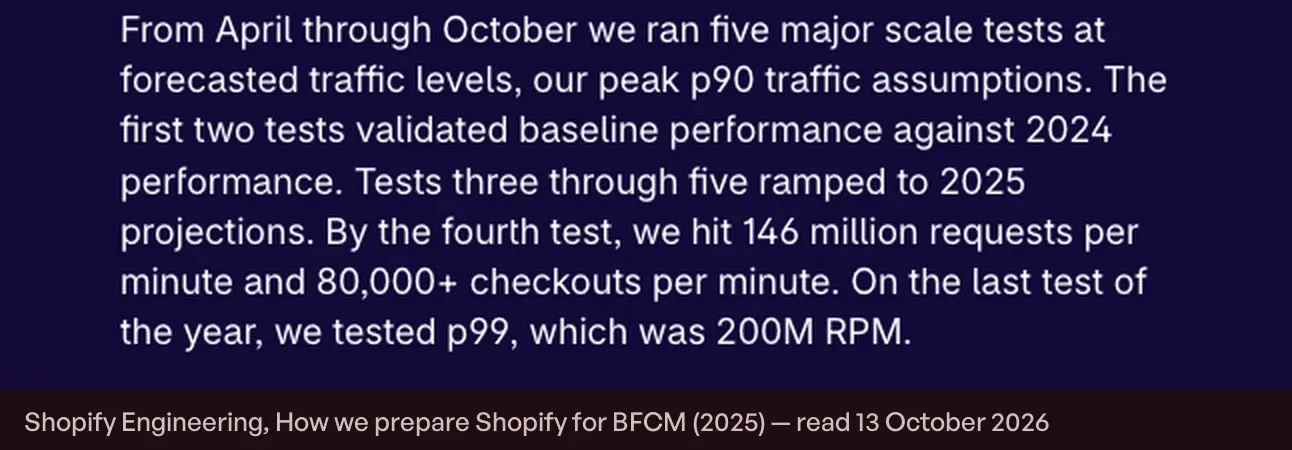
Every autumn Shopify publishes an unusually candid account of how it prepares for Black Friday. The 2025 edition on Shopify's engineering blog reports that the platform peaked at 284 million requests per minute at the edge during BFCM 2024, that engineering ran five major scale tests from April through October, and that by the fourth test they were sustaining 146 million requests per minute and 80,000+ checkouts per minute.
What the post does not contain is a single line of guidance for the merchants running on top of all that, or for the developers whose apps render on their storefronts. It is a description of Shopify's preparation, not yours. And that absence is the useful part, because it tells you where your risk is not.
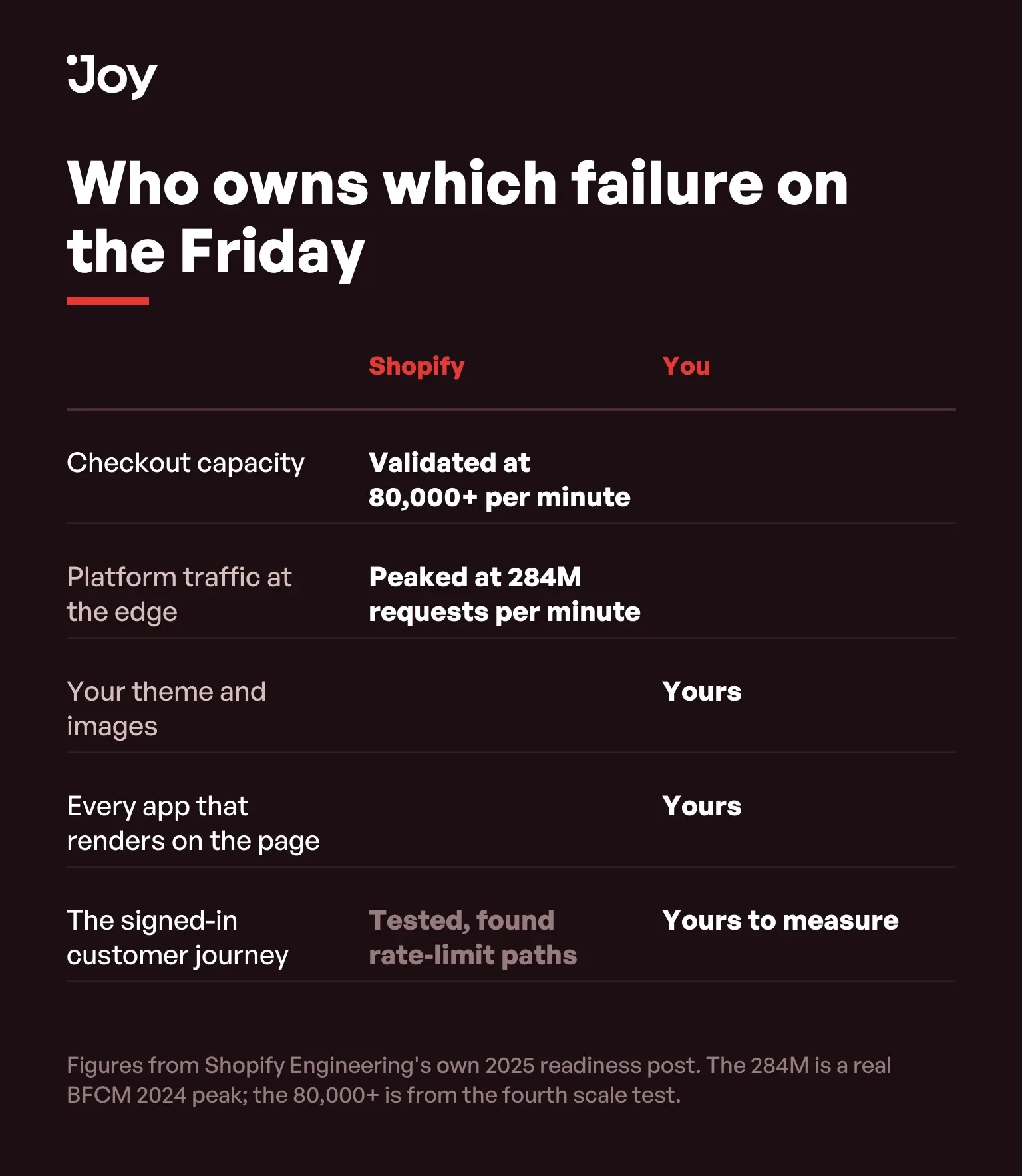
Checkout is not your problem. It is validated, every year, at a volume no single store approaches. The part of Black Friday that is yours is the storefront: your theme, your images, and every app that draws something onto the page before a customer can buy.
Key Takeaways
- Shopify ran five major scale tests from April through October and validated 80,000+ checkouts per minute. Checkout capacity is not the thing your store needs to prepare.
- The same post says modeling real signed-in buyers exposed rate-limit paths that anonymous browsing never touches. Loyalty redemption is a signed-in path.
- No loyalty vendor publishes a readiness or load page, and no primary source measures what a loyalty widget costs a storefront under peak traffic. That gap is why this page gives you a test rather than a number.
- Measure your product page and cart signed in, not only signed out. The signed-out measurement is the one every tool gives you by default and the one your best customers never see.
- Decide in advance what happens if the widget cannot load. A page that still sells without its loyalty block is a decision, not an accident.
Published 12 October 2026. The scale-test figures below are quoted from Shopify Engineering's own post and linked. Where this page reasons rather than reports, it says so.
What Shopify actually validated
| Measurement | Figure | What it is |
|---|---|---|
| Actual peak, BFCM 2024 | 284 million requests per minute at the edge, 80 million at app servers | Shopify's own traffic, not a test |
| Scale tests | Five major tests, April through October, at forecasted traffic levels | Run before the season, not during it |
| Fourth test | 146 million requests per minute and 80,000+ checkouts per minute | Checkout validated far above any single store's load |
| Final test | 200 million requests per minute | The ceiling they chose to prove |
| What changed in the method | Authenticated checkout added to the test scenarios | Modeling real buyers exposed rate-limit paths that anonymous browsing never touches |
Two of those rows are often quoted as one number, so it is worth keeping them apart. The 284 million requests per minute is a real peak from BFCM 2024. The 80,000+ checkouts per minute is from the fourth scale test, alongside 146 million requests per minute. Neither figure is a limit, and neither is a promise about your store.
The signed-in path is where loyalty lives
The most interesting line in Shopify's BFCM readiness post is a method change rather than a number. They added authenticated checkout to the test scenarios, and the result was that modeling real buyers exposed rate-limit paths that anonymous browsing never touches. Signed-in traffic behaves differently from anonymous traffic, and it behaves differently in ways that only appear under load.
That matters to a loyalty program more than to almost any other category on a storefront, because loyalty is a signed-in feature by construction. Points belong to a customer account. Shopify's guide to store credit says the credit can be applied only when the customer is signed in through customer accounts, or through Shop Pay. A reward that is not attached to an identified customer is just a discount code.
So the question "will my loyalty program survive Black Friday" is not a checkout-capacity question at all. It is a question about how your storefront behaves on the authenticated path, under the heaviest traffic of the year, for the customers who matter most.
What nobody has measured, including us
Here is the honest state of the evidence. No loyalty vendor publishes a BFCM readiness or load page. Not Smile, not LoyaltyLion, not Yotpo, not Rivo, and not Joy. The category documents features, not peak behaviour. There is no primary source on what a loyalty widget costs a storefront under load, on time-to-interactive with the widget present, or on how any app handles a webhook backlog at peak.
That is a real gap and we are not going to fill it with a marketing number. Shopify's own web performance documentation makes the general point without naming anyone: each feature that you add to your online store can impact your store's web performance. Everything in the next section is therefore a test you run on your own store, producing a number about your theme and your traffic, rather than a benchmark somebody published about theirs.
The pre-flight, in six steps
This takes an afternoon and it is the only readiness measurement that means anything, because it is made on the store that will actually take the orders.
| Step | Do this | Why it is on the list |
|---|---|---|
| 1 | List every app that renders on the storefront | Theme editor, then App embeds. Count them. Uninstalling an app you stopped using in March removes code that still runs in November. |
| 2 | Measure the product page signed out | This is the measurement every tool gives you, and the baseline everything else is compared against. |
| 3 | Measure the same page signed in | Log in as a real customer with points and a reward, then measure again. This is the path nobody tests and the one your repeat buyers take. |
| 4 | Walk the full loyalty journey as that customer | Earn, redeem, apply the reward, pay. Read what the page does while the widget is loading, not only what it does once loaded. |
| 5 | Watch the page with the loyalty app blocked | In your browser's network tools, block the app's requests and reload. The page should still render and still sell. |
| 6 | Write down the freeze date, and what gets turned off first | Decide now which storefront features you disable if the site slows on the Friday. Deciding on the day is how stores lose the weekend. |
Step three is the one that gets skipped, and it is the one worth the afternoon. Every performance tool measures a signed-out visitor by default. Your repeat customers are signed in, they see more of the page, and during BFCM they are a larger share of your traffic than at any other time of year, because that is who your marketing has been talking to since October.
Why the signed-in measurement needs a different tool
There is a practical reason step three gets skipped, and knowing it saves an hour of confusion. The tool most merchants reach for fetches a public URL from outside your store. It has no session, no account, and no way to sign in, so it can only ever measure the page an anonymous visitor sees. It is not that it reports the signed-in page badly. It cannot see the signed-in page at all.
Measuring the signed-in page means measuring from a browser that is already logged in: open your own store in a normal window, sign in as a test customer who holds points and a reward, and run the audit built into your browser's developer tools on that session. The number will usually be worse than the public one, and the difference is the part of your storefront that only exists for the customers you have spent a year earning.
Shopify's own web performance report is the useful complement. That report, as Shopify's page on online store web performance describes it, summarises loading speed, interactivity and visual stability as your visitors experience the site, which is a different question from how one page behaved on one synthetic run. Use the audit in your browser to find what is slow on a specific page, and that report to see whether it is showing up across the store.
The numbers worth measuring against
"Fast enough" needs a threshold, and there is a published one. Google's Core Web Vitals, defined in its Web Vitals article on web.dev, set three: Largest Contentful Paint within 2.5 seconds, Interaction to Next Paint of 200 milliseconds or less, and Cumulative Layout Shift of 0.1 or less.
Two details in how they are assessed matter more than the numbers. The assessment uses the 75th percentile of page loads, so a page that is fast for most people and slow for a quarter of them does not pass — and the quarter it is slow for is disproportionately the mobile traffic that carries your weekend. And mobile and desktop are measured separately, which is the measurement most merchants skip.
Layout shift deserves a particular mention for this category. A loyalty widget that injects itself after the page has rendered moves the content underneath it, and that movement is exactly what CLS measures. It is also the failure a merchant is least likely to notice on their own fast laptop and most likely to hear about from a customer who tapped the wrong button.
Step five deserves a sentence too. Blocking the app's requests and reloading tells you what your customer sees in the worst case: whether the page still renders, whether the add-to-cart button still works, and whether anything is waiting on a response that is not coming. A storefront that sells without its loyalty block is not a failure of the loyalty program. It is a store that degrades on purpose.
Points will be late before the store is slow
There is a second failure mode that no readiness checklist mentions, and it is more likely than a slow page. Loyalty apps award points from order events, which arrive after the order is placed. On an ordinary Tuesday the gap between buying and seeing the points is short enough that nobody notices. On the Friday, when order volume is several times normal and every integration in the ecosystem is draining the same kind of queue, that gap can stretch.
Nothing is broken when this happens. The order is complete, the money is taken, the points are owed and will arrive. But the customer sees a balance that has not moved, and the support queue sees a question it cannot answer quickly, on the one day it has no slack. This is reasoning about how event-driven systems behave under load rather than a measured finding about any particular app, and we would rather say so than invent a number.
The preparation is copy, not infrastructure. Decide now what the widget and the order confirmation say about timing, write it in the plainest language you have, and make sure your support team has the same sentence. A customer who was told points can take a few hours during a sale does not open a ticket. A customer who was promised instant points does.
The settings you cannot safely change on the day
Readiness is partly a performance question and partly a configuration one, and the configuration half has a deadline that is easy to miss: some settings do not reach backwards.
Discount combination settings are the clearest case. Joy, Smile and Rivo all document the same behaviour in their help centres, in almost the same words: a change to the combination setting applies only to reward codes issued after the change. A code that a customer redeemed in October and saved for your sale carries October's setting into the November cart. Fix the setting on the Friday and it will work perfectly for every code generated from that moment on, which is exactly why a merchant can test the fix, watch it succeed, and still take tickets all weekend.
The earning base behaves the same way for a different reason: changing what points are calculated on does not retroactively re-price the points already awarded, so a mid-weekend change produces two populations of customers with different arithmetic and no way to explain the difference to either. Tier thresholds are a third. None of these are emergencies on an ordinary week. All three are irreversible in practice once the weekend has started.
So the configuration freeze is not the same date as the theme freeze, and it is earlier. The theme freeze protects the storefront from a late edit. The configuration freeze has to happen before the campaigns that issue codes, which for most merchants means before the end of October.
A failure budget beats a readiness score
Most readiness advice is a list of things to turn on. The more useful document is the opposite: an ordered list of what you turn off, written while nobody is under pressure, and agreed with whoever else has admin access.
Order it by distance from the purchase. Decorative motion and pop-ups first, because they cost rendering and sell nothing. Then storefront widgets that are not on the purchase path. The loyalty widget is usually late on that list rather than early, because by Black Friday it is doing real work: it is the thing that tells a returning customer what they have earned, and it is the mechanism that turns a one-weekend buyer into a second order in January.
Support load belongs in the same budget. The weekend's hidden cost is every ticket that asks where my points went, and the programs that handle BFCM well are the ones that answered those questions on the page before the customer had to ask. The Game Collection recorded a 40% reduction in customer service tickets after putting its program on Joy, which is the kind of number that compounds on the one weekend your support queue has no slack in it.
Where this sits in the rest of the preparation
Readiness is a storefront job and it is not the whole job. Our Black Friday checklist sets the order of work for the weeks before the weekend, and our BFCM guide covers the calendar itself, including the dates that move each year. If the loyalty program is not configured yet, setting it up takes about fifteen minutes, and our BFCM app guide covers what each app in a typical stack caps on its free plan, which is its own kind of readiness failure.
Measure the store you will actually trade on
Shopify spends six months and five scale tests proving that the part it owns will hold. The part you own gets tested once, by real customers, on the day. An afternoon in October moves that test forward by six weeks, and it produces something no vendor benchmark can: a number about your store, measured on the path your best customers take.
FAQs
Will my store go down during Black Friday?
Checkout is Shopify's infrastructure and it was validated at 80,000+ checkouts per minute in scale testing, which is far above what any single store produces. The risk that belongs to you is your own storefront: the theme, the images, and every app that renders on the page.
Does a loyalty widget slow down my store?
No primary source measures this for any loyalty app, including ours, so treat any vendor number you see with suspicion. What you can do is measure your own store with and without the app's requests, which takes about ten minutes and gives you a figure that is actually about your theme and your traffic.
Why measure signed in as well as signed out?
Because the loyalty experience only exists for signed-in customers. Store credit, for example, can be applied only when the customer is signed in through customer accounts. Shopify's own engineers found that modeling signed-in buyers surfaced rate-limit paths that anonymous browsing never touched.
When should I stop making changes to my store?
Earlier than feels comfortable. A freeze is only useful if it covers the period in which you would otherwise be tempted to fix something, which is the last week of November. Set the date, write it down, and tell whoever else has admin access.
What should I turn off if the store slows down on the day?
Whatever does not sell. Decide the order in advance: non-essential animations and pop-ups first, then third-party widgets that are not part of the purchase path, and only then anything a customer is mid-journey with. The point of writing the list in October is that nobody has to make the call under pressure.

Written by
Thomas Nguyen is the CEO & Co-founder of Joy, a loyalty solution for Shopify and eCommerce brands. With years of experience building high-performance Shopify apps, Thomas aims to help merchants grow through customizable and retention-focused tools.
Related reading
 Program design
VIP Early Access on Shopify: Three Ways to Gate a Sale Before It Opens
Shopify can limit an automatic discount to a customer segment. Three ways to gate a VIP sale, and where each one leaks.
 Thomas Nguyen
 How-to Guide
Black Friday Checklist That Turns Traffic Into Revenue
Four settings on a Black Friday checklist take days, not minutes. A 14-day points approval period lands BFCM points on 11 December.
Thomas Nguyen How-to Guide
Set Up Your BFCM Loyalty in 15 Minutes
Set up BFCM loyalty in fifteen minutes, then spend a sixteenth placing one real order with both the sale discount and a reward on it.
Thomas Nguyen How-to Guide
Shopify Discount Combinations: Why Your Loyalty Reward Will Not Stack
Shopify does not combine discounts by default, and the setting only reaches reward codes issued after you change it.
Thomas Nguyen How-to Guide
Shopify BFCM Guide: Black Friday 2026 Is 27 November
Black Friday 2026 is 27 November and Cyber Monday is 30 November. Shopify changed how it counts BFCM customers, so 81M is not growth.
Thomas Nguyen How-to Guide
How to Enhance Customer Loyalty: A 7-Step System That Works
A 5% lift in retention can drive 25–95% more profit — but most brands never close the gap between knowing loyalty matters and building a system that moves the numbers. Here is a 7-step system to enhance customer loyalty, from baseline audit to ROI measurement, with real brand examples.
Thomas Nguyen