

An Expert Guide to Shopify POS Loyalty Programs
Shopify POS has no built-in loyalty. Smile and Gameball run on POS free; Joy adds POS, Wallet passes and VIP tiers at $129. 12 apps compared.

Summarize this post with AI
Shopify POS runs no points program of its own, so in-store loyalty comes from an app with a POS extension. As of 11 November 2026, Smile and Gameball include Shopify POS on their free plans, Appstle starts it at $10 a month and BON at $29, and Joy puts its POS extension on the Advanced plan at $129 a month.
The entry price is the wrong number to compare. Once the counter needs VIP tiers as well, the apps' own listings and pricing pages on 11 November 2026 put a store doing 2,000 orders a month at $30 on Appstle, $129 on Joy or BON, $199 on Smile and $369 on Rivo. Joy's $129 plan carries the extension for Shopify POS and POS Pro, Apple and Google Wallet passes, and VIP and B2B tiers.
The part a customer notices is smaller than any plan sheet: one sentence at the counter, telling them what this order just earned.
Key Takeaways
- Shopify POS stores customer profiles but runs no points program, so earning and redeeming at the counter needs a loyalty app with a POS extension.
- Each app's listing on 11 November 2026 shows Shopify POS on the free plan at Smile and Gameball, at $10 on Appstle, $12 on Love Loyalty and $29 on BON, and from Advanced at $129 on Joy.
- With VIP tiers and POS together at 2,000 orders a month, the vendors' published prices on 11 November 2026 run from $30 on Appstle to $699 on Okendo, and Joy and BON both cost $129.
- Joy's Advanced plan adds Apple and Google Wallet passes, a points block on the POS post-purchase and order details screens, and enrollment at the counter by QR code.
- Glamour Us enrolled 60% of members within 30 days and reached a 55% reward redemption rate after joining its in-store and online program on Joy.
What Is A POS Loyalty Program?

A POS loyalty program is a system that rewards your customers for shopping within your physical store. The same program you run on your Shopify store carries into your in-store checkout, so a customer earns on a counter sale and spends the balance online, or the other way round.
Shopify's POS customer-management guide covers customer profiles, purchase history and custom metafields for details such as "loyalty program status". The points, tiers and redemption come from a loyalty app with a POS extension, and the comparison table below shows which apps have one and on which plan.
Key Features of A Shopify POS Loyalty Program
A Shopify POS loyalty program works when staff can run it without a manual and the reports tell you what the program earned.
Here’s what a Shopify POS loyalty program should have:
- Ease of Use: The program should be simple to understand and use, for both your customers and your staff.
- Integrated In-Store and Online Rewards: Customers should be able to earn and redeem points whether they shop in-store or online.
- Real-Time Tracking: The program instantly tracks customer purchases, points earned, and rewards redeemed.
- Flexible Redemption Options: Offer multiple reward types, such as discounts, free products, or merchandise, to suit your audience’s preferences.
- Automated Notifications: Send automated email or SMS notifications to remind customers about their points balance, reward milestones, expiring points, or special offers.
- Analytics and Reporting: Track key metrics, such as customer engagement, redemption rates, and program ROI, to measure the effectiveness of your loyalty program and make data-driven adjustments.
6 Typical Types of Shopify POS Loyalty Programs You Can Consider
Besides choosing the right app for your loyalty program, you should also think about how you want the program to work. And if you run your business both online and in person, the loyalty program should be integrated to create an omnichannel experience for your customers.
Here are some common types of loyalty programs that work well on your Shopify online store and POS system:
- Points-Based: Customers earn points for purchases or actions, redeemable for discounts or free products.
=> Example: A coffee shop gives 1 point per $1 spent, and 100 points can be redeemed for a free drink.
- Tiered-Based: Customers progress through different tiers (e.g., Bronze, Silver, Gold) based on their spending or engagement, unlocking increasingly valuable rewards at each level.
=> Example: Bronze members get a 5% discount, Silver members get 10% off, and free shipping, and Gold members get 15% off, free shipping, and a birthday gift.
- Cash-Back: Customers earn a percentage of their purchase value as store credit for future use.
=> Example: Customers earn 5% cash back on all purchases, which they can use for future orders.
- Subscription-Based: Customers pay a recurring fee to join a VIP program with exclusive benefits, such as free shipping, early access to sales, or personalized discounts.
=> Example: A bookstore charges $10/month to members for 20% off purchases and free shipping.
- Perks Programs (Early Access, Exclusive Discounts): Customers gain access to non-monetary benefits, such as early product releases and special discounts.
=> Example: A cosmetics store offers members early access to collections and 10% off limited editions.
- Value-Based: Align your loyalty program with your brand values, such as sustainability or community involvement. Customers earn rewards for actions that support those values.
=> Example: A sustainable fashion store plants a tree for every $50 spent by loyalty program members.
Shopify POS Loyalty Apps Compared: POS Plan, VIP Plan and Cost at 2,000 Orders
Every competitor price below was read from the app's Shopify App Store listing and its pricing page on 11 November 2026, and each app name links to its listing. Joy's figures come from joy.so/pricing.
| App | Shopify POS from | VIP tiers from | Apple/Google Wallet pass | Cost at 2,000 orders/mo with VIP + POS |
|---|---|---|---|---|
| Joy | Advanced, $129 (Shopify POS and POS Pro) | Advanced, $129 | Advanced, $129 | $129 |
| Smile | Free | Growth, $199 | Not stated | $199 |
| Rivo | Listing: Essential, $15. Pricing page: Scale (3 locations), Plus at $499 (unlimited) | Scale, $49 | Separate Rivo Accounts product, $499 | $369 |
| BON | Basic, $29 | Growth, $129 | Not stated | $129 |
| Yotpo | Pricing page contradicts itself: Free in the feature table, Premium on the plan card | Premium, custom quote | Not stated | Custom quote |
| Appstle | Starter, $10 | Business, $30 | Not stated | $30 |
| Love Loyalty | Professional, $12 | Growth, $79 | Growth, $79 | $79 |
| Growave | Entry, $15 (POS Loyalty QR on Growth, $199) | Growth, $199 | Growth, $199 | $274 |
| CWILL | Essential, $19 | Pro, $69 | Not stated | $294 |
| LoyaltyLion | Classic, $199 (one location; several from Advanced, custom) | Add-on on Classic, price not stated; included on Advanced, custom | Loyalty Pass add-on on every plan, price not stated | Custom quote |
| Okendo | Every Loyalty plan, from $99 | Every Loyalty plan, from $99 | Not stated | $699 |
| Gameball | Free | Starter, $34 (5 tiers) | Not stated | $159 |
"Not stated" means neither the listing nor the pricing page says.
How the last column is built. It is the lowest published plan that includes both VIP tiers and Shopify POS, plus that plan's published overage at 2,000 orders a month, billed monthly:
- Joy: Advanced includes 2,000 orders (joy.so/pricing).
- Appstle: Appstle's listing covers up to 2,000 orders on Business.
- Love Loyalty: Love Loyalty's listing includes 2,000 orders on Growth.
- BON: BON's listing puts no order cap on Growth.
- Smile: Smile's pricing page includes 2,500 orders on Growth.
- Gameball: Gameball's listing stops Starter at 1,000 orders, so Pro at $159 applies. Gameball's pricing page counts rewarded customers rather than orders, 1,000 of them on Pro.
- Growave: Growave's pricing page includes 1,500 orders on Growth, then $15 per 100, so $199 + $75.
- CWILL: CWILL's pricing page includes 500 orders on Pro, then $15 per 100, so $69 + $225.
- Rivo: Rivo's listing includes 400 orders on Scale, then $20 per 100 up to a $499 cap, so $49 + $320. Rivo's pricing page shows a $49–$499 range for 200–2,500 orders without the step.
- Okendo: the 1,501–3,500 order band on Okendo's loyalty pricing.
- LoyaltyLion: LoyaltyLion's pricing page covers 500 orders on Classic and quotes Advanced above that.
- Yotpo: Yotpo's loyalty pricing page puts VIP tiers on Premium, which is quote-only.
Joy lands in the middle. Appstle and Love Loyalty cost less for the same pair of features, while Gameball, Smile, Growave, CWILL, Rivo and Okendo cost more. Two apps publish a POS location limit: Rivo caps Scale at 3 locations and LoyaltyLion keeps Classic to one. The other ten, Joy included, state none. For VIP pricing at other order volumes, see what Shopify loyalty apps cost at 500, 2,000 and 10,000 orders.
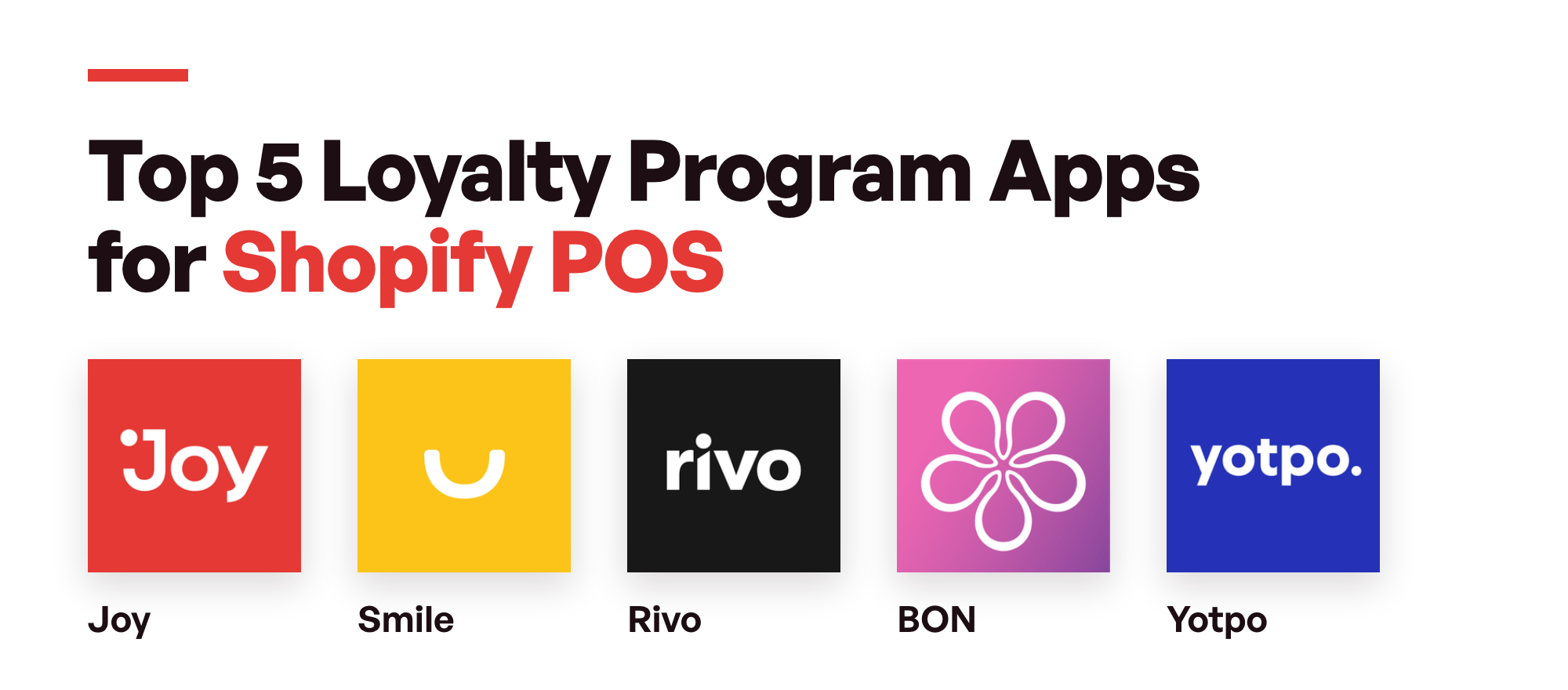
1. Joy Loyalty Program Rewards — POS, Wallet passes and VIP tiers on one plan
Joy Loyalty Program Rewards is a loyalty and referral platform. It sends loyalty emails itself: reward notifications on every plan, under your own sender from Essential. For the rest of your email program, Klaviyo connects on every plan, Starter included, like most of Joy's 30+ integrations.
Best for: Retailers who want the counter to run the same program as the website, VIP and B2B tiers included. Joy's Advanced plan at $129 a month puts the POS extension, Apple and Google Wallet passes, and VIP tiers by points, spend or order count, all on one published price. A brand adding in-store tiers next year does not have to change plans or buy add-ons to do it.
Not ideal for: A single-location store that only needs customers to earn and redeem at the till. Joy has no POS on Starter or Essential, and as of 11 November 2026 Smile's free plan or Appstle's $10 Starter covers that job. Paying $129 for a points balance at one counter buys features that store will leave unused.
4.9★ from 1,700+ reviews on the Shopify App Store; 10,000+ Shopify stores use Joy.
What it actually does
- POS extension for Shopify POS and POS Pro. Staff redeem a customer's points as a discount at checkout.
- A live tile on the POS Smart Grid. With the customer and products in the cart, the Joy tile shows the balance and an estimate of the points the order will earn (Joy's POS workflow guide).
- A points block after payment. On the post-purchase screen, the Joy Loyalty block shows points earned, redeemed and pending, and the new balance. On the order details screen it shows what any past order earned and redeemed. The block is on the Advanced and Ultimate plans (the POS points block update).
- Enrollment by Wallet pass. Staff generate a QR code in the Joy app, and the customer scans it and taps Add. New customers are enrolled automatically, existing members are linked to their account, and the pass updates points after every transaction (the Wallet pass at POS update).
Joy measures results in Assisted Orders: orders placed through a referral link or with a loyalty-generated discount code. A reward redeemed at the counter is that kind of discount, so in-store redemptions sit in the same measure as online ones.
What to check before you commit
POS, Wallet passes and VIP tiers all start on Advanced: $129 a month with 2,000 orders included, then $10 per 100 orders. Joy counts every order created in Shopify toward that allowance, whatever its source, so counter sales draw on the same allowance as the website. Advanced carries a 14-day free trial, and every paid plan has a full refund within the first 30 days. Running separate Shopify stores, one per region for example, needs Ultimate at $499, where multi-store support sits.
2. Smile: Loyalty Program Rewards — Shopify POS on the free plan
Best for: A store that wants customers earning and redeeming in person before it pays anything. Smile's pricing page lists native Shopify POS support on every plan, and its FAQ confirms in-store earning and redemption on any plan. The free plan covers 200 orders a month.
Not ideal for: Brands that want tiers at the counter on a mid-sized budget. VIP tiers start on Growth at $199 a month, with 2,500 orders included and then $20 per 100. Smile states nothing about Wallet passes or POS Pro on its listing or pricing page.
4.9★ from 4,672 reviews on Smile's listing.
What to check before you commit
API and JS SDK access sit on Smile Plus at $999 a month, billed annually, and that plan is listed on Smile's pricing page alone.
3. Rivo: Loyalty Program, Rewards — VIP tiers from $49, three POS locations on Scale
Best for: Retailers with up to three shops that want VIP tiers built on amount spent, orders placed or points earned. Rivo's pricing page puts VIP tiers and POS for 3 locations on Scale from $49, and unlimited locations on Plus at $499.
Not ideal for: Stores that keep growing on Scale. Rivo's listing includes 400 orders at $49, then $20 per 100 up to a $499 cap, which reaches $369 at 2,000 orders. Apple and Google Wallet passes sit in Rivo's separate Accounts product at $499, outside its loyalty plans.
4.7★ from 1,441 reviews on Rivo's listing.
What to check before you commit
Rivo's two pages disagree on where POS starts: Essential at $15 on the listing, Scale on the pricing page. Ask which plan your number of locations needs before you install.
4. BON Loyalty Program & Rewards — POS and customer QR from $29
Best for: Stores that want POS earning and redemption plus a customer QR code at a low monthly fee, then VIP tiers without an order cap. BON's listing puts "Shopify POS (earn/redeem) & Customer QR" on Basic at $29 with 500 orders, and VIP and B2B tiers on Growth at $129 with unlimited monthly orders, or $1,236 a year billed annually.
Not ideal for: Brands that need Wallet passes at the counter or a published location policy. Neither appears on BON's listing or pricing page, and BON does not state what its VIP tiers are measured on.
5.0★ from 1,987 reviews on BON's listing.
5. Yotpo: Loyalty Rewards Program — confirm the POS plan in writing
Best for: Brands buying loyalty on an enterprise contract, with VIP tiers and cross-brand programs negotiated in one quote. Yotpo's loyalty pricing page puts VIP tiers on Premium, a custom quote, and cross-brand programs on Enterprise.
Not ideal for: Anyone who wants the POS price before a sales call. The same pricing page lists "POS support" on the Premium card while its feature table marks Shopify POS as included on Free, Pro and Premium. Pro starts at $199 with 500 orders, then charges $0.20 per order up to 1,000, $0.10 up to 3,000 and $0.05 up to 10,000.
4.7★ from 966 reviews on Yotpo's listing.
Setting Up Your Shopify POS Loyalty Program Using Joy Loyalty
Joy Loyalty Program Rewards runs on Shopify POS and POS Pro through its POS extension. The steps below configure a Shopify POS loyalty program with it.
Add Joy Loyalty To Your Shopify Store
- Install the Joy Loyalty Program app from the Shopify App Store. Ensure you’ve subscribed to a plan that includes the POS option (Advanced or Ultimate plans).
Once installed, go to your Shopify POS app and follow these steps to integrate Joy:
- Navigate to POS > Add Tile > Select App > Joy.
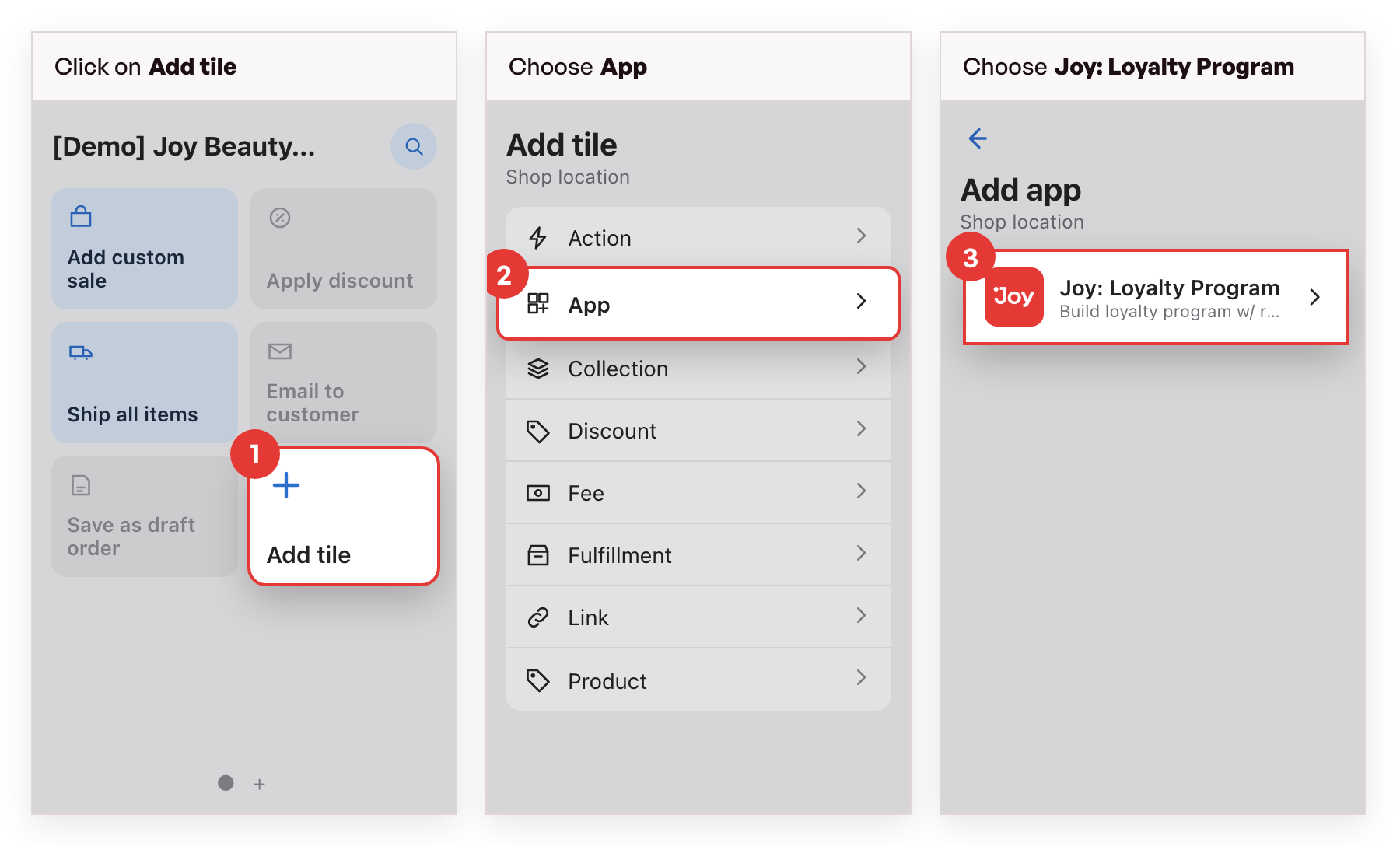
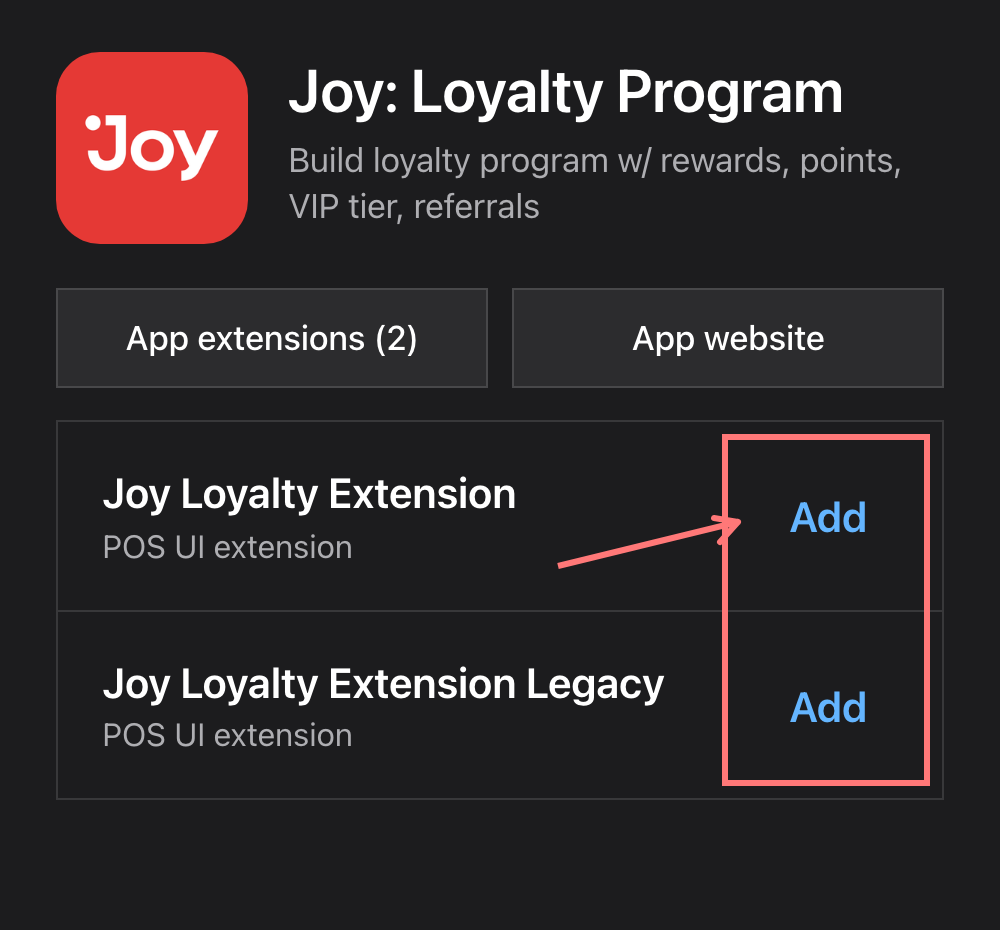
- Choose the version that suits your needs and click Add:
- New Version (Joy Loyalty Extension): Offers advanced features like customer redemptions, loyalty details, and coupon management.
- Legacy Version (Joy Loyalty Extension Legacy): This version displays basic member information and allows for fixed presets, but it lacks newer features. (Switching to the latest version is recommended.)
Enable Loyalty Program For POS
To run your Shopify POS loyalty program using Joy, you need to subscribe to the Advanced Plan or above to unlock POS loyalty features.
If you’re currently on the Advanced or Ultimate plan, follow these steps to activate Shopify POS loyalty:
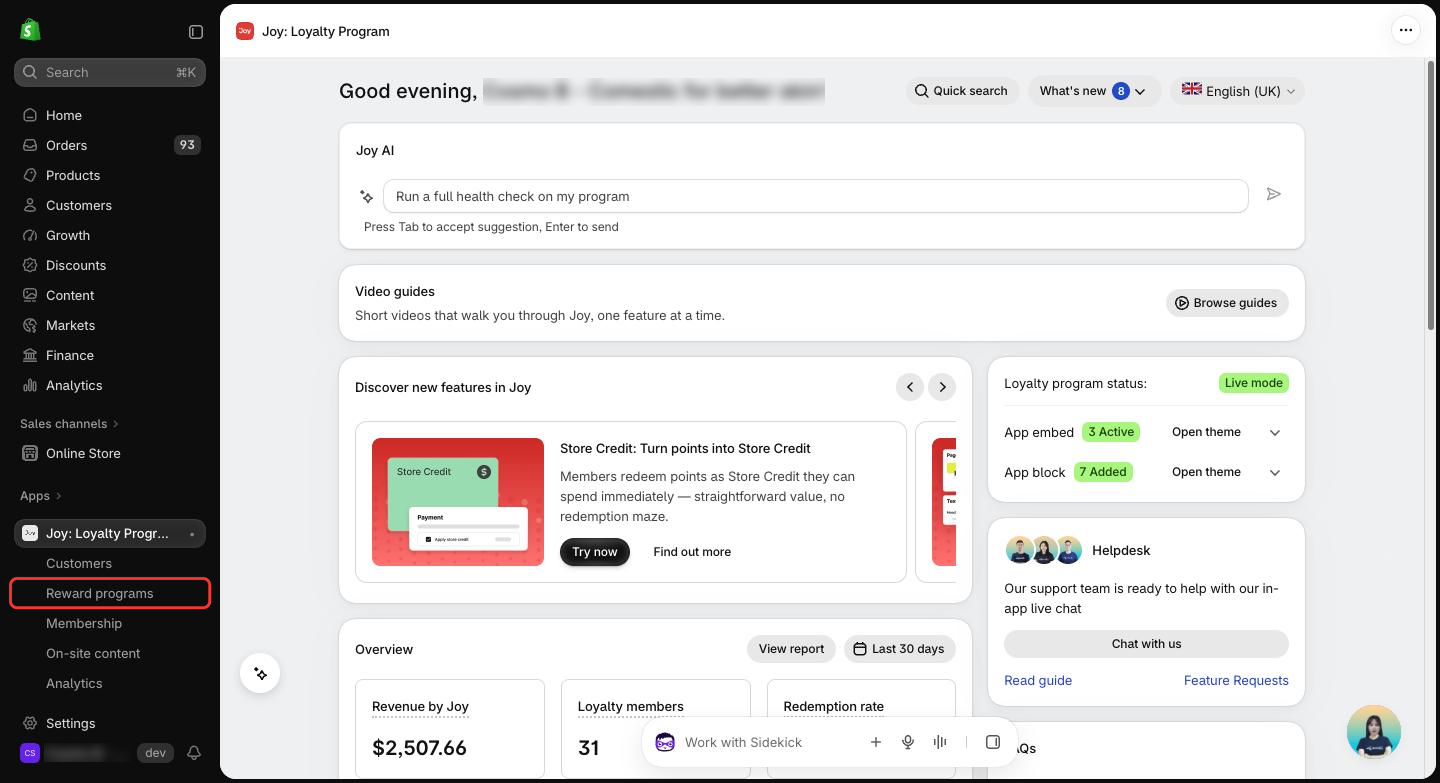
- Step 1: From your Shopify admin dashboard, navigate to the Apps section and open the Joy Loyalty Program.
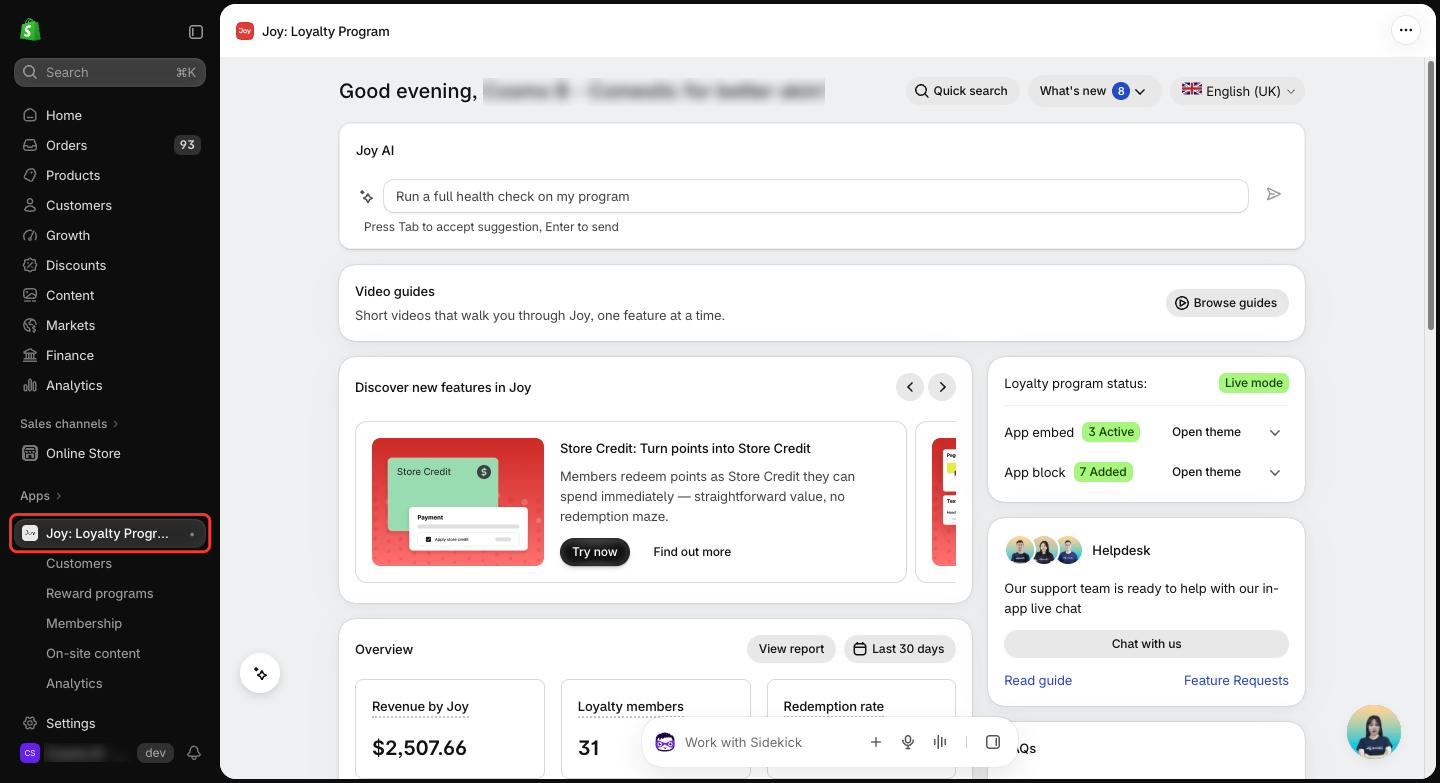
- Step 2: Click Reward programs in the Joy menu.
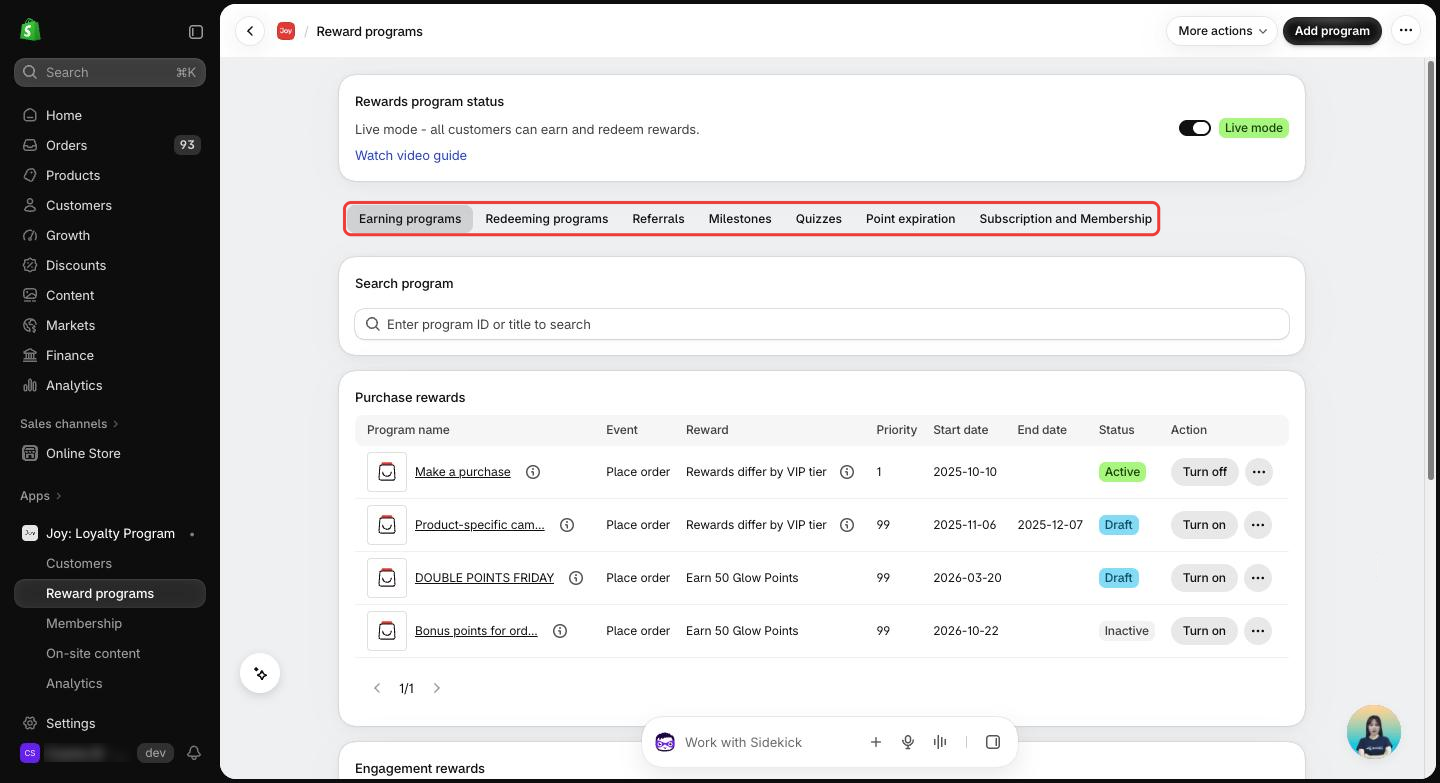
- Step 3: Select the Earning programs or Redeeming programs tab based on the feature you want to configure.
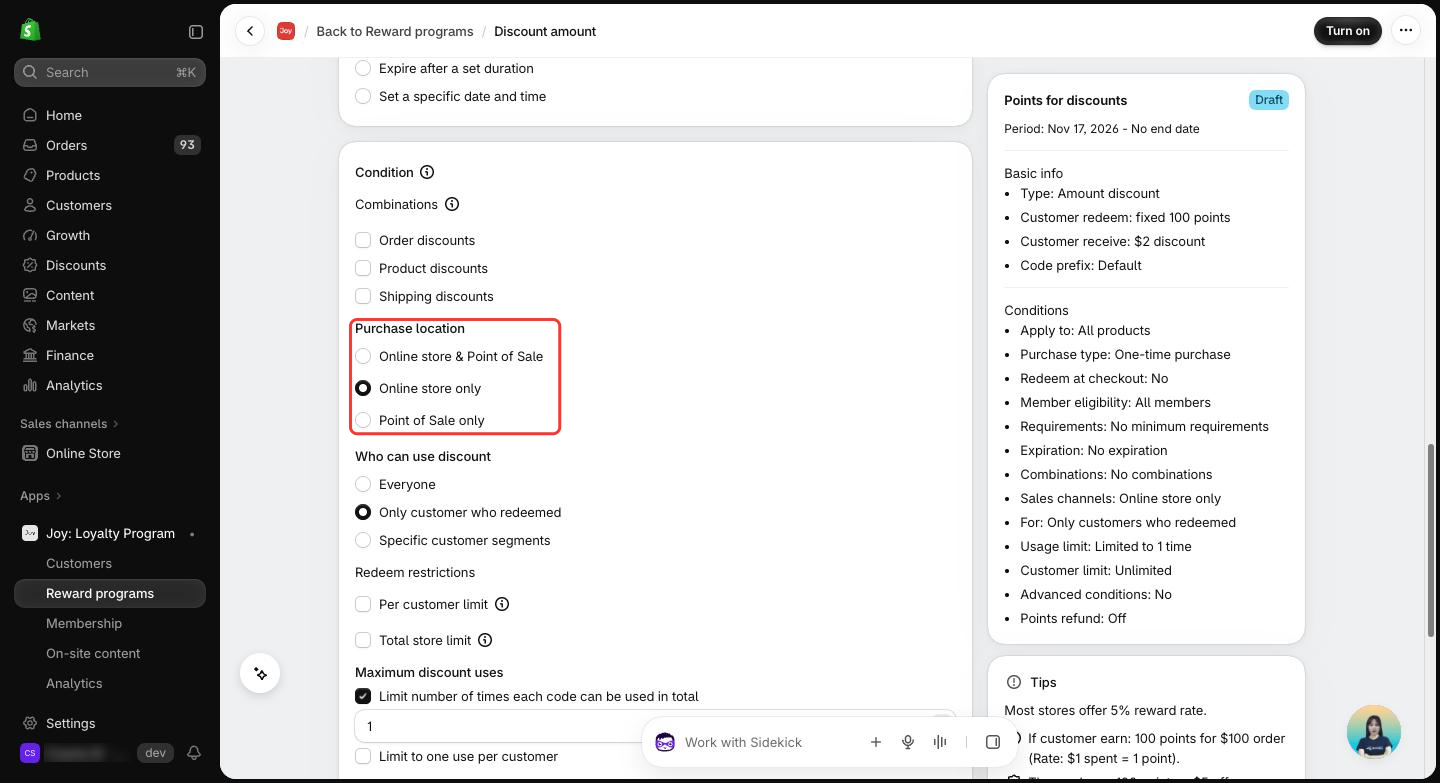
- Step 4: For a redeeming program, set Purchase location to Online store & Point of Sale. For an earning program, use Exclusions under Rewarding conditions to leave out specific POS locations or custom products.
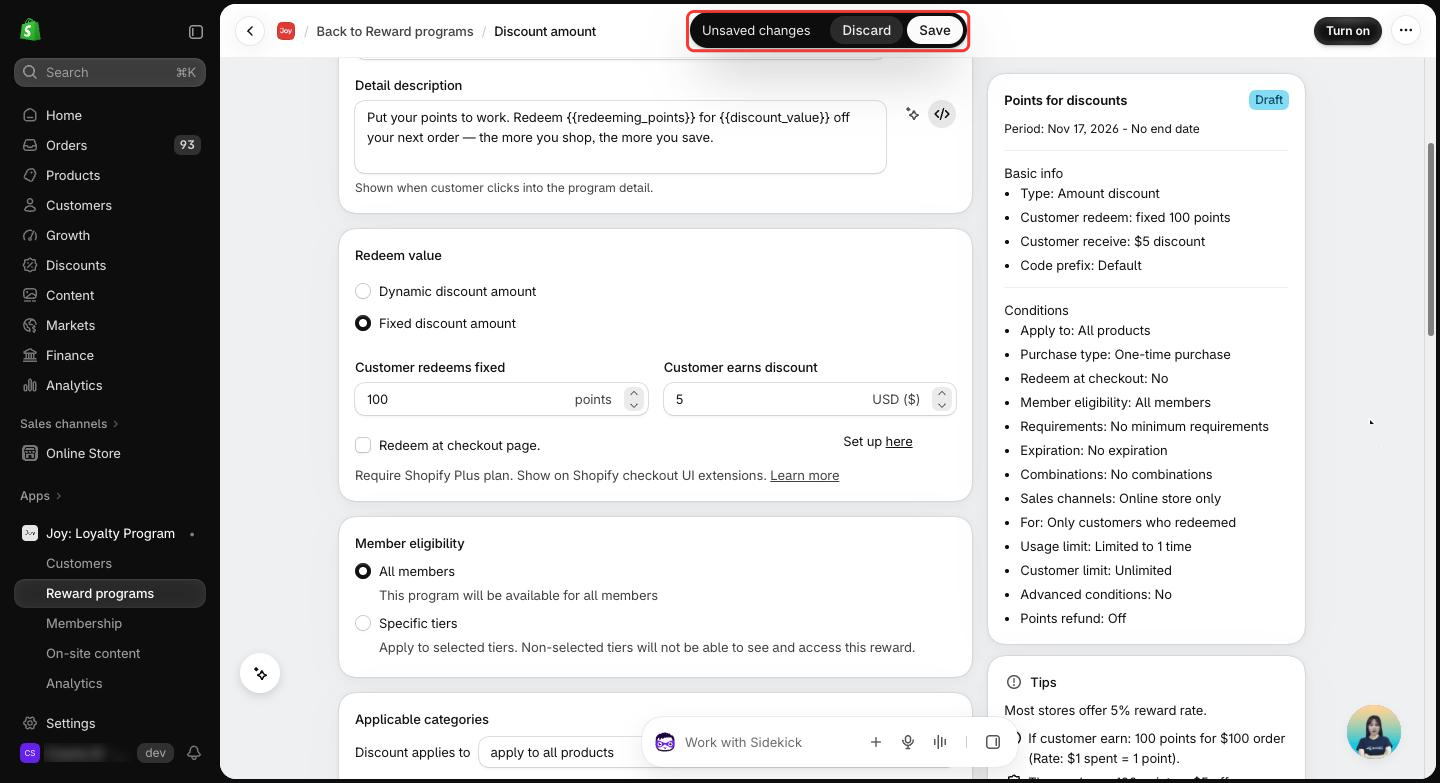
- Step 5. Click Save, then Turn on to enable the loyalty program for POS.
Set Up Your Incentives For Shopify POS
Select a loyalty program type to match your business goals. For example, a Points-Based Program:
- Step 1: Access Reward programs > Earning programs > Select an existing Place order program, or click Add program to create one.
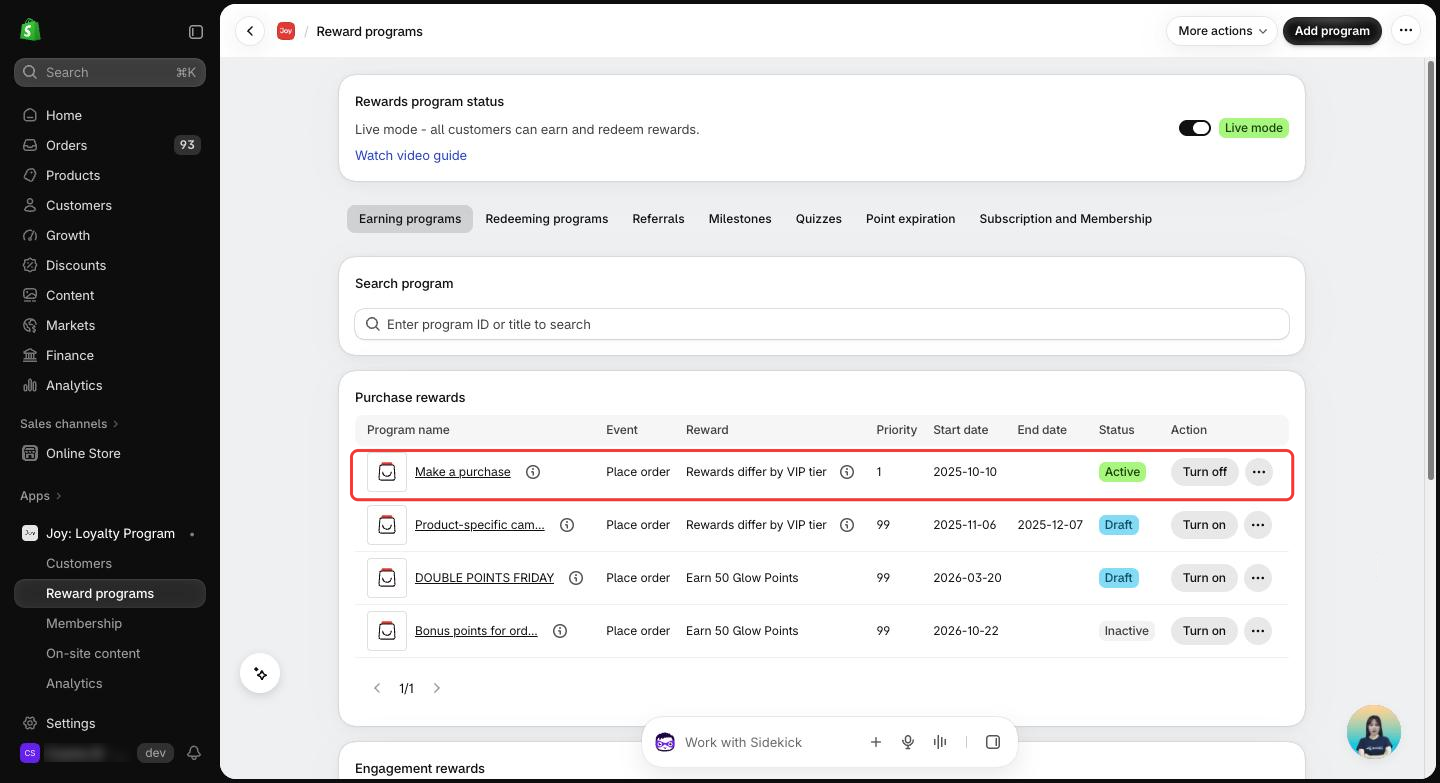
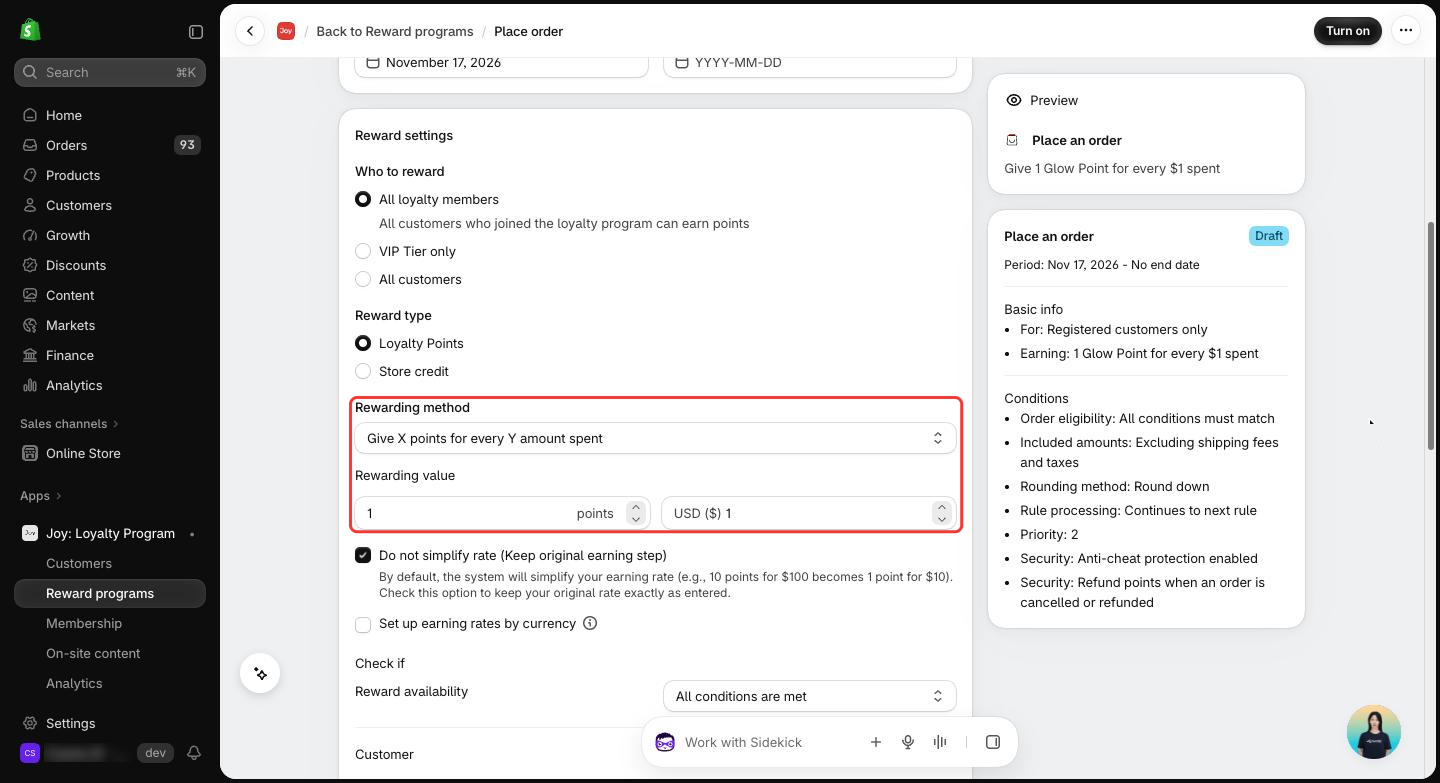
- Step 2. Assign points for each dollar spent (e.g., 1 point for every $1) to reward your customers for their purchases.
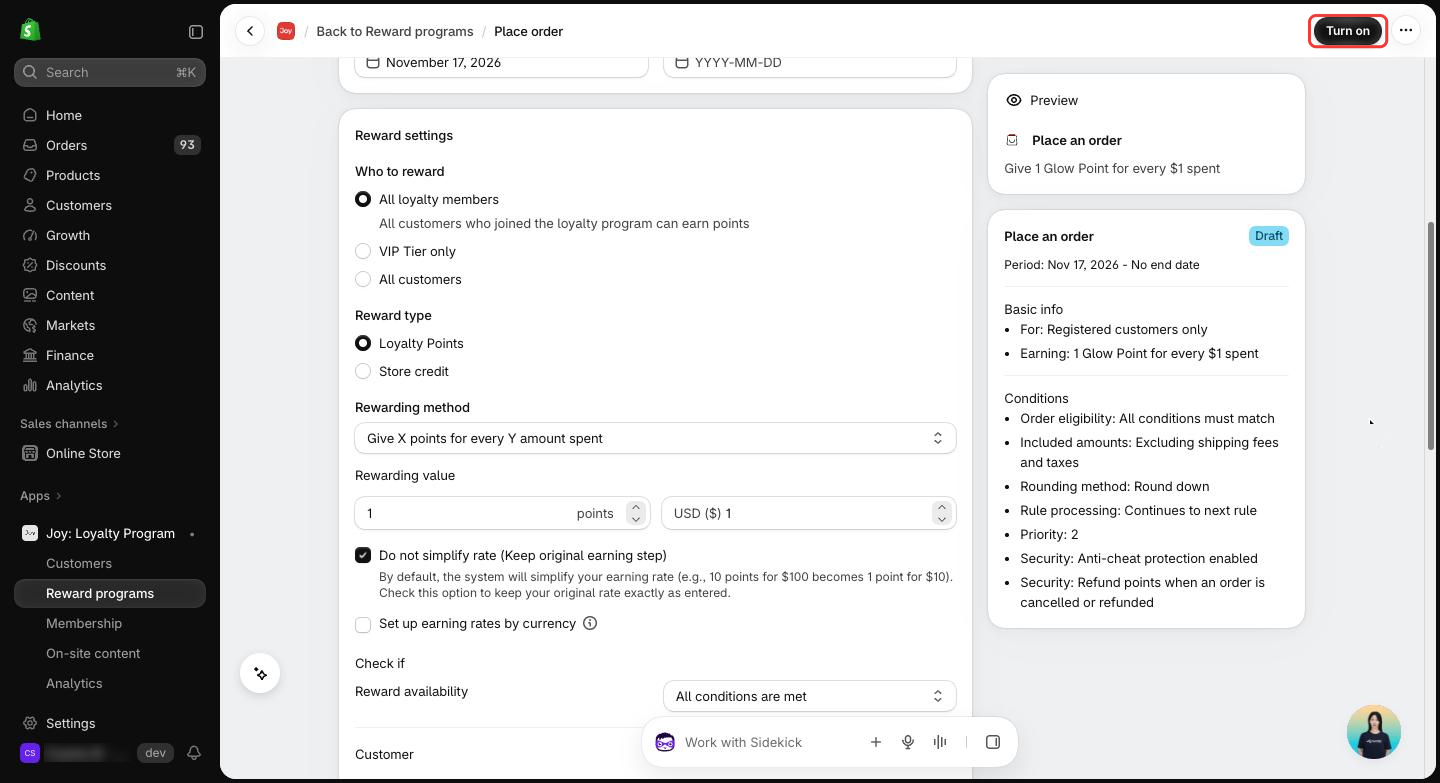
- Step 3. Click Save and Turn On.
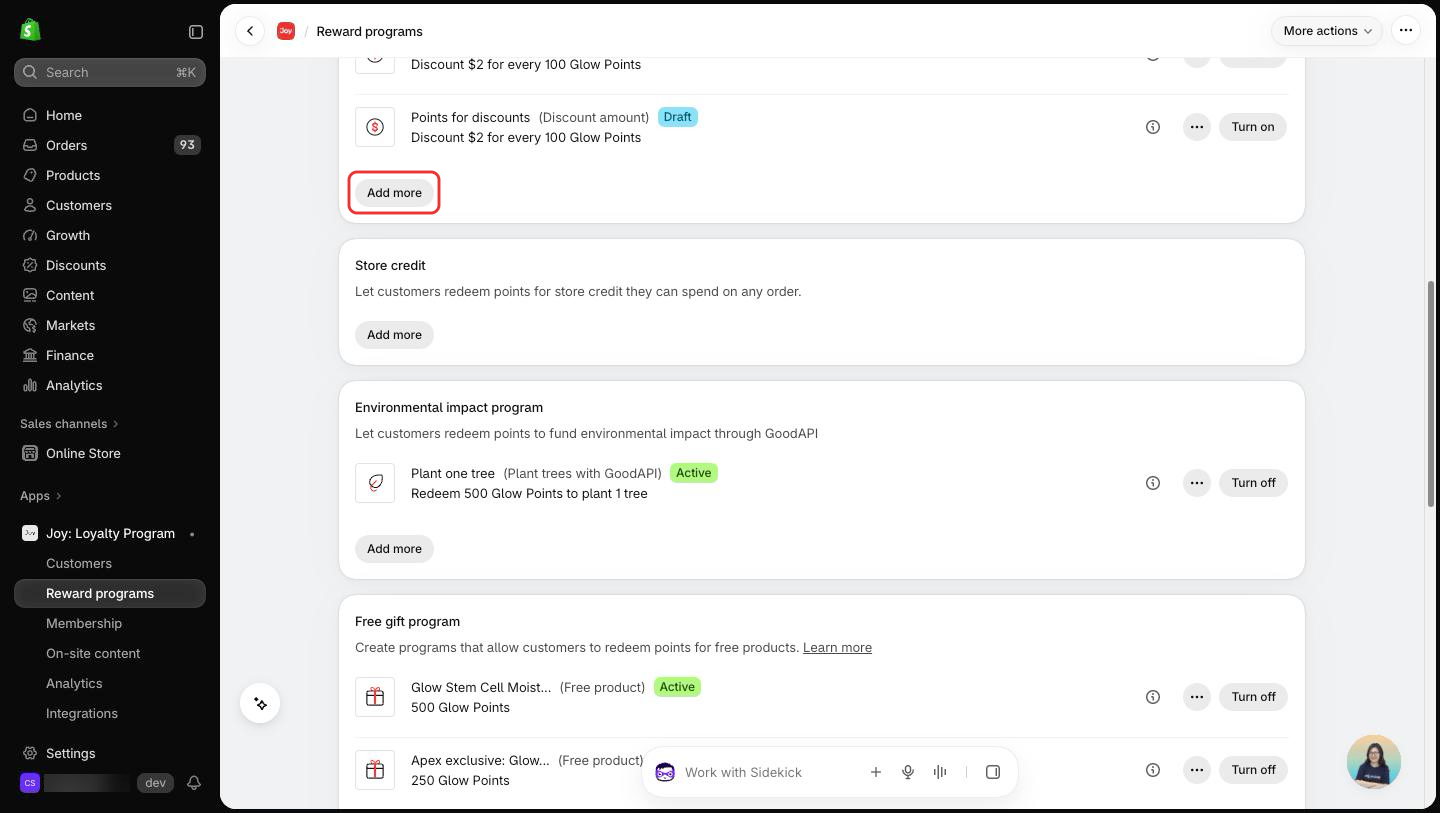
- Step 4. Open the Redeeming programs tab and click Add more in the Discount program section.
- Step 5. Set redemption rules, such as 100 points = $5 discount
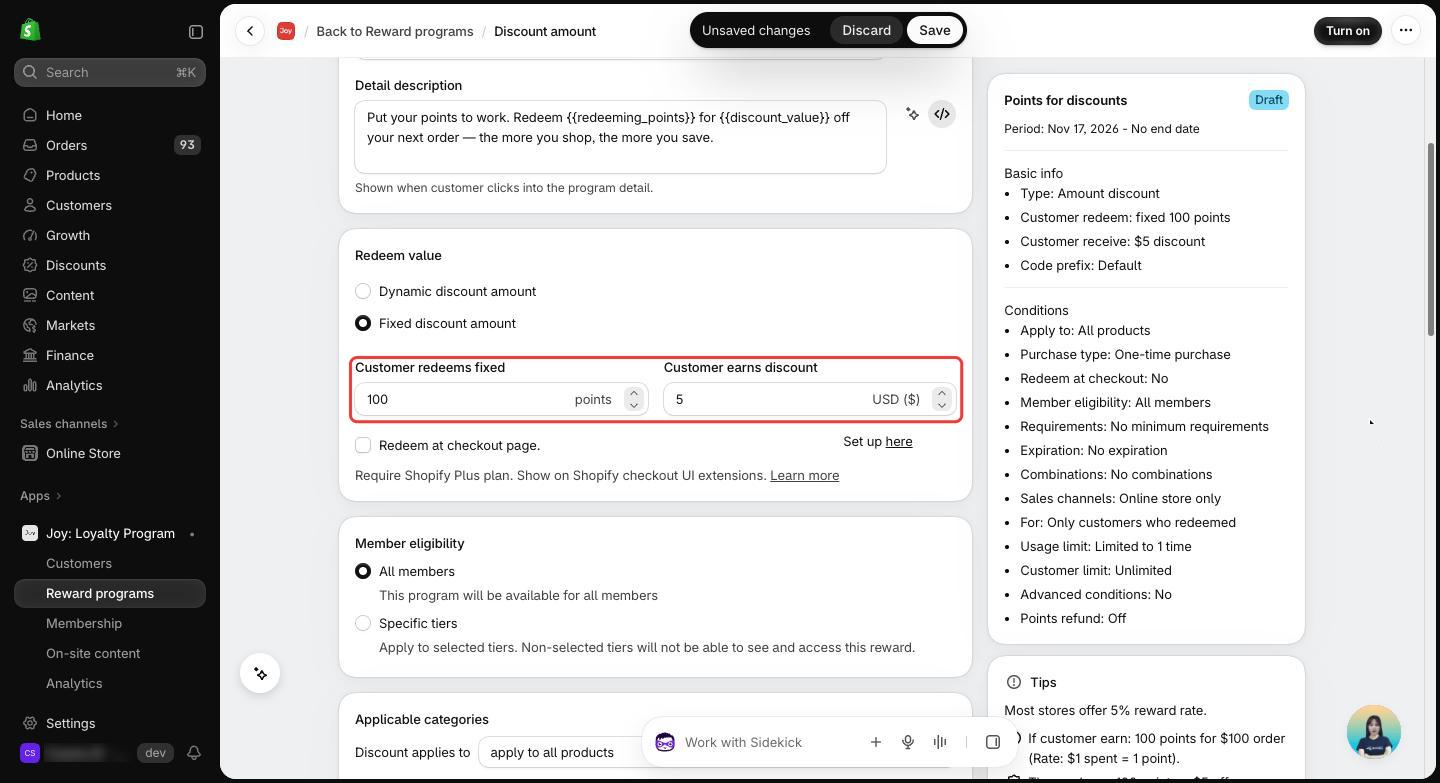
- Step 6: Save and Turn On.
Common Mistakes To Avoid
These mistakes undercut a Shopify POS loyalty program at setup, and each one has a fix:
- Creating the customer before searching for them: Ask for the customer's email or phone number and look them up first. A new profile created without that check makes a duplicate customer in Shopify, which makes the program harder to run for that customer (Joy's POS workflow guide).
- Overcomplicated Rules: Creating a program with overly complex rules or confusing reward structures discourages customer participation. Simplify your program by clearly outlining how points are earned and redeemed.
- Ignoring Customer Preferences and Feedback: Failing to consider customer shopping habits or feedback can make the program less appealing. Regularly survey customers and use their insights to shape your loyalty offerings.
- Not Promoting the Program: Assuming customers will notice your loyalty program without promotion leads to low engagement. Actively promote the program in-store, online, and through email campaigns to increase awareness.
- Offering Rewards That Are Too Hard to Achieve: Setting unrealistic reward thresholds frustrates customers and decreases participation. Offer attainable rewards that align with your customers' spending patterns.
- Not Training Your Team: A poorly trained staff may fail to explain the loyalty program or encourage customers to join. Ensure your team understands the loyalty program thoroughly and can effectively guide customers through it.
Step-By-Step Guide To Add & Redeem Points For Customers On Shopify POS With Joy App
Here's a step-by-step guide to adding and redeeming points for your customers with Shopify POS.
Adding Points for Purchases:
Ensure the customer is registered in the loyalty program and that they are added to the cart. Complete the purchase as usual. Points will automatically accrue based on the program rules. Open the Shopify POS app:
- Step 1: Locate the price display bar at the bottom of the screen (e.g., “3 items – US$210.00”) and click on it.
- Step 2: In the cart screen, select the Add customer option.
- Step 3: Pick the customer from your database or add a new one to assign points.
- Step 4: After selecting or adding the customer, click the “X” icon or close the selection screen to return to the cart.
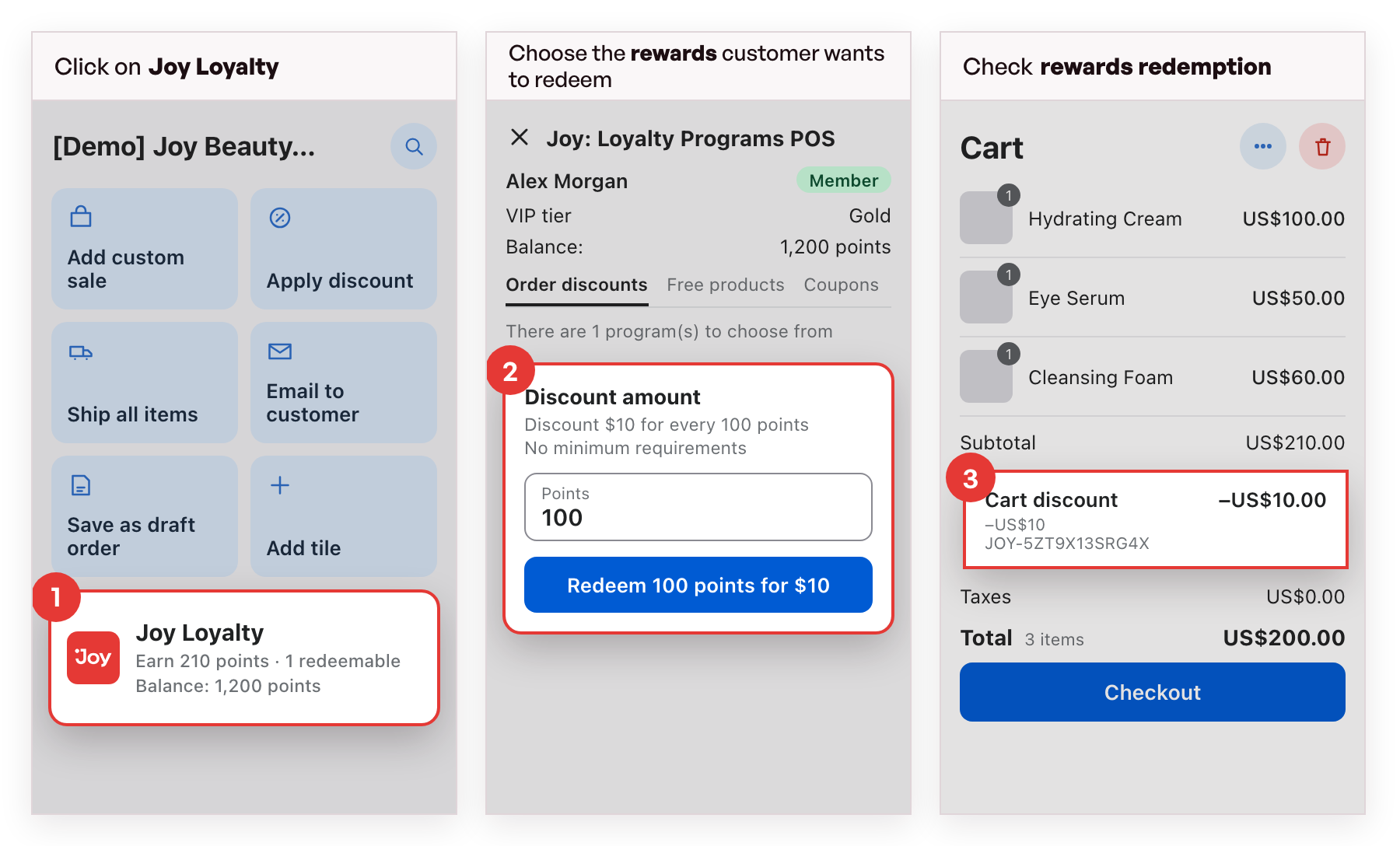
Once the customer is added, complete the sale or checkout process. The Joy app automatically rewards loyalty points based on the customer's purchase. If the Joy Loyalty block is active on the post-purchase screen, the cashier taps View loyalty points and reads out the points earned and the new balance.
Redeeming Points:
- From the POS cart, select the customer.
- Open the Joy Loyalty tile.
- Review the customer’s available points or coupons.
- Apply rewards (e.g., discounts or free products) directly to the cart.
- Complete the transaction to ensure the customer’s points balance updates automatically.
Enroll a Customer With a Wallet Pass at the Counter
On Advanced and Ultimate, staff can put a customer's loyalty card on their phone before they leave. Add the customer and at least one product to the cart, open Joy Loyalty in Shopify POS, and tap Add to Apple Wallet or Add to Google Wallet in the Wallet pass section. The customer scans the QR code and taps Add. The steps are in Joy's staff guide to adding a Wallet pass at POS.
Retailers’ Successful Loyalty Program with Shopify POS
Glamour Us is a cosmetics store serving the Chula Vista and San Diego communities. Before Joy, its POS handled customer care only, so customers had no way to earn points or receive rewards across both the shop and the website.
What is the Program?
Glamour Us connected its in-store and online customers in one Joy program. The program focuses on:
- Letting customers earn and redeem points through purchases, whether they shop online or in-store.
- Birthday rewards, Google review rewards and points for following the store on social media.
- Importing existing points using the Shopify customer ID or the customer's phone number.
- Migrating customer profiles, VIP tiers, birth dates and point balances, so regulars kept what they had.
Achievements and Performance
Joy's Glamour Us case study reports three results:
- 60% of members enrolled within 30 days of the program going live across both channels.
- A 55% reward redemption rate, driven by the mix of earning programs above.
- 197% month-over-month sales growth.
Lessons for Implementing the Shopify POS Loyalty Program
- Seamless Integration: Focus on integrating loyalty seamlessly with both physical and online shopping experiences to unify the customer journey.
- Import Before You Launch: Glamour Us brought balances over by Shopify customer ID and phone number, so in-store regulars started the new program with their points intact.
- Know Your Audience: Focus on the loyal customers and design a program tailored to their preferences—simple rewards, quick wins, and points that are simple to reach.
- Personalization: Offering personalized rewards, such as birthday gifts, enhances customer engagement and satisfaction.
- Continuous Improvement: Monitor performance metrics regularly to optimize the loyalty program and maintain a healthy balance between earning and redeeming points.
Before You Install a Shopify POS Loyalty App
The comparison table carries a date for a reason. Vendors reprice on their own schedule, and two of them, Rivo and Yotpo, already disagree with their own pages about which plan carries POS. Shopify sets part of the counter experience as well: on iOS, Shopify POS keeps the post-purchase loyalty summary behind a View loyalty points tap.
Glamour Us reached 60% enrollment in 30 days with a program that let a regular earn at the counter and spend online. The sentence your cashier says after payment, telling a customer what that order just earned, is where that starts.
Pull last month's order count from your Shopify admin, find the plan each app needs at that number in the cost note above, and if it lands on Joy's Advanced plan, install Joy from the Shopify App Store and add the Joy tile to your POS grid before the next shift.
FAQs
How do customers earn points in the Shopify POS Loyalty Program?
Through the loyalty app connected to Shopify POS. With Joy, a registered customer earns points when the cashier adds them to the cart and processes the order as usual, the same way they earn online. Other earning actions, such as birthdays or referrals, run through the same program and the same balance.
Can I customize the rewards offered through the Loyalty Program?
Yes. Discounts, free shipping, free products and tier rewards are set in the loyalty app, and you choose which of them apply at the counter. With Joy, VIP and B2B tiers start on the Advanced plan.
Is the Loyalty Program integrated with both in-store and online sales?
Yes, when the app has a POS extension. One balance covers both channels, so a customer earns at the counter and redeems online, or the reverse. In Joy, set each earning or redeeming program's channels to Online Store & POS.
How do I track loyalty points in Shopify POS?
In the loyalty app, because Shopify POS keeps no points ledger of its own. In Joy, the POS Smart Grid tile shows a customer's balance while the cart is open, the Joy Loyalty block shows each order's points after payment, and the full activity history sits in the Joy admin.
Are there any costs associated with the Shopify POS Loyalty Program?
Yes. Shopify POS includes no loyalty program, so the cost is the app's plan. On each app's listing as of 11 November 2026, Smile and Gameball include POS on their free plans, Appstle charges $10 and BON $29, and Joy starts POS on Advanced at $129 a month. Add VIP tiers and the vendors' published prices at 2,000 orders a month run from $30 to $699, app by app in the table above.

Written by
Thomas Nguyen is the CEO & Co-founder of Joy, a loyalty solution for Shopify and eCommerce brands. With years of experience building high-performance Shopify apps, Thomas aims to help merchants grow through customizable and retention-focused tools.
Related reading
 How-to Guide
Shopify Scripts Deprecation: The First BFCM Without Them
Shopify Scripts stopped running on 30 June 2026. The scripts written only for last year's sale are the ones not yet missed.
 Thomas Nguyen
 How-to Guide
Shopify BFCM Guide: Black Friday 2026 Is 27 November
Black Friday 2026 is 27 November and Cyber Monday is 30 November. Shopify changed how it counts BFCM customers, so 81M is not growth.
Thomas Nguyen How-to Guide
BFCM Readiness: Shopify Tests Checkout, Nobody Tests Your Widget
Shopify scale-tests checkout at 80,000 a minute. The risk you own is the storefront, measured on the signed-in path.
Thomas Nguyen How-to Guide
Shopify Discount Combinations: Why Your Loyalty Reward Will Not Stack
Shopify does not combine discounts by default, and the setting only reaches reward codes issued after you change it.
Thomas Nguyen How-to Guide
Tag the BFCM Cohort Before It Arrives: What a Date Filter Cannot Rebuild
Shopify can rebuild who bought during the sale at any time. It cannot rebuild who was already a member that day. A tag can.
Thomas Nguyen How-to Guide
What Does a Discounted Order Earn? Four Apps, Four Answers
A $100 jacket at 40% off: does it earn 100 points or 60? Four loyalty apps, four answers, and one test that settles it.
Thomas Nguyen